mirror of
https://github.com/dbt-labs/dbt-core
synced 2025-12-19 16:41:27 +00:00
Compare commits
7 Commits
adding-sem
...
experiment
| Author | SHA1 | Date | |
|---|---|---|---|

|
3144df1fa6 | ||
|
|
992dc5ce5c | ||
|
|
243c2cb0ed | ||
|
|
c888fe52d6 | ||
|
|
32ff2fbfd4 | ||
|
|
7599b9bca1 | ||
|
|
0b1d93a18b |
@@ -1,39 +1,44 @@
|
||||
[bumpversion]
|
||||
current_version = 1.4.0a1
|
||||
current_version = 0.19.0
|
||||
parse = (?P<major>\d+)
|
||||
\.(?P<minor>\d+)
|
||||
\.(?P<patch>\d+)
|
||||
((?P<prekind>a|b|rc)
|
||||
(?P<pre>\d+) # pre-release version num
|
||||
)?
|
||||
serialize =
|
||||
{major}.{minor}.{patch}{prekind}{pre}
|
||||
((?P<prerelease>[a-z]+)(?P<num>\d+))?
|
||||
serialize =
|
||||
{major}.{minor}.{patch}{prerelease}{num}
|
||||
{major}.{minor}.{patch}
|
||||
commit = False
|
||||
tag = False
|
||||
|
||||
[bumpversion:part:prekind]
|
||||
[bumpversion:part:prerelease]
|
||||
first_value = a
|
||||
optional_value = final
|
||||
values =
|
||||
values =
|
||||
a
|
||||
b
|
||||
rc
|
||||
final
|
||||
|
||||
[bumpversion:part:pre]
|
||||
[bumpversion:part:num]
|
||||
first_value = 1
|
||||
|
||||
[bumpversion:file:setup.py]
|
||||
|
||||
[bumpversion:file:core/setup.py]
|
||||
|
||||
[bumpversion:file:core/dbt/version.py]
|
||||
|
||||
[bumpversion:file:plugins/postgres/setup.py]
|
||||
|
||||
[bumpversion:file:plugins/redshift/setup.py]
|
||||
|
||||
[bumpversion:file:plugins/snowflake/setup.py]
|
||||
|
||||
[bumpversion:file:plugins/bigquery/setup.py]
|
||||
|
||||
[bumpversion:file:plugins/postgres/dbt/adapters/postgres/__version__.py]
|
||||
|
||||
[bumpversion:file:docker/Dockerfile]
|
||||
[bumpversion:file:plugins/redshift/dbt/adapters/redshift/__version__.py]
|
||||
|
||||
[bumpversion:file:tests/adapter/setup.py]
|
||||
[bumpversion:file:plugins/snowflake/dbt/adapters/snowflake/__version__.py]
|
||||
|
||||
[bumpversion:file:plugins/bigquery/dbt/adapters/bigquery/__version__.py]
|
||||
|
||||
[bumpversion:file:tests/adapter/dbt/tests/adapter/__version__.py]
|
||||
|
||||
@@ -1,20 +0,0 @@
|
||||
## Previous Releases
|
||||
|
||||
For information on prior major and minor releases, see their changelogs:
|
||||
|
||||
|
||||
* [1.3](https://github.com/dbt-labs/dbt-core/blob/1.3.latest/CHANGELOG.md)
|
||||
* [1.2](https://github.com/dbt-labs/dbt-core/blob/1.2.latest/CHANGELOG.md)
|
||||
* [1.1](https://github.com/dbt-labs/dbt-core/blob/1.1.latest/CHANGELOG.md)
|
||||
* [1.0](https://github.com/dbt-labs/dbt-core/blob/1.0.latest/CHANGELOG.md)
|
||||
* [0.21](https://github.com/dbt-labs/dbt-core/blob/0.21.latest/CHANGELOG.md)
|
||||
* [0.20](https://github.com/dbt-labs/dbt-core/blob/0.20.latest/CHANGELOG.md)
|
||||
* [0.19](https://github.com/dbt-labs/dbt-core/blob/0.19.latest/CHANGELOG.md)
|
||||
* [0.18](https://github.com/dbt-labs/dbt-core/blob/0.18.latest/CHANGELOG.md)
|
||||
* [0.17](https://github.com/dbt-labs/dbt-core/blob/0.17.latest/CHANGELOG.md)
|
||||
* [0.16](https://github.com/dbt-labs/dbt-core/blob/0.16.latest/CHANGELOG.md)
|
||||
* [0.15](https://github.com/dbt-labs/dbt-core/blob/0.15.latest/CHANGELOG.md)
|
||||
* [0.14](https://github.com/dbt-labs/dbt-core/blob/0.14.latest/CHANGELOG.md)
|
||||
* [0.13](https://github.com/dbt-labs/dbt-core/blob/0.13.latest/CHANGELOG.md)
|
||||
* [0.12](https://github.com/dbt-labs/dbt-core/blob/0.12.latest/CHANGELOG.md)
|
||||
* [0.11 and earlier](https://github.com/dbt-labs/dbt-core/blob/0.11.latest/CHANGELOG.md)
|
||||
@@ -1,53 +0,0 @@
|
||||
# CHANGELOG Automation
|
||||
|
||||
We use [changie](https://changie.dev/) to automate `CHANGELOG` generation. For installation and format/command specifics, see the documentation.
|
||||
|
||||
### Quick Tour
|
||||
|
||||
- All new change entries get generated under `/.changes/unreleased` as a yaml file
|
||||
- `header.tpl.md` contains the contents of the entire CHANGELOG file
|
||||
- `0.0.0.md` contains the contents of the footer for the entire CHANGELOG file. changie looks to be in the process of supporting a footer file the same as it supports a header file. Switch to that when available. For now, the 0.0.0 in the file name forces it to the bottom of the changelog no matter what version we are releasing.
|
||||
- `.changie.yaml` contains the fields in a change, the format of a single change, as well as the format of the Contributors section for each version.
|
||||
|
||||
### Workflow
|
||||
|
||||
#### Daily workflow
|
||||
Almost every code change we make associated with an issue will require a `CHANGELOG` entry. After you have created the PR in GitHub, run `changie new` and follow the command prompts to generate a yaml file with your change details. This only needs to be done once per PR.
|
||||
|
||||
The `changie new` command will ensure correct file format and file name. There is a one to one mapping of issues to changes. Multiple issues cannot be lumped into a single entry. If you make a mistake, the yaml file may be directly modified and saved as long as the format is preserved.
|
||||
|
||||
Note: If your PR has been cleared by the Core Team as not needing a changelog entry, the `Skip Changelog` label may be put on the PR to bypass the GitHub action that blacks PRs from being merged when they are missing a `CHANGELOG` entry.
|
||||
|
||||
#### Prerelease Workflow
|
||||
These commands batch up changes in `/.changes/unreleased` to be included in this prerelease and move those files to a directory named for the release version. The `--move-dir` will be created if it does not exist and is created in `/.changes`.
|
||||
|
||||
```
|
||||
changie batch <version> --move-dir '<version>' --prerelease 'rc1'
|
||||
changie merge
|
||||
```
|
||||
|
||||
Example
|
||||
```
|
||||
changie batch 1.0.5 --move-dir '1.0.5' --prerelease 'rc1'
|
||||
changie merge
|
||||
```
|
||||
|
||||
#### Final Release Workflow
|
||||
These commands batch up changes in `/.changes/unreleased` as well as `/.changes/<version>` to be included in this final release and delete all prereleases. This rolls all prereleases up into a single final release. All `yaml` files in `/unreleased` and `<version>` will be deleted at this point.
|
||||
|
||||
```
|
||||
changie batch <version> --include '<version>' --remove-prereleases
|
||||
changie merge
|
||||
```
|
||||
|
||||
Example
|
||||
```
|
||||
changie batch 1.0.5 --include '1.0.5' --remove-prereleases
|
||||
changie merge
|
||||
```
|
||||
|
||||
### A Note on Manual Edits & Gotchas
|
||||
- Changie generates markdown files in the `.changes` directory that are parsed together with the `changie merge` command. Every time `changie merge` is run, it regenerates the entire file. For this reason, any changes made directly to `CHANGELOG.md` will be overwritten on the next run of `changie merge`.
|
||||
- If changes need to be made to the `CHANGELOG.md`, make the changes to the relevant `<version>.md` file located in the `/.changes` directory. You will then run `changie merge` to regenerate the `CHANGELOG.MD`.
|
||||
- Do not run `changie batch` again on released versions. Our final release workflow deletes all of the yaml files associated with individual changes. If for some reason modifications to the `CHANGELOG.md` are required after we've generated the final release `CHANGELOG.md`, the modifications need to be done manually to the `<version>.md` file in the `/.changes` directory.
|
||||
- changie can modify, create and delete files depending on the command you run. This is expected. Be sure to commit everything that has been modified and deleted.
|
||||
@@ -1,6 +0,0 @@
|
||||
# dbt Core Changelog
|
||||
|
||||
- This file provides a full account of all changes to `dbt-core` and `dbt-postgres`
|
||||
- Changes are listed under the (pre)release in which they first appear. Subsequent releases include changes from previous releases.
|
||||
- "Breaking changes" listed under a version may require action from end users or external maintainers when upgrading to that version.
|
||||
- Do not edit this file directly. This file is auto-generated using [changie](https://github.com/miniscruff/changie). For details on how to document a change, see [the contributing guide](https://github.com/dbt-labs/dbt-core/blob/main/CONTRIBUTING.md#adding-changelog-entry)
|
||||
@@ -1,7 +0,0 @@
|
||||
kind: "Dependency"
|
||||
body: "Update pathspec requirement from ~=0.9.0 to >=0.9,<0.11 in /core"
|
||||
time: 2022-09-23T00:06:46.00000Z
|
||||
custom:
|
||||
Author: dependabot[bot]
|
||||
Issue: 4904
|
||||
PR: 5917
|
||||
@@ -1,7 +0,0 @@
|
||||
kind: "Dependency"
|
||||
body: "Bump black from 22.8.0 to 22.10.0"
|
||||
time: 2022-10-07T00:08:48.00000Z
|
||||
custom:
|
||||
Author: dependabot[bot]
|
||||
Issue: 4904
|
||||
PR: 6019
|
||||
@@ -1,7 +0,0 @@
|
||||
kind: "Dependency"
|
||||
body: "Bump mashumaro[msgpack] from 3.0.4 to 3.1.1 in /core"
|
||||
time: 2022-10-20T00:07:53.00000Z
|
||||
custom:
|
||||
Author: dependabot[bot]
|
||||
Issue: 4904
|
||||
PR: 6108
|
||||
@@ -1,7 +0,0 @@
|
||||
kind: "Dependency"
|
||||
body: "Update colorama requirement from <0.4.6,>=0.3.9 to >=0.3.9,<0.4.7 in /core"
|
||||
time: 2022-10-26T00:09:10.00000Z
|
||||
custom:
|
||||
Author: dependabot[bot]
|
||||
Issue: 4904
|
||||
PR: 6144
|
||||
@@ -1,7 +0,0 @@
|
||||
kind: Docs
|
||||
body: minor doc correction
|
||||
time: 2022-09-08T15:41:57.689162-04:00
|
||||
custom:
|
||||
Author: andy-clapson
|
||||
Issue: "5791"
|
||||
PR: "5684"
|
||||
@@ -1,7 +0,0 @@
|
||||
kind: Docs
|
||||
body: Generate API docs for new CLI interface
|
||||
time: 2022-10-07T09:06:56.446078-05:00
|
||||
custom:
|
||||
Author: stu-k
|
||||
Issue: "5528"
|
||||
PR: "6022"
|
||||
@@ -1,6 +0,0 @@
|
||||
kind: Docs
|
||||
time: 2022-10-17T17:14:11.715348-05:00
|
||||
custom:
|
||||
Author: paulbenschmidt
|
||||
Issue: "5880"
|
||||
PR: "324"
|
||||
@@ -1,7 +0,0 @@
|
||||
kind: Docs
|
||||
body: Fix rendering of sample code for metrics
|
||||
time: 2022-11-16T15:57:43.204201+01:00
|
||||
custom:
|
||||
Author: jtcohen6
|
||||
Issue: "323"
|
||||
PR: "346"
|
||||
@@ -1,8 +0,0 @@
|
||||
kind: Features
|
||||
body: Added favor-state flag to optionally favor state nodes even if unselected node
|
||||
exists
|
||||
time: 2022-04-08T16:54:59.696564+01:00
|
||||
custom:
|
||||
Author: daniel-murray josephberni
|
||||
Issue: "2968"
|
||||
PR: "5859"
|
||||
@@ -1,7 +0,0 @@
|
||||
kind: Features
|
||||
body: Proto logging messages
|
||||
time: 2022-08-17T15:48:57.225267-04:00
|
||||
custom:
|
||||
Author: gshank
|
||||
Issue: "5610"
|
||||
PR: "5643"
|
||||
@@ -1,7 +0,0 @@
|
||||
kind: Features
|
||||
body: Friendlier error messages when packages.yml is malformed
|
||||
time: 2022-09-12T12:59:35.121188+01:00
|
||||
custom:
|
||||
Author: jared-rimmer
|
||||
Issue: "5486"
|
||||
PR: "5812"
|
||||
@@ -1,7 +0,0 @@
|
||||
kind: Features
|
||||
body: Migrate dbt-utils current_timestamp macros into core + adapters
|
||||
time: 2022-09-14T09:56:25.97818-07:00
|
||||
custom:
|
||||
Author: colin-rogers-dbt
|
||||
Issue: "5521"
|
||||
PR: "5838"
|
||||
@@ -1,7 +0,0 @@
|
||||
kind: Features
|
||||
body: Allow partitions in external tables to be supplied as a list
|
||||
time: 2022-09-25T21:16:51.051239654+02:00
|
||||
custom:
|
||||
Author: pgoslatara
|
||||
Issue: "5929"
|
||||
PR: "5930"
|
||||
@@ -1,7 +0,0 @@
|
||||
kind: Features
|
||||
body: extend -f flag shorthand for seed command
|
||||
time: 2022-10-03T11:07:05.381632-05:00
|
||||
custom:
|
||||
Author: dave-connors-3
|
||||
Issue: "5990"
|
||||
PR: "5991"
|
||||
@@ -1,8 +0,0 @@
|
||||
kind: Features
|
||||
body: This pulls the profile name from args when constructing a RuntimeConfig in lib.py,
|
||||
enabling the dbt-server to override the value that's in the dbt_project.yml
|
||||
time: 2022-11-02T15:00:03.000805-05:00
|
||||
custom:
|
||||
Author: racheldaniel
|
||||
Issue: "6201"
|
||||
PR: "6202"
|
||||
@@ -1,7 +0,0 @@
|
||||
kind: Features
|
||||
body: Added an md5 function to the base context
|
||||
time: 2022-11-14T18:52:07.788593+02:00
|
||||
custom:
|
||||
Author: haritamar
|
||||
Issue: "6246"
|
||||
PR: "6247"
|
||||
@@ -1,7 +0,0 @@
|
||||
kind: Features
|
||||
body: Exposures support metrics in lineage
|
||||
time: 2022-11-30T11:29:13.256034-05:00
|
||||
custom:
|
||||
Author: michelleark
|
||||
Issue: "6057"
|
||||
PR: "6342"
|
||||
@@ -1,7 +0,0 @@
|
||||
kind: Fixes
|
||||
body: Account for disabled flags on models in schema files more completely
|
||||
time: 2022-09-16T10:48:54.162273-05:00
|
||||
custom:
|
||||
Author: emmyoop
|
||||
Issue: "3992"
|
||||
PR: "5868"
|
||||
@@ -1,7 +0,0 @@
|
||||
kind: Fixes
|
||||
body: Add validation of enabled config for metrics, exposures and sources
|
||||
time: 2022-10-10T11:32:18.752322-05:00
|
||||
custom:
|
||||
Author: emmyoop
|
||||
Issue: "6030"
|
||||
PR: "6038"
|
||||
@@ -1,7 +0,0 @@
|
||||
kind: Fixes
|
||||
body: check length of args of python model function before accessing it
|
||||
time: 2022-10-11T16:07:15.464093-04:00
|
||||
custom:
|
||||
Author: chamini2
|
||||
Issue: "6041"
|
||||
PR: "6042"
|
||||
@@ -1,8 +0,0 @@
|
||||
kind: Fixes
|
||||
body: Add functors to ensure event types with str-type attributes are initialized
|
||||
to spec, even when provided non-str type params.
|
||||
time: 2022-10-16T17:37:42.846683-07:00
|
||||
custom:
|
||||
Author: versusfacit
|
||||
Issue: "5436"
|
||||
PR: "5874"
|
||||
@@ -1,7 +0,0 @@
|
||||
kind: Fixes
|
||||
body: Allow hooks to fail without halting execution flow
|
||||
time: 2022-11-07T09:53:14.340257-06:00
|
||||
custom:
|
||||
Author: ChenyuLInx
|
||||
Issue: "5625"
|
||||
PR: "6059"
|
||||
@@ -1,7 +0,0 @@
|
||||
kind: Fixes
|
||||
body: Clarify Error Message for how many models are allowed in a Python file
|
||||
time: 2022-11-15T08:10:21.527884-05:00
|
||||
custom:
|
||||
Author: justbldwn
|
||||
Issue: "6245"
|
||||
PR: "6251"
|
||||
@@ -1,7 +0,0 @@
|
||||
kind: Under the Hood
|
||||
body: Put black config in explicit config
|
||||
time: 2022-09-27T19:42:59.241433-07:00
|
||||
custom:
|
||||
Author: max-sixty
|
||||
Issue: "5946"
|
||||
PR: "5947"
|
||||
@@ -1,7 +0,0 @@
|
||||
kind: Under the Hood
|
||||
body: Added flat_graph attribute the Manifest class's deepcopy() coverage
|
||||
time: 2022-09-29T13:44:06.275941-04:00
|
||||
custom:
|
||||
Author: peterallenwebb
|
||||
Issue: "5809"
|
||||
PR: "5975"
|
||||
@@ -1,7 +0,0 @@
|
||||
kind: Under the Hood
|
||||
body: Add mypy configs so `mypy` passes from CLI
|
||||
time: 2022-10-05T12:03:10.061263-07:00
|
||||
custom:
|
||||
Author: max-sixty
|
||||
Issue: "5983"
|
||||
PR: "5983"
|
||||
@@ -1,7 +0,0 @@
|
||||
kind: Under the Hood
|
||||
body: Exception message cleanup.
|
||||
time: 2022-10-07T09:46:27.682872-05:00
|
||||
custom:
|
||||
Author: emmyoop
|
||||
Issue: "6023"
|
||||
PR: "6024"
|
||||
@@ -1,7 +0,0 @@
|
||||
kind: Under the Hood
|
||||
body: Add dmypy cache to gitignore
|
||||
time: 2022-10-07T14:00:44.227644-07:00
|
||||
custom:
|
||||
Author: max-sixty
|
||||
Issue: "6028"
|
||||
PR: "5978"
|
||||
@@ -1,7 +0,0 @@
|
||||
kind: Under the Hood
|
||||
body: Provide useful errors when the value of 'materialized' is invalid
|
||||
time: 2022-10-13T18:19:12.167548-04:00
|
||||
custom:
|
||||
Author: peterallenwebb
|
||||
Issue: "5229"
|
||||
PR: "6025"
|
||||
@@ -1,7 +0,0 @@
|
||||
kind: Under the Hood
|
||||
body: Fixed extra whitespace in strings introduced by black.
|
||||
time: 2022-10-17T15:15:11.499246-05:00
|
||||
custom:
|
||||
Author: luke-bassett
|
||||
Issue: "1350"
|
||||
PR: "6086"
|
||||
@@ -1,7 +0,0 @@
|
||||
kind: Under the Hood
|
||||
body: Clean up string formatting
|
||||
time: 2022-10-17T15:58:44.676549-04:00
|
||||
custom:
|
||||
Author: eve-johns
|
||||
Issue: "6068"
|
||||
PR: "6082"
|
||||
@@ -1,7 +0,0 @@
|
||||
kind: Under the Hood
|
||||
body: Remove the 'root_path' field from most nodes
|
||||
time: 2022-10-28T10:48:37.687886-04:00
|
||||
custom:
|
||||
Author: gshank
|
||||
Issue: "6171"
|
||||
PR: "6172"
|
||||
@@ -1,7 +0,0 @@
|
||||
kind: Under the Hood
|
||||
body: Combine certain logging events with different levels
|
||||
time: 2022-10-28T11:03:44.887836-04:00
|
||||
custom:
|
||||
Author: gshank
|
||||
Issue: "6173"
|
||||
PR: "6174"
|
||||
@@ -1,7 +0,0 @@
|
||||
kind: Under the Hood
|
||||
body: Convert threading tests to pytest
|
||||
time: 2022-11-08T07:45:50.589147-06:00
|
||||
custom:
|
||||
Author: stu-k
|
||||
Issue: "5942"
|
||||
PR: "6226"
|
||||
@@ -1,7 +0,0 @@
|
||||
kind: Under the Hood
|
||||
body: Convert postgres index tests to pytest
|
||||
time: 2022-11-08T11:56:33.743042-06:00
|
||||
custom:
|
||||
Author: stu-k
|
||||
Issue: "5770"
|
||||
PR: "6228"
|
||||
@@ -1,7 +0,0 @@
|
||||
kind: Under the Hood
|
||||
body: Convert use color tests to pytest
|
||||
time: 2022-11-08T13:31:04.788547-06:00
|
||||
custom:
|
||||
Author: stu-k
|
||||
Issue: "5771"
|
||||
PR: "6230"
|
||||
@@ -1,7 +0,0 @@
|
||||
kind: Under the Hood
|
||||
body: Add github actions workflow to generate high level CLI API docs
|
||||
time: 2022-11-16T13:00:37.916202-06:00
|
||||
custom:
|
||||
Author: stu-k
|
||||
Issue: "5942"
|
||||
PR: "6187"
|
||||
@@ -1,80 +0,0 @@
|
||||
changesDir: .changes
|
||||
unreleasedDir: unreleased
|
||||
headerPath: header.tpl.md
|
||||
versionHeaderPath: ""
|
||||
changelogPath: CHANGELOG.md
|
||||
versionExt: md
|
||||
versionFormat: '## dbt-core {{.Version}} - {{.Time.Format "January 02, 2006"}}'
|
||||
kindFormat: '### {{.Kind}}'
|
||||
changeFormat: '- {{.Body}} ([#{{.Custom.Issue}}](https://github.com/dbt-labs/dbt-core/issues/{{.Custom.Issue}}), [#{{.Custom.PR}}](https://github.com/dbt-labs/dbt-core/pull/{{.Custom.PR}}))'
|
||||
|
||||
kinds:
|
||||
- label: Breaking Changes
|
||||
- label: Features
|
||||
- label: Fixes
|
||||
- label: Docs
|
||||
changeFormat: '- {{.Body}} ([dbt-docs/#{{.Custom.Issue}}](https://github.com/dbt-labs/dbt-docs/issues/{{.Custom.Issue}}), [dbt-docs/#{{.Custom.PR}}](https://github.com/dbt-labs/dbt-docs/pull/{{.Custom.PR}}))'
|
||||
- label: Under the Hood
|
||||
- label: Dependencies
|
||||
changeFormat: '- {{.Body}} ({{if ne .Custom.Issue ""}}[#{{.Custom.Issue}}](https://github.com/dbt-labs/dbt-core/issues/{{.Custom.Issue}}), {{end}}[#{{.Custom.PR}}](https://github.com/dbt-labs/dbt-core/pull/{{.Custom.PR}}))'
|
||||
- label: Security
|
||||
changeFormat: '- {{.Body}} ({{if ne .Custom.Issue ""}}[#{{.Custom.Issue}}](https://github.com/dbt-labs/dbt-core/issues/{{.Custom.Issue}}), {{end}}[#{{.Custom.PR}}](https://github.com/dbt-labs/dbt-core/pull/{{.Custom.PR}}))'
|
||||
|
||||
newlines:
|
||||
afterChangelogHeader: 1
|
||||
afterKind: 1
|
||||
afterChangelogVersion: 1
|
||||
beforeKind: 1
|
||||
endOfVersion: 1
|
||||
|
||||
custom:
|
||||
- key: Author
|
||||
label: GitHub Username(s) (separated by a single space if multiple)
|
||||
type: string
|
||||
minLength: 3
|
||||
- key: Issue
|
||||
label: GitHub Issue Number
|
||||
type: int
|
||||
minInt: 1
|
||||
- key: PR
|
||||
label: GitHub Pull Request Number
|
||||
type: int
|
||||
minInt: 1
|
||||
|
||||
footerFormat: |
|
||||
{{- $contributorDict := dict }}
|
||||
{{- /* any names added to this list should be all lowercase for later matching purposes */}}
|
||||
{{- $core_team := list "michelleark" "peterallenwebb" "emmyoop" "nathaniel-may" "gshank" "leahwicz" "chenyulinx" "stu-k" "iknox-fa" "versusfacit" "mcknight-42" "jtcohen6" "dependabot[bot]" "snyk-bot" "colin-rogers-dbt" }}
|
||||
{{- range $change := .Changes }}
|
||||
{{- $authorList := splitList " " $change.Custom.Author }}
|
||||
{{- /* loop through all authors for a PR */}}
|
||||
{{- range $author := $authorList }}
|
||||
{{- $authorLower := lower $author }}
|
||||
{{- /* we only want to include non-core team contributors */}}
|
||||
{{- if not (has $authorLower $core_team)}}
|
||||
{{- /* Docs kind link back to dbt-docs instead of dbt-core PRs */}}
|
||||
{{- $prLink := $change.Kind }}
|
||||
{{- if eq $change.Kind "Docs" }}
|
||||
{{- $prLink = "[dbt-docs/#pr](https://github.com/dbt-labs/dbt-docs/pull/pr)" | replace "pr" $change.Custom.PR }}
|
||||
{{- else }}
|
||||
{{- $prLink = "[#pr](https://github.com/dbt-labs/dbt-core/pull/pr)" | replace "pr" $change.Custom.PR }}
|
||||
{{- end }}
|
||||
{{- /* check if this contributor has other PRs associated with them already */}}
|
||||
{{- if hasKey $contributorDict $author }}
|
||||
{{- $prList := get $contributorDict $author }}
|
||||
{{- $prList = append $prList $prLink }}
|
||||
{{- $contributorDict := set $contributorDict $author $prList }}
|
||||
{{- else }}
|
||||
{{- $prList := list $prLink }}
|
||||
{{- $contributorDict := set $contributorDict $author $prList }}
|
||||
{{- end }}
|
||||
{{- end}}
|
||||
{{- end}}
|
||||
{{- end }}
|
||||
{{- /* no indentation here for formatting so the final markdown doesn't have unneeded indentations */}}
|
||||
{{- if $contributorDict}}
|
||||
### Contributors
|
||||
{{- range $k,$v := $contributorDict }}
|
||||
- [@{{$k}}](https://github.com/{{$k}}) ({{ range $index, $element := $v }}{{if $index}}, {{end}}{{$element}}{{end}})
|
||||
{{- end }}
|
||||
{{- end }}
|
||||
218
.circleci/config.yml
Normal file
218
.circleci/config.yml
Normal file
@@ -0,0 +1,218 @@
|
||||
version: 2.1
|
||||
jobs:
|
||||
unit:
|
||||
docker: &test_only
|
||||
- image: fishtownanalytics/test-container:9
|
||||
environment:
|
||||
DBT_INVOCATION_ENV: circle
|
||||
steps:
|
||||
- checkout
|
||||
- run: tox -e flake8,mypy,unit-py36,unit-py38
|
||||
build-wheels:
|
||||
docker: *test_only
|
||||
steps:
|
||||
- checkout
|
||||
- run:
|
||||
name: Build wheels
|
||||
command: |
|
||||
python3.8 -m venv "${PYTHON_ENV}"
|
||||
export PYTHON_BIN="${PYTHON_ENV}/bin/python"
|
||||
$PYTHON_BIN -m pip install -U pip setuptools
|
||||
$PYTHON_BIN -m pip install -r requirements.txt
|
||||
$PYTHON_BIN -m pip install -r dev_requirements.txt
|
||||
/bin/bash ./scripts/build-wheels.sh
|
||||
$PYTHON_BIN ./scripts/collect-dbt-contexts.py > ./dist/context_metadata.json
|
||||
$PYTHON_BIN ./scripts/collect-artifact-schema.py > ./dist/artifact_schemas.json
|
||||
environment:
|
||||
PYTHON_ENV: /home/tox/build_venv/
|
||||
- store_artifacts:
|
||||
path: ./dist
|
||||
destination: dist
|
||||
integration-postgres-py36:
|
||||
docker: &test_and_postgres
|
||||
- image: fishtownanalytics/test-container:9
|
||||
environment:
|
||||
DBT_INVOCATION_ENV: circle
|
||||
- image: postgres
|
||||
name: database
|
||||
environment: &pgenv
|
||||
POSTGRES_USER: "root"
|
||||
POSTGRES_PASSWORD: "password"
|
||||
POSTGRES_DB: "dbt"
|
||||
steps:
|
||||
- checkout
|
||||
- run: &setupdb
|
||||
name: Setup postgres
|
||||
command: bash test/setup_db.sh
|
||||
environment:
|
||||
PGHOST: database
|
||||
PGUSER: root
|
||||
PGPASSWORD: password
|
||||
PGDATABASE: postgres
|
||||
- run:
|
||||
name: Run tests
|
||||
command: tox -e integration-postgres-py36
|
||||
- store_artifacts:
|
||||
path: ./logs
|
||||
integration-snowflake-py36:
|
||||
docker: *test_only
|
||||
steps:
|
||||
- checkout
|
||||
- run:
|
||||
name: Run tests
|
||||
command: tox -e integration-snowflake-py36
|
||||
no_output_timeout: 1h
|
||||
- store_artifacts:
|
||||
path: ./logs
|
||||
integration-redshift-py36:
|
||||
docker: *test_only
|
||||
steps:
|
||||
- checkout
|
||||
- run:
|
||||
name: Run tests
|
||||
command: tox -e integration-redshift-py36
|
||||
- store_artifacts:
|
||||
path: ./logs
|
||||
integration-bigquery-py36:
|
||||
docker: *test_only
|
||||
steps:
|
||||
- checkout
|
||||
- run:
|
||||
name: Run tests
|
||||
command: tox -e integration-bigquery-py36
|
||||
- store_artifacts:
|
||||
path: ./logs
|
||||
integration-postgres-py38:
|
||||
docker: *test_and_postgres
|
||||
steps:
|
||||
- checkout
|
||||
- run: *setupdb
|
||||
- run:
|
||||
name: Run tests
|
||||
command: tox -e integration-postgres-py38
|
||||
- store_artifacts:
|
||||
path: ./logs
|
||||
integration-snowflake-py38:
|
||||
docker: *test_only
|
||||
steps:
|
||||
- checkout
|
||||
- run:
|
||||
name: Run tests
|
||||
command: tox -e integration-snowflake-py38
|
||||
no_output_timeout: 1h
|
||||
- store_artifacts:
|
||||
path: ./logs
|
||||
integration-redshift-py38:
|
||||
docker: *test_only
|
||||
steps:
|
||||
- checkout
|
||||
- run:
|
||||
name: Run tests
|
||||
command: tox -e integration-redshift-py38
|
||||
- store_artifacts:
|
||||
path: ./logs
|
||||
integration-bigquery-py38:
|
||||
docker: *test_only
|
||||
steps:
|
||||
- checkout
|
||||
- run:
|
||||
name: Run tests
|
||||
command: tox -e integration-bigquery-py38
|
||||
- store_artifacts:
|
||||
path: ./logs
|
||||
|
||||
integration-postgres-py39:
|
||||
docker: *test_and_postgres
|
||||
steps:
|
||||
- checkout
|
||||
- run: *setupdb
|
||||
- run:
|
||||
name: Run tests
|
||||
command: tox -e integration-postgres-py39
|
||||
- store_artifacts:
|
||||
path: ./logs
|
||||
integration-snowflake-py39:
|
||||
docker: *test_only
|
||||
steps:
|
||||
- checkout
|
||||
- run:
|
||||
name: Run tests
|
||||
command: tox -e integration-snowflake-py39
|
||||
no_output_timeout: 1h
|
||||
- store_artifacts:
|
||||
path: ./logs
|
||||
integration-redshift-py39:
|
||||
docker: *test_only
|
||||
steps:
|
||||
- checkout
|
||||
- run:
|
||||
name: Run tests
|
||||
command: tox -e integration-redshift-py39
|
||||
- store_artifacts:
|
||||
path: ./logs
|
||||
integration-bigquery-py39:
|
||||
docker: *test_only
|
||||
steps:
|
||||
- checkout
|
||||
- run:
|
||||
name: Run tests
|
||||
command: tox -e integration-bigquery-py39
|
||||
- store_artifacts:
|
||||
path: ./logs
|
||||
|
||||
workflows:
|
||||
version: 2
|
||||
test-everything:
|
||||
jobs:
|
||||
- unit
|
||||
- integration-postgres-py36:
|
||||
requires:
|
||||
- unit
|
||||
- integration-redshift-py36:
|
||||
requires:
|
||||
- integration-postgres-py36
|
||||
- integration-bigquery-py36:
|
||||
requires:
|
||||
- integration-postgres-py36
|
||||
- integration-snowflake-py36:
|
||||
requires:
|
||||
- integration-postgres-py36
|
||||
- integration-postgres-py38:
|
||||
requires:
|
||||
- unit
|
||||
- integration-redshift-py38:
|
||||
requires:
|
||||
- integration-postgres-py38
|
||||
- integration-bigquery-py38:
|
||||
requires:
|
||||
- integration-postgres-py38
|
||||
- integration-snowflake-py38:
|
||||
requires:
|
||||
- integration-postgres-py38
|
||||
- integration-postgres-py39:
|
||||
requires:
|
||||
- unit
|
||||
- integration-redshift-py39:
|
||||
requires:
|
||||
- integration-postgres-py39
|
||||
- integration-bigquery-py39:
|
||||
requires:
|
||||
- integration-postgres-py39
|
||||
# - integration-snowflake-py39:
|
||||
# requires:
|
||||
# - integration-postgres-py39
|
||||
- build-wheels:
|
||||
requires:
|
||||
- unit
|
||||
- integration-postgres-py36
|
||||
- integration-redshift-py36
|
||||
- integration-bigquery-py36
|
||||
- integration-snowflake-py36
|
||||
- integration-postgres-py38
|
||||
- integration-redshift-py38
|
||||
- integration-bigquery-py38
|
||||
- integration-snowflake-py38
|
||||
- integration-postgres-py39
|
||||
- integration-redshift-py39
|
||||
- integration-bigquery-py39
|
||||
# - integration-snowflake-py39
|
||||
12
.flake8
12
.flake8
@@ -1,12 +0,0 @@
|
||||
[flake8]
|
||||
select =
|
||||
E
|
||||
W
|
||||
F
|
||||
ignore =
|
||||
W503 # makes Flake8 work like black
|
||||
W504
|
||||
E203 # makes Flake8 work like black
|
||||
E741
|
||||
E501 # long line checking is done in black
|
||||
exclude = test
|
||||
@@ -1,2 +0,0 @@
|
||||
# Reformatting dbt-core via black, flake8, mypy, and assorted pre-commit hooks.
|
||||
43e3fc22c4eae4d3d901faba05e33c40f1f1dc5a
|
||||
75
.github/CODEOWNERS
vendored
75
.github/CODEOWNERS
vendored
@@ -1,75 +0,0 @@
|
||||
# This file contains the code owners for the dbt-core repo.
|
||||
# PRs will be automatically assigned for review to the associated
|
||||
# team(s) or person(s) that touches any files that are mapped to them.
|
||||
#
|
||||
# A statement takes precedence over the statements above it so more general
|
||||
# assignments are found at the top with specific assignments being lower in
|
||||
# the ordering (i.e. catch all assignment should be the first item)
|
||||
#
|
||||
# Consult GitHub documentation for formatting guidelines:
|
||||
# https://docs.github.com/en/repositories/managing-your-repositorys-settings-and-features/customizing-your-repository/about-code-owners#example-of-a-codeowners-file
|
||||
|
||||
# As a default for areas with no assignment,
|
||||
# the core team as a whole will be assigned
|
||||
* @dbt-labs/core
|
||||
|
||||
# Changes to GitHub configurations including Actions
|
||||
/.github/ @leahwicz
|
||||
|
||||
### LANGUAGE
|
||||
|
||||
# Language core modules
|
||||
/core/dbt/config/ @dbt-labs/core-language
|
||||
/core/dbt/context/ @dbt-labs/core-language
|
||||
/core/dbt/contracts/ @dbt-labs/core-language
|
||||
/core/dbt/deps/ @dbt-labs/core-language
|
||||
/core/dbt/events/ @dbt-labs/core-language # structured logging
|
||||
/core/dbt/parser/ @dbt-labs/core-language
|
||||
|
||||
# Language misc files
|
||||
/core/dbt/dataclass_schema.py @dbt-labs/core-language
|
||||
/core/dbt/hooks.py @dbt-labs/core-language
|
||||
/core/dbt/node_types.py @dbt-labs/core-language
|
||||
/core/dbt/semver.py @dbt-labs/core-language
|
||||
|
||||
|
||||
### EXECUTION
|
||||
|
||||
# Execution core modules
|
||||
/core/dbt/graph/ @dbt-labs/core-execution
|
||||
/core/dbt/task/ @dbt-labs/core-execution
|
||||
|
||||
# Execution misc files
|
||||
/core/dbt/compilation.py @dbt-labs/core-execution
|
||||
/core/dbt/flags.py @dbt-labs/core-execution
|
||||
/core/dbt/lib.py @dbt-labs/core-execution
|
||||
/core/dbt/main.py @dbt-labs/core-execution
|
||||
/core/dbt/profiler.py @dbt-labs/core-execution
|
||||
/core/dbt/selected_resources.py @dbt-labs/core-execution
|
||||
/core/dbt/tracking.py @dbt-labs/core-execution
|
||||
/core/dbt/version.py @dbt-labs/core-execution
|
||||
|
||||
|
||||
### ADAPTERS
|
||||
|
||||
# Adapter interface ("base" + "sql" adapter defaults, cache)
|
||||
/core/dbt/adapters @dbt-labs/core-adapters
|
||||
|
||||
# Global project (default macros + materializations), starter project
|
||||
/core/dbt/include @dbt-labs/core-adapters
|
||||
|
||||
# Postgres plugin
|
||||
/plugins/ @dbt-labs/core-adapters
|
||||
|
||||
# Functional tests for adapter plugins
|
||||
/tests/adapter @dbt-labs/core-adapters
|
||||
|
||||
### TESTS
|
||||
|
||||
# Overlapping ownership for vast majority of unit + functional tests
|
||||
|
||||
# Perf regression testing framework
|
||||
# This excludes the test project files itself since those aren't specific
|
||||
# framework changes (excluded by not setting an owner next to it- no owner)
|
||||
/performance @nathaniel-may
|
||||
/performance/projects
|
||||
97
.github/ISSUE_TEMPLATE/bug-report.yml
vendored
97
.github/ISSUE_TEMPLATE/bug-report.yml
vendored
@@ -1,97 +0,0 @@
|
||||
name: 🐞 Bug
|
||||
description: Report a bug or an issue you've found with dbt
|
||||
title: "[Bug] <title>"
|
||||
labels: ["bug", "triage"]
|
||||
body:
|
||||
- type: markdown
|
||||
attributes:
|
||||
value: |
|
||||
Thanks for taking the time to fill out this bug report!
|
||||
- type: checkboxes
|
||||
attributes:
|
||||
label: Is this a new bug in dbt-core?
|
||||
description: >
|
||||
In other words, is this an error, flaw, failure or fault in our software?
|
||||
|
||||
If this is a bug that broke existing functionality that used to work, please open a regression issue.
|
||||
If this is a bug in an adapter plugin, please open an issue in the adapter's repository.
|
||||
If this is a bug experienced while using dbt Cloud, please report to [support](mailto:support@getdbt.com).
|
||||
If this is a request for help or troubleshooting code in your own dbt project, please join our [dbt Community Slack](https://www.getdbt.com/community/join-the-community/) or open a [Discussion question](https://github.com/dbt-labs/docs.getdbt.com/discussions).
|
||||
|
||||
Please search to see if an issue already exists for the bug you encountered.
|
||||
options:
|
||||
- label: I believe this is a new bug in dbt-core
|
||||
required: true
|
||||
- label: I have searched the existing issues, and I could not find an existing issue for this bug
|
||||
required: true
|
||||
- type: textarea
|
||||
attributes:
|
||||
label: Current Behavior
|
||||
description: A concise description of what you're experiencing.
|
||||
validations:
|
||||
required: true
|
||||
- type: textarea
|
||||
attributes:
|
||||
label: Expected Behavior
|
||||
description: A concise description of what you expected to happen.
|
||||
validations:
|
||||
required: true
|
||||
- type: textarea
|
||||
attributes:
|
||||
label: Steps To Reproduce
|
||||
description: Steps to reproduce the behavior.
|
||||
placeholder: |
|
||||
1. In this environment...
|
||||
2. With this config...
|
||||
3. Run '...'
|
||||
4. See error...
|
||||
validations:
|
||||
required: true
|
||||
- type: textarea
|
||||
id: logs
|
||||
attributes:
|
||||
label: Relevant log output
|
||||
description: |
|
||||
If applicable, log output to help explain your problem.
|
||||
render: shell
|
||||
validations:
|
||||
required: false
|
||||
- type: textarea
|
||||
attributes:
|
||||
label: Environment
|
||||
description: |
|
||||
examples:
|
||||
- **OS**: Ubuntu 20.04
|
||||
- **Python**: 3.9.12 (`python3 --version`)
|
||||
- **dbt-core**: 1.1.1 (`dbt --version`)
|
||||
value: |
|
||||
- OS:
|
||||
- Python:
|
||||
- dbt:
|
||||
render: markdown
|
||||
validations:
|
||||
required: false
|
||||
- type: dropdown
|
||||
id: database
|
||||
attributes:
|
||||
label: Which database adapter are you using with dbt?
|
||||
description: If the bug is specific to the database or adapter, please open the issue in that adapter's repository instead
|
||||
multiple: true
|
||||
options:
|
||||
- postgres
|
||||
- redshift
|
||||
- snowflake
|
||||
- bigquery
|
||||
- spark
|
||||
- other (mention it in "Additional Context")
|
||||
validations:
|
||||
required: false
|
||||
- type: textarea
|
||||
attributes:
|
||||
label: Additional Context
|
||||
description: |
|
||||
Links? References? Anything that will give us more context about the issue you are encountering!
|
||||
|
||||
Tip: You can attach images or log files by clicking this area to highlight it and then dragging files in.
|
||||
validations:
|
||||
required: false
|
||||
41
.github/ISSUE_TEMPLATE/bug_report.md
vendored
Normal file
41
.github/ISSUE_TEMPLATE/bug_report.md
vendored
Normal file
@@ -0,0 +1,41 @@
|
||||
---
|
||||
name: Bug report
|
||||
about: Report a bug or an issue you've found with dbt
|
||||
title: ''
|
||||
labels: bug, triage
|
||||
assignees: ''
|
||||
|
||||
---
|
||||
|
||||
### Describe the bug
|
||||
A clear and concise description of what the bug is. What command did you run? What happened?
|
||||
|
||||
### Steps To Reproduce
|
||||
In as much detail as possible, please provide steps to reproduce the issue. Sample data that triggers the issue, example model code, etc is all very helpful here.
|
||||
|
||||
### Expected behavior
|
||||
A clear and concise description of what you expected to happen.
|
||||
|
||||
### Screenshots and log output
|
||||
If applicable, add screenshots or log output to help explain your problem.
|
||||
|
||||
### System information
|
||||
**Which database are you using dbt with?**
|
||||
- [ ] postgres
|
||||
- [ ] redshift
|
||||
- [ ] bigquery
|
||||
- [ ] snowflake
|
||||
- [ ] other (specify: ____________)
|
||||
|
||||
|
||||
**The output of `dbt --version`:**
|
||||
```
|
||||
<output goes here>
|
||||
```
|
||||
|
||||
**The operating system you're using:**
|
||||
|
||||
**The output of `python --version`:**
|
||||
|
||||
### Additional context
|
||||
Add any other context about the problem here.
|
||||
23
.github/ISSUE_TEMPLATE/config.yml
vendored
23
.github/ISSUE_TEMPLATE/config.yml
vendored
@@ -1,23 +0,0 @@
|
||||
blank_issues_enabled: false
|
||||
contact_links:
|
||||
- name: Ask the community for help
|
||||
url: https://github.com/dbt-labs/docs.getdbt.com/discussions
|
||||
about: Need help troubleshooting? Check out our guide on how to ask
|
||||
- name: Contact dbt Cloud support
|
||||
url: mailto:support@getdbt.com
|
||||
about: Are you using dbt Cloud? Contact our support team for help!
|
||||
- name: Participate in Discussions
|
||||
url: https://github.com/dbt-labs/dbt-core/discussions
|
||||
about: Do you have a Big Idea for dbt? Read open discussions, or start a new one
|
||||
- name: Create an issue for dbt-redshift
|
||||
url: https://github.com/dbt-labs/dbt-redshift/issues/new/choose
|
||||
about: Report a bug or request a feature for dbt-redshift
|
||||
- name: Create an issue for dbt-bigquery
|
||||
url: https://github.com/dbt-labs/dbt-bigquery/issues/new/choose
|
||||
about: Report a bug or request a feature for dbt-bigquery
|
||||
- name: Create an issue for dbt-snowflake
|
||||
url: https://github.com/dbt-labs/dbt-snowflake/issues/new/choose
|
||||
about: Report a bug or request a feature for dbt-snowflake
|
||||
- name: Create an issue for dbt-spark
|
||||
url: https://github.com/dbt-labs/dbt-spark/issues/new/choose
|
||||
about: Report a bug or request a feature for dbt-spark
|
||||
59
.github/ISSUE_TEMPLATE/feature-request.yml
vendored
59
.github/ISSUE_TEMPLATE/feature-request.yml
vendored
@@ -1,59 +0,0 @@
|
||||
name: ✨ Feature
|
||||
description: Propose a straightforward extension of dbt functionality
|
||||
title: "[Feature] <title>"
|
||||
labels: ["enhancement", "triage"]
|
||||
body:
|
||||
- type: markdown
|
||||
attributes:
|
||||
value: |
|
||||
Thanks for taking the time to fill out this feature request!
|
||||
- type: checkboxes
|
||||
attributes:
|
||||
label: Is this your first time submitting a feature request?
|
||||
description: >
|
||||
We want to make sure that features are distinct and discoverable,
|
||||
so that other members of the community can find them and offer their thoughts.
|
||||
|
||||
Issues are the right place to request straightforward extensions of existing dbt functionality.
|
||||
For "big ideas" about future capabilities of dbt, we ask that you open a
|
||||
[discussion](https://github.com/dbt-labs/dbt-core/discussions) in the "Ideas" category instead.
|
||||
options:
|
||||
- label: I have read the [expectations for open source contributors](https://docs.getdbt.com/docs/contributing/oss-expectations)
|
||||
required: true
|
||||
- label: I have searched the existing issues, and I could not find an existing issue for this feature
|
||||
required: true
|
||||
- label: I am requesting a straightforward extension of existing dbt functionality, rather than a Big Idea better suited to a discussion
|
||||
required: true
|
||||
- type: textarea
|
||||
attributes:
|
||||
label: Describe the feature
|
||||
description: A clear and concise description of what you want to happen.
|
||||
validations:
|
||||
required: true
|
||||
- type: textarea
|
||||
attributes:
|
||||
label: Describe alternatives you've considered
|
||||
description: |
|
||||
A clear and concise description of any alternative solutions or features you've considered.
|
||||
validations:
|
||||
required: false
|
||||
- type: textarea
|
||||
attributes:
|
||||
label: Who will this benefit?
|
||||
description: |
|
||||
What kind of use case will this feature be useful for? Please be specific and provide examples, this will help us prioritize properly.
|
||||
validations:
|
||||
required: false
|
||||
- type: input
|
||||
attributes:
|
||||
label: Are you interested in contributing this feature?
|
||||
description: Let us know if you want to write some code, and how we can help.
|
||||
validations:
|
||||
required: false
|
||||
- type: textarea
|
||||
attributes:
|
||||
label: Anything else?
|
||||
description: |
|
||||
Links? References? Anything that will give us more context about the feature you are suggesting!
|
||||
validations:
|
||||
required: false
|
||||
23
.github/ISSUE_TEMPLATE/feature_request.md
vendored
Normal file
23
.github/ISSUE_TEMPLATE/feature_request.md
vendored
Normal file
@@ -0,0 +1,23 @@
|
||||
---
|
||||
name: Feature request
|
||||
about: Suggest an idea for dbt
|
||||
title: ''
|
||||
labels: enhancement, triage
|
||||
assignees: ''
|
||||
|
||||
---
|
||||
|
||||
### Describe the feature
|
||||
A clear and concise description of what you want to happen.
|
||||
|
||||
### Describe alternatives you've considered
|
||||
A clear and concise description of any alternative solutions or features you've considered.
|
||||
|
||||
### Additional context
|
||||
Is this feature database-specific? Which database(s) is/are relevant? Please include any other relevant context here.
|
||||
|
||||
### Who will this benefit?
|
||||
What kind of use case will this feature be useful for? Please be specific and provide examples, this will help us prioritize properly.
|
||||
|
||||
### Are you interested in contributing this feature?
|
||||
Let us know if you want to write some code, and how we can help.
|
||||
93
.github/ISSUE_TEMPLATE/regression-report.yml
vendored
93
.github/ISSUE_TEMPLATE/regression-report.yml
vendored
@@ -1,93 +0,0 @@
|
||||
name: ☣️ Regression
|
||||
description: Report a regression you've observed in a newer version of dbt
|
||||
title: "[Regression] <title>"
|
||||
labels: ["bug", "regression", "triage"]
|
||||
body:
|
||||
- type: markdown
|
||||
attributes:
|
||||
value: |
|
||||
Thanks for taking the time to fill out this regression report!
|
||||
- type: checkboxes
|
||||
attributes:
|
||||
label: Is this a regression in a recent version of dbt-core?
|
||||
description: >
|
||||
A regression is when documented functionality works as expected in an older version of dbt-core,
|
||||
and no longer works after upgrading to a newer version of dbt-core
|
||||
options:
|
||||
- label: I believe this is a regression in dbt-core functionality
|
||||
required: true
|
||||
- label: I have searched the existing issues, and I could not find an existing issue for this regression
|
||||
required: true
|
||||
- type: textarea
|
||||
attributes:
|
||||
label: Current Behavior
|
||||
description: A concise description of what you're experiencing.
|
||||
validations:
|
||||
required: true
|
||||
- type: textarea
|
||||
attributes:
|
||||
label: Expected/Previous Behavior
|
||||
description: A concise description of what you expected to happen.
|
||||
validations:
|
||||
required: true
|
||||
- type: textarea
|
||||
attributes:
|
||||
label: Steps To Reproduce
|
||||
description: Steps to reproduce the behavior.
|
||||
placeholder: |
|
||||
1. In this environment...
|
||||
2. With this config...
|
||||
3. Run '...'
|
||||
4. See error...
|
||||
validations:
|
||||
required: true
|
||||
- type: textarea
|
||||
id: logs
|
||||
attributes:
|
||||
label: Relevant log output
|
||||
description: |
|
||||
If applicable, log output to help explain your problem.
|
||||
render: shell
|
||||
validations:
|
||||
required: false
|
||||
- type: textarea
|
||||
attributes:
|
||||
label: Environment
|
||||
description: |
|
||||
examples:
|
||||
- **OS**: Ubuntu 20.04
|
||||
- **Python**: 3.9.12 (`python3 --version`)
|
||||
- **dbt-core (working version)**: 1.1.1 (`dbt --version`)
|
||||
- **dbt-core (regression version)**: 1.2.0 (`dbt --version`)
|
||||
value: |
|
||||
- OS:
|
||||
- Python:
|
||||
- dbt (working version):
|
||||
- dbt (regression version):
|
||||
render: markdown
|
||||
validations:
|
||||
required: true
|
||||
- type: dropdown
|
||||
id: database
|
||||
attributes:
|
||||
label: Which database adapter are you using with dbt?
|
||||
description: If the regression is specific to the database or adapter, please open the issue in that adapter's repository instead
|
||||
multiple: true
|
||||
options:
|
||||
- postgres
|
||||
- redshift
|
||||
- snowflake
|
||||
- bigquery
|
||||
- spark
|
||||
- other (mention it in "Additional Context")
|
||||
validations:
|
||||
required: false
|
||||
- type: textarea
|
||||
attributes:
|
||||
label: Additional Context
|
||||
description: |
|
||||
Links? References? Anything that will give us more context about the issue you are encountering!
|
||||
|
||||
Tip: You can attach images or log files by clicking this area to highlight it and then dragging files in.
|
||||
validations:
|
||||
required: false
|
||||
216
.github/_README.md
vendored
216
.github/_README.md
vendored
@@ -1,216 +0,0 @@
|
||||
<!-- GitHub will publish this readme on the main repo page if the name is `README.md` so we've added the leading underscore to prevent this -->
|
||||
<!-- Do not rename this file `README.md` -->
|
||||
<!-- See https://docs.github.com/en/repositories/managing-your-repositorys-settings-and-features/customizing-your-repository/about-readmes -->
|
||||
|
||||
## What are GitHub Actions?
|
||||
|
||||
GitHub Actions are used for many different purposes. We use them to run tests in CI, validate PRs are in an expected state, and automate processes.
|
||||
|
||||
- [Overview of GitHub Actions](https://docs.github.com/en/actions/learn-github-actions/understanding-github-actions)
|
||||
- [What's a workflow?](https://docs.github.com/en/actions/using-workflows/about-workflows)
|
||||
- [GitHub Actions guides](https://docs.github.com/en/actions/guides)
|
||||
|
||||
___
|
||||
|
||||
## Where do actions and workflows live
|
||||
|
||||
We try to maintain actions that are shared across repositories in a single place so that necesary changes can be made in a single place.
|
||||
|
||||
[dbt-labs/actions](https://github.com/dbt-labs/actions/) is the central repository of actions and workflows we use across repositories.
|
||||
|
||||
GitHub Actions also live locally within a repository. The workflows can be found at `.github/workflows` from the root of the repository. These should be specific to that code base.
|
||||
|
||||
Note: We are actively moving actions into the central Action repository so there is currently some duplication across repositories.
|
||||
|
||||
___
|
||||
|
||||
## Basics of Using Actions
|
||||
|
||||
### Viewing Output
|
||||
|
||||
- View the detailed action output for your PR in the **Checks** tab of the PR. This only shows the most recent run. You can also view high level **Checks** output at the bottom on the PR.
|
||||
|
||||
- View _all_ action output for a repository from the [**Actions**](https://github.com/dbt-labs/dbt-core/actions) tab. Workflow results last 1 year. Artifacts last 90 days, unless specified otherwise in individual workflows.
|
||||
|
||||
This view often shows what seem like duplicates of the same workflow. This occurs when files are renamed but the workflow name has not changed. These are in fact _not_ duplicates.
|
||||
|
||||
You can see the branch the workflow runs from in this view. It is listed in the table between the workflow name and the time/duration of the run. When blank, the workflow is running in the context of the `main` branch.
|
||||
|
||||
### How to view what workflow file is being referenced from a run
|
||||
|
||||
- When viewing the output of a specific workflow run, click the 3 dots at the top right of the display. There will be an option to `View workflow file`.
|
||||
|
||||
### How to manually run a workflow
|
||||
|
||||
- If a workflow has the `on: workflow_dispatch` trigger, it can be manually triggered
|
||||
- From the [**Actions**](https://github.com/dbt-labs/dbt-core/actions) tab, find the workflow you want to run, select it and fill in any inputs requied. That's it!
|
||||
|
||||
### How to re-run jobs
|
||||
|
||||
- Some actions cannot be rerun in the GitHub UI. Namely the snyk checks and the cla check. Snyk checks are rerun by closing and reopening the PR. You can retrigger the cla check by commenting on the PR with `@cla-bot check`
|
||||
|
||||
___
|
||||
|
||||
## General Standards
|
||||
|
||||
### Permissions
|
||||
- By default, workflows have read permissions in the repository for the contents scope only when no permissions are explicitly set.
|
||||
- It is best practice to always define the permissions explicitly. This will allow actions to continue to work when the default permissions on the repository are changed. It also allows explicit grants of the least permissions possible.
|
||||
- There are a lot of permissions available. [Read up on them](https://docs.github.com/en/actions/using-jobs/assigning-permissions-to-jobs) if you're unsure what to use.
|
||||
|
||||
```yaml
|
||||
permissions:
|
||||
contents: read
|
||||
pull-requests: write
|
||||
```
|
||||
|
||||
### Secrets
|
||||
- When to use a [Personal Access Token (PAT)](https://docs.github.com/en/authentication/keeping-your-account-and-data-secure/creating-a-personal-access-token) vs the [GITHUB_TOKEN](https://docs.github.com/en/actions/security-guides/automatic-token-authentication) generated for the action?
|
||||
|
||||
The `GITHUB_TOKEN` is used by default. In most cases it is sufficient for what you need.
|
||||
|
||||
If you expect the workflow to result in a commit to that should retrigger workflows, you will need to use a Personal Access Token for the bot to commit the file. When using the GITHUB_TOKEN, the resulting commit will not trigger another GitHub Actions Workflow run. This is due to limitations set by GitHub. See [the docs](https://docs.github.com/en/actions/security-guides/automatic-token-authentication#using-the-github_token-in-a-workflow) for a more detailed explanation.
|
||||
|
||||
For example, we must use a PAT in our workflow to commit a new changelog yaml file for bot PRs. Once the file has been committed to the branch, it should retrigger the check to validate that a changelog exists on the PR. Otherwise, it would stay in a failed state since the check would never retrigger.
|
||||
|
||||
### Triggers
|
||||
You can configure your workflows to run when specific activity on GitHub happens, at a scheduled time, or when an event outside of GitHub occurs. Read more details in the [GitHub docs](https://docs.github.com/en/actions/using-workflows/events-that-trigger-workflows).
|
||||
|
||||
These triggers are under the `on` key of the workflow and more than one can be listed.
|
||||
|
||||
```yaml
|
||||
on:
|
||||
push:
|
||||
branches:
|
||||
- "main"
|
||||
- "*.latest"
|
||||
- "releases/*"
|
||||
pull_request:
|
||||
# catch when the PR is opened with the label or when the label is added
|
||||
types: [opened, labeled]
|
||||
workflow_dispatch:
|
||||
```
|
||||
|
||||
Some triggers of note that we use:
|
||||
|
||||
- `push` - Runs your workflow when you push a commit or tag.
|
||||
- `pull_request` - Runs your workflow when activity on a pull request in the workflow's repository occurs. Takes in a list of activity types (opened, labeled, etc) if appropriate.
|
||||
- `pull_request_target` - Same as `pull_request` but runs in the context of the PR target branch.
|
||||
- `workflow_call` - used with reusable workflows. Triggered by another workflow calling it.
|
||||
- `workflow_dispatch` - Gives the ability to manually trigger a workflow from the GitHub API, GitHub CLI, or GitHub browser interface.
|
||||
|
||||
|
||||
### Basic Formatting
|
||||
- Add a description of what your workflow does at the top in this format
|
||||
|
||||
```
|
||||
# **what?**
|
||||
# Describe what the action does.
|
||||
|
||||
# **why?**
|
||||
# Why does this action exist?
|
||||
|
||||
# **when?**
|
||||
# How/when will it be triggered?
|
||||
```
|
||||
|
||||
- Leave blank lines between steps and jobs
|
||||
|
||||
```yaml
|
||||
jobs:
|
||||
dependency_changelog:
|
||||
runs-on: ubuntu-latest
|
||||
|
||||
steps:
|
||||
- name: Get File Name Timestamp
|
||||
id: filename_time
|
||||
uses: nanzm/get-time-action@v1.1
|
||||
with:
|
||||
format: 'YYYYMMDD-HHmmss'
|
||||
|
||||
- name: Get File Content Timestamp
|
||||
id: file_content_time
|
||||
uses: nanzm/get-time-action@v1.1
|
||||
with:
|
||||
format: 'YYYY-MM-DDTHH:mm:ss.000000-05:00'
|
||||
|
||||
- name: Generate Filepath
|
||||
id: fp
|
||||
run: |
|
||||
FILEPATH=.changes/unreleased/Dependencies-${{ steps.filename_time.outputs.time }}.yaml
|
||||
echo "::set-output name=FILEPATH::$FILEPATH"
|
||||
```
|
||||
|
||||
- Print out all variables you will reference as the first step of a job. This allows for easier debugging. The first job should log all inputs. Subsequent jobs should reference outputs of other jobs, if present.
|
||||
|
||||
When possible, generate variables at the top of your workflow in a single place to reference later. This is not always strictly possible since you may generate a value to be used later mid-workflow.
|
||||
|
||||
Be sure to use quotes around these logs so special characters are not interpreted.
|
||||
|
||||
```yaml
|
||||
job1:
|
||||
- name: "[DEBUG] Print Variables"
|
||||
run: |
|
||||
echo "all variables defined as inputs"
|
||||
echo "The last commit sha in the release: ${{ inputs.sha }}"
|
||||
echo "The release version number: ${{ inputs.version_number }}"
|
||||
echo "The changelog_path: ${{ inputs.changelog_path }}"
|
||||
echo "The build_script_path: ${{ inputs.build_script_path }}"
|
||||
echo "The s3_bucket_name: ${{ inputs.s3_bucket_name }}"
|
||||
echo "The package_test_command: ${{ inputs.package_test_command }}"
|
||||
|
||||
# collect all the variables that need to be used in subsequent jobs
|
||||
- name: Set Variables
|
||||
id: variables
|
||||
run: |
|
||||
echo "::set-output name=important_path::'performance/runner/Cargo.toml'"
|
||||
echo "::set-output name=release_id::${{github.event.inputs.release_id}}"
|
||||
echo "::set-output name=open_prs::${{github.event.inputs.open_prs}}"
|
||||
|
||||
job2:
|
||||
needs: [job1]
|
||||
- name: "[DEBUG] Print Variables"
|
||||
run: |
|
||||
echo "all variables defined in job1 > Set Variables > outputs"
|
||||
echo "important_path: ${{ needs.job1.outputs.important_path }}"
|
||||
echo "release_id: ${{ needs.job1.outputs.release_id }}"
|
||||
echo "open_prs: ${{ needs.job1.outputs.open_prs }}"
|
||||
```
|
||||
|
||||
- When it's not obvious what something does, add a comment!
|
||||
|
||||
___
|
||||
|
||||
## Tips
|
||||
|
||||
### Context
|
||||
- The [GitHub CLI](https://cli.github.com/) is available in the default runners
|
||||
- Actions run in your context. ie, using an action from the marketplace that uses the GITHUB_TOKEN uses the GITHUB_TOKEN generated by your workflow run.
|
||||
|
||||
### Actions from the Marketplace
|
||||
- Don’t use external actions for things that can easily be accomplished manually.
|
||||
- Always read through what an external action does before using it! Often an action in the GitHub Actions Marketplace can be replaced with a few lines in bash. This is much more maintainable (and won’t change under us) and clear as to what’s actually happening. It also prevents any
|
||||
- Pin actions _we don't control_ to tags.
|
||||
|
||||
### Connecting to AWS
|
||||
- Authenticate with the aws managed workflow
|
||||
|
||||
```yaml
|
||||
- name: Configure AWS credentials from Test account
|
||||
uses: aws-actions/configure-aws-credentials@v1
|
||||
with:
|
||||
aws-access-key-id: ${{ secrets.AWS_ACCESS_KEY_ID }}
|
||||
aws-secret-access-key: ${{ secrets.AWS_SECRET_ACCESS_KEY }}
|
||||
aws-region: us-east-1
|
||||
```
|
||||
|
||||
- Then access with the aws command that comes installed on the action runner machines
|
||||
|
||||
```yaml
|
||||
- name: Copy Artifacts from S3 via CLI
|
||||
run: aws s3 cp ${{ env.s3_bucket }} . --recursive
|
||||
```
|
||||
|
||||
### Testing
|
||||
|
||||
- Depending on what your action does, you may be able to use [`act`](https://github.com/nektos/act) to test the action locally. Some features of GitHub Actions do not work with `act`, among those are reusable workflows. If you can't use `act`, you'll have to push your changes up before being able to test. This can be slow.
|
||||
14
.github/actions/latest-wrangler/Dockerfile
vendored
14
.github/actions/latest-wrangler/Dockerfile
vendored
@@ -1,14 +0,0 @@
|
||||
FROM python:3-slim AS builder
|
||||
ADD . /app
|
||||
WORKDIR /app
|
||||
|
||||
# We are installing a dependency here directly into our app source dir
|
||||
RUN pip install --target=/app requests packaging
|
||||
|
||||
# A distroless container image with Python and some basics like SSL certificates
|
||||
# https://github.com/GoogleContainerTools/distroless
|
||||
FROM gcr.io/distroless/python3-debian10
|
||||
COPY --from=builder /app /app
|
||||
WORKDIR /app
|
||||
ENV PYTHONPATH /app
|
||||
CMD ["/app/main.py"]
|
||||
50
.github/actions/latest-wrangler/README.md
vendored
50
.github/actions/latest-wrangler/README.md
vendored
@@ -1,50 +0,0 @@
|
||||
# Github package 'latest' tag wrangler for containers
|
||||
## Usage
|
||||
|
||||
Plug in the necessary inputs to determine if the container being built should be tagged 'latest; at the package level, for example `dbt-redshift:latest`.
|
||||
|
||||
## Inputs
|
||||
| Input | Description |
|
||||
| - | - |
|
||||
| `package` | Name of the GH package to check against |
|
||||
| `new_version` | Semver of new container |
|
||||
| `gh_token` | GH token with package read scope|
|
||||
| `halt_on_missing` | Return non-zero exit code if requested package does not exist. (defaults to false)|
|
||||
|
||||
|
||||
## Outputs
|
||||
| Output | Description |
|
||||
| - | - |
|
||||
| `latest` | Wether or not the new container should be tagged 'latest'|
|
||||
| `minor_latest` | Wether or not the new container should be tagged major.minor.latest |
|
||||
|
||||
## Example workflow
|
||||
```yaml
|
||||
name: Ship it!
|
||||
on:
|
||||
workflow_dispatch:
|
||||
inputs:
|
||||
package:
|
||||
description: The package to publish
|
||||
required: true
|
||||
version_number:
|
||||
description: The version number
|
||||
required: true
|
||||
|
||||
jobs:
|
||||
build:
|
||||
runs-on: ubuntu-latest
|
||||
steps:
|
||||
- uses: actions/checkout@v1
|
||||
- name: Wrangle latest tag
|
||||
id: is_latest
|
||||
uses: ./.github/actions/latest-wrangler
|
||||
with:
|
||||
package: ${{ github.event.inputs.package }}
|
||||
new_version: ${{ github.event.inputs.new_version }}
|
||||
gh_token: ${{ secrets.GITHUB_TOKEN }}
|
||||
- name: Print the results
|
||||
run: |
|
||||
echo "Is it latest? Survey says: ${{ steps.is_latest.outputs.latest }} !"
|
||||
echo "Is it minor.latest? Survey says: ${{ steps.is_latest.outputs.minor_latest }} !"
|
||||
```
|
||||
20
.github/actions/latest-wrangler/action.yml
vendored
20
.github/actions/latest-wrangler/action.yml
vendored
@@ -1,20 +0,0 @@
|
||||
name: "Github package 'latest' tag wrangler for containers"
|
||||
description: "Determines wether or not a given dbt container should be given a bare 'latest' tag (I.E. dbt-core:latest)"
|
||||
inputs:
|
||||
package_name:
|
||||
description: "Package to check (I.E. dbt-core, dbt-redshift, etc)"
|
||||
required: true
|
||||
new_version:
|
||||
description: "Semver of the container being built (I.E. 1.0.4)"
|
||||
required: true
|
||||
gh_token:
|
||||
description: "Auth token for github (must have view packages scope)"
|
||||
required: true
|
||||
outputs:
|
||||
latest:
|
||||
description: "Wether or not built container should be tagged latest (bool)"
|
||||
minor_latest:
|
||||
description: "Wether or not built container should be tagged minor.latest (bool)"
|
||||
runs:
|
||||
using: "docker"
|
||||
image: "Dockerfile"
|
||||
@@ -1,26 +0,0 @@
|
||||
name: Ship it!
|
||||
on:
|
||||
workflow_dispatch:
|
||||
inputs:
|
||||
package:
|
||||
description: The package to publish
|
||||
required: true
|
||||
version_number:
|
||||
description: The version number
|
||||
required: true
|
||||
|
||||
jobs:
|
||||
build:
|
||||
runs-on: ubuntu-latest
|
||||
steps:
|
||||
- uses: actions/checkout@v1
|
||||
- name: Wrangle latest tag
|
||||
id: is_latest
|
||||
uses: ./.github/actions/latest-wrangler
|
||||
with:
|
||||
package: ${{ github.event.inputs.package }}
|
||||
new_version: ${{ github.event.inputs.new_version }}
|
||||
gh_token: ${{ secrets.GITHUB_TOKEN }}
|
||||
- name: Print the results
|
||||
run: |
|
||||
echo "Is it latest? Survey says: ${{ steps.is_latest.outputs.latest }} !"
|
||||
@@ -1,6 +0,0 @@
|
||||
{
|
||||
"inputs": {
|
||||
"version_number": "1.0.1",
|
||||
"package": "dbt-redshift"
|
||||
}
|
||||
}
|
||||
95
.github/actions/latest-wrangler/main.py
vendored
95
.github/actions/latest-wrangler/main.py
vendored
@@ -1,95 +0,0 @@
|
||||
import os
|
||||
import sys
|
||||
import requests
|
||||
from distutils.util import strtobool
|
||||
from typing import Union
|
||||
from packaging.version import parse, Version
|
||||
|
||||
if __name__ == "__main__":
|
||||
|
||||
# get inputs
|
||||
package = os.environ["INPUT_PACKAGE"]
|
||||
new_version = parse(os.environ["INPUT_NEW_VERSION"])
|
||||
gh_token = os.environ["INPUT_GH_TOKEN"]
|
||||
halt_on_missing = strtobool(os.environ.get("INPUT_HALT_ON_MISSING", "False"))
|
||||
|
||||
# get package metadata from github
|
||||
package_request = requests.get(
|
||||
f"https://api.github.com/orgs/dbt-labs/packages/container/{package}/versions",
|
||||
auth=("", gh_token),
|
||||
)
|
||||
package_meta = package_request.json()
|
||||
|
||||
# Log info if we don't get a 200
|
||||
if package_request.status_code != 200:
|
||||
print(f"Call to GH API failed: {package_request.status_code} {package_meta['message']}")
|
||||
|
||||
# Make an early exit if there is no matching package in github
|
||||
if package_request.status_code == 404:
|
||||
if halt_on_missing:
|
||||
sys.exit(1)
|
||||
else:
|
||||
# everything is the latest if the package doesn't exist
|
||||
print(f"::set-output name=latest::{True}")
|
||||
print(f"::set-output name=minor_latest::{True}")
|
||||
sys.exit(0)
|
||||
|
||||
# TODO: verify package meta is "correct"
|
||||
# https://github.com/dbt-labs/dbt-core/issues/4640
|
||||
|
||||
# map versions and tags
|
||||
version_tag_map = {
|
||||
version["id"]: version["metadata"]["container"]["tags"] for version in package_meta
|
||||
}
|
||||
|
||||
# is pre-release
|
||||
pre_rel = True if any(x in str(new_version) for x in ["a", "b", "rc"]) else False
|
||||
|
||||
# semver of current latest
|
||||
for version, tags in version_tag_map.items():
|
||||
if "latest" in tags:
|
||||
# N.B. This seems counterintuitive, but we expect any version tagged
|
||||
# 'latest' to have exactly three associated tags:
|
||||
# latest, major.minor.latest, and major.minor.patch.
|
||||
# Subtracting everything that contains the string 'latest' gets us
|
||||
# the major.minor.patch which is what's needed for comparison.
|
||||
current_latest = parse([tag for tag in tags if "latest" not in tag][0])
|
||||
else:
|
||||
current_latest = False
|
||||
|
||||
# semver of current_minor_latest
|
||||
for version, tags in version_tag_map.items():
|
||||
if f"{new_version.major}.{new_version.minor}.latest" in tags:
|
||||
# Similar to above, only now we expect exactly two tags:
|
||||
# major.minor.patch and major.minor.latest
|
||||
current_minor_latest = parse([tag for tag in tags if "latest" not in tag][0])
|
||||
else:
|
||||
current_minor_latest = False
|
||||
|
||||
def is_latest(
|
||||
pre_rel: bool, new_version: Version, remote_latest: Union[bool, Version]
|
||||
) -> bool:
|
||||
"""Determine if a given contaier should be tagged 'latest' based on:
|
||||
- it's pre-release status
|
||||
- it's version
|
||||
- the version of a previously identified container tagged 'latest'
|
||||
|
||||
:param pre_rel: Wether or not the version of the new container is a pre-release
|
||||
:param new_version: The version of the new container
|
||||
:param remote_latest: The version of the previously identified container that's
|
||||
already tagged latest or False
|
||||
"""
|
||||
# is a pre-release = not latest
|
||||
if pre_rel:
|
||||
return False
|
||||
# + no latest tag found = is latest
|
||||
if not remote_latest:
|
||||
return True
|
||||
# + if remote version is lower than current = is latest, else not latest
|
||||
return True if remote_latest <= new_version else False
|
||||
|
||||
latest = is_latest(pre_rel, new_version, current_latest)
|
||||
minor_latest = is_latest(pre_rel, new_version, current_minor_latest)
|
||||
|
||||
print(f"::set-output name=latest::{latest}")
|
||||
print(f"::set-output name=minor_latest::{minor_latest}")
|
||||
10
.github/actions/setup-postgres-linux/action.yml
vendored
10
.github/actions/setup-postgres-linux/action.yml
vendored
@@ -1,10 +0,0 @@
|
||||
name: "Set up postgres (linux)"
|
||||
description: "Set up postgres service on linux vm for dbt integration tests"
|
||||
runs:
|
||||
using: "composite"
|
||||
steps:
|
||||
- shell: bash
|
||||
run: |
|
||||
sudo systemctl start postgresql.service
|
||||
pg_isready
|
||||
sudo -u postgres bash ${{ github.action_path }}/setup_db.sh
|
||||
@@ -1 +0,0 @@
|
||||
../../../test/setup_db.sh
|
||||
24
.github/actions/setup-postgres-macos/action.yml
vendored
24
.github/actions/setup-postgres-macos/action.yml
vendored
@@ -1,24 +0,0 @@
|
||||
name: "Set up postgres (macos)"
|
||||
description: "Set up postgres service on macos vm for dbt integration tests"
|
||||
runs:
|
||||
using: "composite"
|
||||
steps:
|
||||
- shell: bash
|
||||
run: |
|
||||
brew services start postgresql
|
||||
echo "Check PostgreSQL service is running"
|
||||
i=10
|
||||
COMMAND='pg_isready'
|
||||
while [ $i -gt -1 ]; do
|
||||
if [ $i == 0 ]; then
|
||||
echo "PostgreSQL service not ready, all attempts exhausted"
|
||||
exit 1
|
||||
fi
|
||||
echo "Check PostgreSQL service status"
|
||||
eval $COMMAND && break
|
||||
echo "PostgreSQL service not ready, wait 10 more sec, attempts left: $i"
|
||||
sleep 10
|
||||
((i--))
|
||||
done
|
||||
createuser -s postgres
|
||||
bash ${{ github.action_path }}/setup_db.sh
|
||||
@@ -1 +0,0 @@
|
||||
../../../test/setup_db.sh
|
||||
@@ -1,12 +0,0 @@
|
||||
name: "Set up postgres (windows)"
|
||||
description: "Set up postgres service on windows vm for dbt integration tests"
|
||||
runs:
|
||||
using: "composite"
|
||||
steps:
|
||||
- shell: pwsh
|
||||
run: |
|
||||
$pgService = Get-Service -Name postgresql*
|
||||
Set-Service -InputObject $pgService -Status running -StartupType automatic
|
||||
Start-Process -FilePath "$env:PGBIN\pg_isready" -Wait -PassThru
|
||||
$env:Path += ";$env:PGBIN"
|
||||
bash ${{ github.action_path }}/setup_db.sh
|
||||
@@ -1 +0,0 @@
|
||||
../../../test/setup_db.sh
|
||||
30
.github/dependabot.yml
vendored
30
.github/dependabot.yml
vendored
@@ -1,30 +0,0 @@
|
||||
version: 2
|
||||
updates:
|
||||
# python dependencies
|
||||
- package-ecosystem: "pip"
|
||||
directory: "/"
|
||||
schedule:
|
||||
interval: "daily"
|
||||
rebase-strategy: "disabled"
|
||||
- package-ecosystem: "pip"
|
||||
directory: "/core"
|
||||
schedule:
|
||||
interval: "daily"
|
||||
rebase-strategy: "disabled"
|
||||
- package-ecosystem: "pip"
|
||||
directory: "/plugins/postgres"
|
||||
schedule:
|
||||
interval: "daily"
|
||||
rebase-strategy: "disabled"
|
||||
|
||||
# docker dependencies
|
||||
- package-ecosystem: "docker"
|
||||
directory: "/"
|
||||
schedule:
|
||||
interval: "weekly"
|
||||
rebase-strategy: "disabled"
|
||||
- package-ecosystem: "docker"
|
||||
directory: "/docker"
|
||||
schedule:
|
||||
interval: "weekly"
|
||||
rebase-strategy: "disabled"
|
||||
21
.github/pull_request_template.md
vendored
21
.github/pull_request_template.md
vendored
@@ -4,20 +4,19 @@ resolves #
|
||||
Include the number of the issue addressed by this PR above if applicable.
|
||||
PRs for code changes without an associated issue *will not be merged*.
|
||||
See CONTRIBUTING.md for more information.
|
||||
|
||||
Example:
|
||||
resolves #1234
|
||||
-->
|
||||
|
||||
|
||||
### Description
|
||||
|
||||
<!---
|
||||
Describe the Pull Request here. Add any references and info to help reviewers
|
||||
understand your changes. Include any tradeoffs you considered.
|
||||
-->
|
||||
<!--- Describe the Pull Request here -->
|
||||
|
||||
|
||||
### Checklist
|
||||
|
||||
- [ ] I have read [the contributing guide](https://github.com/dbt-labs/dbt-core/blob/main/CONTRIBUTING.md) and understand what's expected of me
|
||||
- [ ] I have signed the [CLA](https://docs.getdbt.com/docs/contributor-license-agreements)
|
||||
- [ ] I have run this code in development and it appears to resolve the stated issue
|
||||
- [ ] This PR includes tests, or tests are not required/relevant for this PR
|
||||
- [ ] I have [opened an issue to add/update docs](https://github.com/dbt-labs/docs.getdbt.com/issues/new/choose), or docs changes are not required/relevant for this PR
|
||||
- [ ] I have run `changie new` to [create a changelog entry](https://github.com/dbt-labs/dbt-core/blob/main/CONTRIBUTING.md#adding-a-changelog-entry)
|
||||
- [ ] I have signed the [CLA](https://docs.getdbt.com/docs/contributor-license-agreements)
|
||||
- [ ] I have run this code in development and it appears to resolve the stated issue
|
||||
- [ ] This PR includes tests, or tests are not required/relevant for this PR
|
||||
- [ ] I have updated the `CHANGELOG.md` and added information about my change to the "dbt next" section.
|
||||
|
||||
40
.github/workflows/backport.yml
vendored
40
.github/workflows/backport.yml
vendored
@@ -1,40 +0,0 @@
|
||||
# **what?**
|
||||
# When a PR is merged, if it has the backport label, it will create
|
||||
# a new PR to backport those changes to the given branch. If it can't
|
||||
# cleanly do a backport, it will comment on the merged PR of the failure.
|
||||
#
|
||||
# Label naming convention: "backport <branch name to backport to>"
|
||||
# Example: backport 1.0.latest
|
||||
#
|
||||
# You MUST "Squash and merge" the original PR or this won't work.
|
||||
|
||||
# **why?**
|
||||
# Changes sometimes need to be backported to release branches.
|
||||
# This automates the backporting process
|
||||
|
||||
# **when?**
|
||||
# Once a PR is "Squash and merge"'d, by adding a backport label, this is triggered
|
||||
|
||||
name: Backport
|
||||
on:
|
||||
pull_request:
|
||||
types:
|
||||
- labeled
|
||||
|
||||
permissions:
|
||||
contents: write
|
||||
pull-requests: write
|
||||
|
||||
jobs:
|
||||
backport:
|
||||
name: Backport
|
||||
runs-on: ubuntu-latest
|
||||
# Only react to merged PRs for security reasons.
|
||||
# See https://docs.github.com/en/actions/using-workflows/events-that-trigger-workflows#pull_request_target.
|
||||
if: >
|
||||
github.event.pull_request.merged
|
||||
&& contains(github.event.label.name, 'backport')
|
||||
steps:
|
||||
- uses: tibdex/backport@v2.0.2
|
||||
with:
|
||||
github_token: ${{ secrets.GITHUB_TOKEN }}
|
||||
61
.github/workflows/bot-changelog.yml
vendored
61
.github/workflows/bot-changelog.yml
vendored
@@ -1,61 +0,0 @@
|
||||
# **what?**
|
||||
# When bots create a PR, this action will add a corresponding changie yaml file to that
|
||||
# PR when a specific label is added.
|
||||
#
|
||||
# The file is created off a template:
|
||||
#
|
||||
# kind: <per action matrix>
|
||||
# body: <PR title>
|
||||
# time: <current timestamp>
|
||||
# custom:
|
||||
# Author: <PR User Login (generally the bot)>
|
||||
# Issue: 4904
|
||||
# PR: <PR number>
|
||||
#
|
||||
# **why?**
|
||||
# Automate changelog generation for more visability with automated bot PRs.
|
||||
#
|
||||
# **when?**
|
||||
# Once a PR is created, label should be added to PR before or after creation. You can also
|
||||
# manually trigger this by adding the appropriate label at any time.
|
||||
#
|
||||
# **how to add another bot?**
|
||||
# Add the label and changie kind to the include matrix. That's it!
|
||||
#
|
||||
|
||||
name: Bot Changelog
|
||||
|
||||
on:
|
||||
pull_request:
|
||||
# catch when the PR is opened with the label or when the label is added
|
||||
types: [labeled]
|
||||
|
||||
permissions:
|
||||
contents: write
|
||||
pull-requests: read
|
||||
|
||||
jobs:
|
||||
generate_changelog:
|
||||
strategy:
|
||||
matrix:
|
||||
include:
|
||||
- label: "dependencies"
|
||||
changie_kind: "Dependency"
|
||||
- label: "snyk"
|
||||
changie_kind: "Security"
|
||||
runs-on: ubuntu-latest
|
||||
|
||||
steps:
|
||||
|
||||
- name: Create and commit changelog on bot PR
|
||||
if: ${{ contains(github.event.pull_request.labels.*.name, matrix.label) }}
|
||||
id: bot_changelog
|
||||
uses: emmyoop/changie_bot@v1.0.1
|
||||
with:
|
||||
GITHUB_TOKEN: ${{ secrets.FISHTOWN_BOT_PAT }}
|
||||
commit_author_name: "Github Build Bot"
|
||||
commit_author_email: "<buildbot@fishtownanalytics.com>"
|
||||
commit_message: "Add automated changelog yaml from template for bot PR"
|
||||
changie_kind: ${{ matrix.changie_kind }}
|
||||
label: ${{ matrix.label }}
|
||||
custom_changelog_string: "custom:\n Author: ${{ github.event.pull_request.user.login }}\n Issue: 4904\n PR: ${{ github.event.pull_request.number }}"
|
||||
40
.github/workflows/changelog-existence.yml
vendored
40
.github/workflows/changelog-existence.yml
vendored
@@ -1,40 +0,0 @@
|
||||
# **what?**
|
||||
# Checks that a file has been committed under the /.changes directory
|
||||
# as a new CHANGELOG entry. Cannot check for a specific filename as
|
||||
# it is dynamically generated by change type and timestamp.
|
||||
# This workflow should not require any secrets since it runs for PRs
|
||||
# from forked repos.
|
||||
# By default, secrets are not passed to workflows running from
|
||||
# a forked repo.
|
||||
|
||||
# **why?**
|
||||
# Ensure code change gets reflected in the CHANGELOG.
|
||||
|
||||
# **when?**
|
||||
# This will run for all PRs going into main and *.latest. It will
|
||||
# run when they are opened, reopened, when any label is added or removed
|
||||
# and when new code is pushed to the branch. The action will then get
|
||||
# skipped if the 'Skip Changelog' label is present is any of the labels.
|
||||
|
||||
name: Check Changelog Entry
|
||||
|
||||
on:
|
||||
pull_request:
|
||||
types: [opened, reopened, labeled, unlabeled, synchronize]
|
||||
workflow_dispatch:
|
||||
|
||||
defaults:
|
||||
run:
|
||||
shell: bash
|
||||
|
||||
permissions:
|
||||
contents: read
|
||||
pull-requests: write
|
||||
|
||||
jobs:
|
||||
changelog:
|
||||
uses: dbt-labs/actions/.github/workflows/changelog-existence.yml@main
|
||||
with:
|
||||
changelog_comment: 'Thank you for your pull request! We could not find a changelog entry for this change. For details on how to document a change, see [the contributing guide](https://github.com/dbt-labs/dbt-core/blob/main/CONTRIBUTING.md#adding-changelog-entry).'
|
||||
skip_label: 'Skip Changelog'
|
||||
secrets: inherit
|
||||
166
.github/workflows/generate-cli-api-docs.yml
vendored
166
.github/workflows/generate-cli-api-docs.yml
vendored
@@ -1,166 +0,0 @@
|
||||
# **what?**
|
||||
# On push, if anything in core/dbt/docs or core/dbt/cli has been
|
||||
# created or modified, regenerate the CLI API docs using sphinx.
|
||||
|
||||
# **why?**
|
||||
# We watch for changes in core/dbt/cli because the CLI API docs rely on click
|
||||
# and all supporting flags/params to be generated. We watch for changes in
|
||||
# core/dbt/docs since any changes to sphinx configuration or any of the
|
||||
# .rst files there could result in a differently build final index.html file.
|
||||
|
||||
# **when?**
|
||||
# Whenever a change has been pushed to a branch, and only if there is a diff
|
||||
# between the PR branch and main's core/dbt/cli and or core/dbt/docs dirs.
|
||||
|
||||
# TODO: add bot comment to PR informing contributor that the docs have been committed
|
||||
# TODO: figure out why github action triggered pushes cause github to fail to report
|
||||
# the status of jobs
|
||||
|
||||
name: Generate CLI API docs
|
||||
|
||||
on:
|
||||
pull_request:
|
||||
|
||||
permissions:
|
||||
contents: write
|
||||
pull-requests: write
|
||||
|
||||
env:
|
||||
CLI_DIR: ${{ github.workspace }}/core/dbt/cli
|
||||
DOCS_DIR: ${{ github.workspace }}/core/dbt/docs
|
||||
DOCS_BUILD_DIR: ${{ github.workspace }}/core/dbt/docs/build
|
||||
|
||||
jobs:
|
||||
check_gen:
|
||||
name: check if generation needed
|
||||
runs-on: ubuntu-latest
|
||||
outputs:
|
||||
cli_dir_changed: ${{ steps.check_cli.outputs.cli_dir_changed }}
|
||||
docs_dir_changed: ${{ steps.check_docs.outputs.docs_dir_changed }}
|
||||
|
||||
steps:
|
||||
- name: "[DEBUG] print variables"
|
||||
run: |
|
||||
echo "env.CLI_DIR: ${{ env.CLI_DIR }}"
|
||||
echo "env.DOCS_BUILD_DIR: ${{ env.DOCS_BUILD_DIR }}"
|
||||
echo "env.DOCS_DIR: ${{ env.DOCS_DIR }}"
|
||||
echo ">>>>> git log"
|
||||
git log --pretty=oneline | head -5
|
||||
|
||||
- name: git checkout
|
||||
uses: actions/checkout@v3
|
||||
with:
|
||||
fetch-depth: 0
|
||||
ref: ${{ github.head_ref }}
|
||||
|
||||
- name: set shas
|
||||
id: set_shas
|
||||
run: |
|
||||
THIS_SHA=$(git rev-parse @)
|
||||
LAST_SHA=$(git rev-parse @~1)
|
||||
|
||||
echo "this sha: $THIS_SHA"
|
||||
echo "last sha: $LAST_SHA"
|
||||
|
||||
echo "this_sha=$THIS_SHA" >> $GITHUB_OUTPUT
|
||||
echo "last_sha=$LAST_SHA" >> $GITHUB_OUTPUT
|
||||
|
||||
- name: check for changes in core/dbt/cli
|
||||
id: check_cli
|
||||
run: |
|
||||
CLI_DIR_CHANGES=$(git diff \
|
||||
${{ steps.set_shas.outputs.last_sha }} \
|
||||
${{ steps.set_shas.outputs.this_sha }} \
|
||||
-- ${{ env.CLI_DIR }})
|
||||
|
||||
if [ -n "$CLI_DIR_CHANGES" ]; then
|
||||
echo "changes found"
|
||||
echo $CLI_DIR_CHANGES
|
||||
echo "cli_dir_changed=true" >> $GITHUB_OUTPUT
|
||||
exit 0
|
||||
fi
|
||||
echo "cli_dir_changed=false" >> $GITHUB_OUTPUT
|
||||
echo "no changes found"
|
||||
|
||||
- name: check for changes in core/dbt/docs
|
||||
id: check_docs
|
||||
if: steps.check_cli.outputs.cli_dir_changed == 'false'
|
||||
run: |
|
||||
DOCS_DIR_CHANGES=$(git diff --name-only \
|
||||
${{ steps.set_shas.outputs.last_sha }} \
|
||||
${{ steps.set_shas.outputs.this_sha }} \
|
||||
-- ${{ env.DOCS_DIR }} ':!${{ env.DOCS_BUILD_DIR }}')
|
||||
|
||||
DOCS_BUILD_DIR_CHANGES=$(git diff --name-only \
|
||||
${{ steps.set_shas.outputs.last_sha }} \
|
||||
${{ steps.set_shas.outputs.this_sha }} \
|
||||
-- ${{ env.DOCS_BUILD_DIR }})
|
||||
|
||||
if [ -n "$DOCS_DIR_CHANGES" ] && [ -z "$DOCS_BUILD_DIR_CHANGES" ]; then
|
||||
echo "changes found"
|
||||
echo $DOCS_DIR_CHANGES
|
||||
echo "docs_dir_changed=true" >> $GITHUB_OUTPUT
|
||||
exit 0
|
||||
fi
|
||||
echo "docs_dir_changed=false" >> $GITHUB_OUTPUT
|
||||
echo "no changes found"
|
||||
|
||||
gen_docs:
|
||||
name: generate docs
|
||||
runs-on: ubuntu-latest
|
||||
needs: [check_gen]
|
||||
if: |
|
||||
needs.check_gen.outputs.cli_dir_changed == 'true'
|
||||
|| needs.check_gen.outputs.docs_dir_changed == 'true'
|
||||
|
||||
steps:
|
||||
- name: "[DEBUG] print variables"
|
||||
run: |
|
||||
echo "env.DOCS_DIR: ${{ env.DOCS_DIR }}"
|
||||
echo "github head_ref: ${{ github.head_ref }}"
|
||||
|
||||
- name: git checkout
|
||||
uses: actions/checkout@v3
|
||||
with:
|
||||
ref: ${{ github.head_ref }}
|
||||
|
||||
- name: install python
|
||||
uses: actions/setup-python@v4.3.0
|
||||
with:
|
||||
python-version: 3.8
|
||||
|
||||
- name: install dev requirements
|
||||
run: |
|
||||
python3 -m venv env
|
||||
source env/bin/activate
|
||||
python -m pip install --upgrade pip
|
||||
pip install -r requirements.txt -r dev-requirements.txt
|
||||
|
||||
- name: generate docs
|
||||
run: |
|
||||
source env/bin/activate
|
||||
cd ${{ env.DOCS_DIR }}
|
||||
|
||||
echo "cleaning existing docs"
|
||||
make clean
|
||||
|
||||
echo "creating docs"
|
||||
make html
|
||||
|
||||
- name: debug
|
||||
run: |
|
||||
echo ">>>>> status"
|
||||
git status
|
||||
echo ">>>>> remotes"
|
||||
git remote -v
|
||||
echo ">>>>> branch"
|
||||
git branch -v
|
||||
echo ">>>>> log"
|
||||
git log --pretty=oneline | head -5
|
||||
|
||||
- name: commit docs
|
||||
run: |
|
||||
git config user.name 'Github Build Bot'
|
||||
git config user.email 'buildbot@fishtownanalytics.com'
|
||||
git commit -am "Add generated CLI API docs"
|
||||
git push -u origin ${{ github.head_ref }}
|
||||
26
.github/workflows/jira-creation.yml
vendored
26
.github/workflows/jira-creation.yml
vendored
@@ -1,26 +0,0 @@
|
||||
# **what?**
|
||||
# Mirrors issues into Jira. Includes the information: title,
|
||||
# GitHub Issue ID and URL
|
||||
|
||||
# **why?**
|
||||
# Jira is our tool for tracking and we need to see these issues in there
|
||||
|
||||
# **when?**
|
||||
# On issue creation or when an issue is labeled `Jira`
|
||||
|
||||
name: Jira Issue Creation
|
||||
|
||||
on:
|
||||
issues:
|
||||
types: [opened, labeled]
|
||||
|
||||
permissions:
|
||||
issues: write
|
||||
|
||||
jobs:
|
||||
call-label-action:
|
||||
uses: dbt-labs/jira-actions/.github/workflows/jira-creation.yml@main
|
||||
secrets:
|
||||
JIRA_BASE_URL: ${{ secrets.JIRA_BASE_URL }}
|
||||
JIRA_USER_EMAIL: ${{ secrets.JIRA_USER_EMAIL }}
|
||||
JIRA_API_TOKEN: ${{ secrets.JIRA_API_TOKEN }}
|
||||
26
.github/workflows/jira-label.yml
vendored
26
.github/workflows/jira-label.yml
vendored
@@ -1,26 +0,0 @@
|
||||
# **what?**
|
||||
# Calls mirroring Jira label Action. Includes adding a new label
|
||||
# to an existing issue or removing a label as well
|
||||
|
||||
# **why?**
|
||||
# Jira is our tool for tracking and we need to see these labels in there
|
||||
|
||||
# **when?**
|
||||
# On labels being added or removed from issues
|
||||
|
||||
name: Jira Label Mirroring
|
||||
|
||||
on:
|
||||
issues:
|
||||
types: [labeled, unlabeled]
|
||||
|
||||
permissions:
|
||||
issues: read
|
||||
|
||||
jobs:
|
||||
call-label-action:
|
||||
uses: dbt-labs/jira-actions/.github/workflows/jira-label.yml@main
|
||||
secrets:
|
||||
JIRA_BASE_URL: ${{ secrets.JIRA_BASE_URL }}
|
||||
JIRA_USER_EMAIL: ${{ secrets.JIRA_USER_EMAIL }}
|
||||
JIRA_API_TOKEN: ${{ secrets.JIRA_API_TOKEN }}
|
||||
27
.github/workflows/jira-transition.yml
vendored
27
.github/workflows/jira-transition.yml
vendored
@@ -1,27 +0,0 @@
|
||||
# **what?**
|
||||
# Transition a Jira issue to a new state
|
||||
# Only supports these GitHub Issue transitions:
|
||||
# closed, deleted, reopened
|
||||
|
||||
# **why?**
|
||||
# Jira needs to be kept up-to-date
|
||||
|
||||
# **when?**
|
||||
# On issue closing, deletion, reopened
|
||||
|
||||
name: Jira Issue Transition
|
||||
|
||||
on:
|
||||
issues:
|
||||
types: [closed, deleted, reopened]
|
||||
|
||||
# no special access is needed
|
||||
permissions: read-all
|
||||
|
||||
jobs:
|
||||
call-label-action:
|
||||
uses: dbt-labs/jira-actions/.github/workflows/jira-transition.yml@main
|
||||
secrets:
|
||||
JIRA_BASE_URL: ${{ secrets.JIRA_BASE_URL }}
|
||||
JIRA_USER_EMAIL: ${{ secrets.JIRA_USER_EMAIL }}
|
||||
JIRA_API_TOKEN: ${{ secrets.JIRA_API_TOKEN }}
|
||||
234
.github/workflows/main.yml
vendored
234
.github/workflows/main.yml
vendored
@@ -1,234 +0,0 @@
|
||||
# **what?**
|
||||
# Runs code quality checks, unit tests, integration tests and
|
||||
# verifies python build on all code commited to the repository. This workflow
|
||||
# should not require any secrets since it runs for PRs from forked repos. By
|
||||
# default, secrets are not passed to workflows running from a forked repos.
|
||||
|
||||
# **why?**
|
||||
# Ensure code for dbt meets a certain quality standard.
|
||||
|
||||
# **when?**
|
||||
# This will run for all PRs, when code is pushed to a release
|
||||
# branch, and when manually triggered.
|
||||
|
||||
name: Tests and Code Checks
|
||||
|
||||
on:
|
||||
push:
|
||||
branches:
|
||||
- "main"
|
||||
- "*.latest"
|
||||
- "releases/*"
|
||||
pull_request:
|
||||
workflow_dispatch:
|
||||
|
||||
permissions: read-all
|
||||
|
||||
# will cancel previous workflows triggered by the same event and for the same ref for PRs or same SHA otherwise
|
||||
concurrency:
|
||||
group: ${{ github.workflow }}-${{ github.event_name }}-${{ contains(github.event_name, 'pull_request') && github.event.pull_request.head.ref || github.sha }}
|
||||
cancel-in-progress: true
|
||||
|
||||
defaults:
|
||||
run:
|
||||
shell: bash
|
||||
|
||||
jobs:
|
||||
code-quality:
|
||||
name: code-quality
|
||||
|
||||
runs-on: ubuntu-latest
|
||||
timeout-minutes: 10
|
||||
|
||||
steps:
|
||||
- name: Check out the repository
|
||||
uses: actions/checkout@v2
|
||||
|
||||
- name: Set up Python
|
||||
uses: actions/setup-python@v4.3.0
|
||||
with:
|
||||
python-version: '3.8'
|
||||
|
||||
- name: Install python dependencies
|
||||
run: |
|
||||
python -m pip install --user --upgrade pip
|
||||
python -m pip --version
|
||||
python -m pip install pre-commit
|
||||
pre-commit --version
|
||||
python -m pip install mypy==0.942
|
||||
mypy --version
|
||||
python -m pip install -r requirements.txt
|
||||
python -m pip install -r dev-requirements.txt
|
||||
dbt --version
|
||||
|
||||
- name: Run pre-commit hooks
|
||||
run: pre-commit run --all-files --show-diff-on-failure
|
||||
|
||||
unit:
|
||||
name: unit test / python ${{ matrix.python-version }}
|
||||
|
||||
runs-on: ubuntu-latest
|
||||
timeout-minutes: 10
|
||||
|
||||
strategy:
|
||||
fail-fast: false
|
||||
matrix:
|
||||
python-version: ["3.7", "3.8", "3.9", "3.10"]
|
||||
|
||||
env:
|
||||
TOXENV: "unit"
|
||||
PYTEST_ADDOPTS: "-v --color=yes --csv unit_results.csv"
|
||||
|
||||
steps:
|
||||
- name: Check out the repository
|
||||
uses: actions/checkout@v2
|
||||
|
||||
- name: Set up Python ${{ matrix.python-version }}
|
||||
uses: actions/setup-python@v4.3.0
|
||||
with:
|
||||
python-version: ${{ matrix.python-version }}
|
||||
|
||||
- name: Install python dependencies
|
||||
run: |
|
||||
python -m pip install --user --upgrade pip
|
||||
python -m pip --version
|
||||
python -m pip install tox
|
||||
tox --version
|
||||
|
||||
- name: Run tox
|
||||
run: tox
|
||||
|
||||
- name: Get current date
|
||||
if: always()
|
||||
id: date
|
||||
run: echo "::set-output name=date::$(date +'%Y-%m-%dT%H_%M_%S')" #no colons allowed for artifacts
|
||||
|
||||
- uses: actions/upload-artifact@v2
|
||||
if: always()
|
||||
with:
|
||||
name: unit_results_${{ matrix.python-version }}-${{ steps.date.outputs.date }}.csv
|
||||
path: unit_results.csv
|
||||
|
||||
integration:
|
||||
name: integration test / python ${{ matrix.python-version }} / ${{ matrix.os }}
|
||||
|
||||
runs-on: ${{ matrix.os }}
|
||||
timeout-minutes: 45
|
||||
|
||||
strategy:
|
||||
fail-fast: false
|
||||
matrix:
|
||||
python-version: ["3.7", "3.8", "3.9", "3.10"]
|
||||
os: [ubuntu-20.04]
|
||||
include:
|
||||
- python-version: 3.8
|
||||
os: windows-latest
|
||||
- python-version: 3.8
|
||||
os: macos-latest
|
||||
|
||||
env:
|
||||
TOXENV: integration
|
||||
PYTEST_ADDOPTS: "-v --color=yes -n4 --csv integration_results.csv"
|
||||
DBT_INVOCATION_ENV: github-actions
|
||||
DBT_TEST_USER_1: dbt_test_user_1
|
||||
DBT_TEST_USER_2: dbt_test_user_2
|
||||
DBT_TEST_USER_3: dbt_test_user_3
|
||||
|
||||
steps:
|
||||
- name: Check out the repository
|
||||
uses: actions/checkout@v2
|
||||
|
||||
- name: Set up Python ${{ matrix.python-version }}
|
||||
uses: actions/setup-python@v4.3.0
|
||||
with:
|
||||
python-version: ${{ matrix.python-version }}
|
||||
|
||||
- name: Set up postgres (linux)
|
||||
if: runner.os == 'Linux'
|
||||
uses: ./.github/actions/setup-postgres-linux
|
||||
|
||||
- name: Set up postgres (macos)
|
||||
if: runner.os == 'macOS'
|
||||
uses: ./.github/actions/setup-postgres-macos
|
||||
|
||||
- name: Set up postgres (windows)
|
||||
if: runner.os == 'Windows'
|
||||
uses: ./.github/actions/setup-postgres-windows
|
||||
|
||||
- name: Install python tools
|
||||
run: |
|
||||
python -m pip install --user --upgrade pip
|
||||
python -m pip --version
|
||||
python -m pip install tox
|
||||
tox --version
|
||||
|
||||
- name: Run tests
|
||||
run: tox
|
||||
|
||||
- name: Get current date
|
||||
if: always()
|
||||
id: date
|
||||
run: echo "::set-output name=date::$(date +'%Y_%m_%dT%H_%M_%S')" #no colons allowed for artifacts
|
||||
|
||||
- uses: actions/upload-artifact@v2
|
||||
if: always()
|
||||
with:
|
||||
name: logs_${{ matrix.python-version }}_${{ matrix.os }}_${{ steps.date.outputs.date }}
|
||||
path: ./logs
|
||||
|
||||
- uses: actions/upload-artifact@v2
|
||||
if: always()
|
||||
with:
|
||||
name: integration_results_${{ matrix.python-version }}_${{ matrix.os }}_${{ steps.date.outputs.date }}.csv
|
||||
path: integration_results.csv
|
||||
|
||||
build:
|
||||
name: build packages
|
||||
|
||||
runs-on: ubuntu-latest
|
||||
|
||||
steps:
|
||||
- name: Check out the repository
|
||||
uses: actions/checkout@v2
|
||||
|
||||
- name: Set up Python
|
||||
uses: actions/setup-python@v4.3.0
|
||||
with:
|
||||
python-version: '3.8'
|
||||
|
||||
- name: Install python dependencies
|
||||
run: |
|
||||
python -m pip install --user --upgrade pip
|
||||
python -m pip install --upgrade setuptools wheel twine check-wheel-contents
|
||||
python -m pip --version
|
||||
|
||||
- name: Build distributions
|
||||
run: ./scripts/build-dist.sh
|
||||
|
||||
- name: Show distributions
|
||||
run: ls -lh dist/
|
||||
|
||||
- name: Check distribution descriptions
|
||||
run: |
|
||||
twine check dist/*
|
||||
|
||||
- name: Check wheel contents
|
||||
run: |
|
||||
check-wheel-contents dist/*.whl --ignore W007,W008
|
||||
|
||||
- name: Install wheel distributions
|
||||
run: |
|
||||
find ./dist/*.whl -maxdepth 1 -type f | xargs python -m pip install --force-reinstall --find-links=dist/
|
||||
|
||||
- name: Check wheel distributions
|
||||
run: |
|
||||
dbt --version
|
||||
|
||||
- name: Install source distributions
|
||||
# ignore dbt-1.0.0, which intentionally raises an error when installed from source
|
||||
run: |
|
||||
find ./dist/dbt-[a-z]*.gz -maxdepth 1 -type f | xargs python -m pip install --force-reinstall --find-links=dist/
|
||||
|
||||
- name: Check source distributions
|
||||
run: |
|
||||
dbt --version
|
||||
62
.github/workflows/release-branch-tests.yml
vendored
62
.github/workflows/release-branch-tests.yml
vendored
@@ -1,62 +0,0 @@
|
||||
# **what?**
|
||||
# The purpose of this workflow is to trigger CI to run for each
|
||||
# release branch and main branch on a regular cadence. If the CI workflow
|
||||
# fails for a branch, it will post to dev-core-alerts to raise awareness.
|
||||
# The 'aurelien-baudet/workflow-dispatch' Action triggers the existing
|
||||
# CI worklow file on the given branch to run so that even if we change the
|
||||
# CI workflow file in the future, the one that is tailored for the given
|
||||
# release branch will be used.
|
||||
|
||||
# **why?**
|
||||
# Ensures release branches and main are always shippable and not broken.
|
||||
# Also, can catch any dependencies shifting beneath us that might
|
||||
# introduce breaking changes (could also impact Cloud).
|
||||
|
||||
# **when?**
|
||||
# Mainly on a schedule of 9:00, 13:00, 18:00 UTC everyday.
|
||||
# Manual trigger can also test on demand
|
||||
|
||||
name: Release branch scheduled testing
|
||||
|
||||
on:
|
||||
schedule:
|
||||
- cron: '0 9,13,18 * * *' # 9:00, 13:00, 18:00 UTC
|
||||
|
||||
workflow_dispatch: # for manual triggering
|
||||
|
||||
# no special access is needed
|
||||
permissions: read-all
|
||||
|
||||
jobs:
|
||||
kick-off-ci:
|
||||
name: Kick-off CI
|
||||
runs-on: ubuntu-latest
|
||||
|
||||
strategy:
|
||||
# must run CI 1 branch at a time b/c the workflow-dispatch Action polls for
|
||||
# latest run for results and it gets confused when we kick off multiple runs
|
||||
# at once. There is a race condition so we will just run in sequential order.
|
||||
max-parallel: 1
|
||||
fail-fast: false
|
||||
matrix:
|
||||
branch: [1.0.latest, 1.1.latest, 1.2.latest, 1.3.latest, main]
|
||||
|
||||
steps:
|
||||
- name: Call CI workflow for ${{ matrix.branch }} branch
|
||||
id: trigger-step
|
||||
uses: aurelien-baudet/workflow-dispatch@v2.1.1
|
||||
with:
|
||||
workflow: main.yml
|
||||
ref: ${{ matrix.branch }}
|
||||
token: ${{ secrets.FISHTOWN_BOT_PAT }}
|
||||
|
||||
- name: Post failure to Slack
|
||||
uses: ravsamhq/notify-slack-action@v1
|
||||
if: ${{ always() && !contains(steps.trigger-step.outputs.workflow-conclusion,'success') }}
|
||||
with:
|
||||
status: ${{ job.status }}
|
||||
notification_title: 'dbt-core scheduled run of "${{ matrix.branch }}" branch not successful'
|
||||
message_format: ':x: CI on branch "${{ matrix.branch }}" ${{ steps.trigger-step.outputs.workflow-conclusion }}'
|
||||
footer: 'Linked failed CI run ${{ steps.trigger-step.outputs.workflow-url }}'
|
||||
env:
|
||||
SLACK_WEBHOOK_URL: ${{ secrets.SLACK_DEV_CORE_ALERTS }}
|
||||
116
.github/workflows/release-docker.yml
vendored
116
.github/workflows/release-docker.yml
vendored
@@ -1,116 +0,0 @@
|
||||
# **what?**
|
||||
# This workflow will generate a series of docker images for dbt and push them to the github container registry
|
||||
|
||||
# **why?**
|
||||
# Docker images for dbt are used in a number of important places throughout the dbt ecosystem. This is how we keep those images up-to-date.
|
||||
|
||||
# **when?**
|
||||
# This is triggered manually
|
||||
|
||||
# **next steps**
|
||||
# - build this into the release workflow (or conversly, break out the different release methods into their own workflow files)
|
||||
|
||||
name: Docker release
|
||||
|
||||
permissions:
|
||||
packages: write
|
||||
|
||||
on:
|
||||
workflow_dispatch:
|
||||
inputs:
|
||||
package:
|
||||
description: The package to release. _One_ of [dbt-core, dbt-redshift, dbt-bigquery, dbt-snowflake, dbt-spark, dbt-postgres]
|
||||
required: true
|
||||
version_number:
|
||||
description: The release version number (i.e. 1.0.0b1). Do not include `latest` tags or a leading `v`!
|
||||
required: true
|
||||
|
||||
jobs:
|
||||
get_version_meta:
|
||||
name: Get version meta
|
||||
runs-on: ubuntu-latest
|
||||
outputs:
|
||||
major: ${{ steps.version.outputs.major }}
|
||||
minor: ${{ steps.version.outputs.minor }}
|
||||
patch: ${{ steps.version.outputs.patch }}
|
||||
latest: ${{ steps.latest.outputs.latest }}
|
||||
minor_latest: ${{ steps.latest.outputs.minor_latest }}
|
||||
steps:
|
||||
- uses: actions/checkout@v1
|
||||
- name: Split version
|
||||
id: version
|
||||
run: |
|
||||
IFS="." read -r MAJOR MINOR PATCH <<< ${{ github.event.inputs.version_number }}
|
||||
echo "::set-output name=major::$MAJOR"
|
||||
echo "::set-output name=minor::$MINOR"
|
||||
echo "::set-output name=patch::$PATCH"
|
||||
|
||||
- name: Is pkg 'latest'
|
||||
id: latest
|
||||
uses: ./.github/actions/latest-wrangler
|
||||
with:
|
||||
package: ${{ github.event.inputs.package }}
|
||||
new_version: ${{ github.event.inputs.version_number }}
|
||||
gh_token: ${{ secrets.GITHUB_TOKEN }}
|
||||
halt_on_missing: False
|
||||
|
||||
setup_image_builder:
|
||||
name: Set up docker image builder
|
||||
runs-on: ubuntu-latest
|
||||
needs: [get_version_meta]
|
||||
steps:
|
||||
- name: Set up Docker Buildx
|
||||
uses: docker/setup-buildx-action@v1
|
||||
|
||||
build_and_push:
|
||||
name: Build images and push to GHCR
|
||||
runs-on: ubuntu-latest
|
||||
needs: [setup_image_builder, get_version_meta]
|
||||
steps:
|
||||
- name: Get docker build arg
|
||||
id: build_arg
|
||||
run: |
|
||||
echo "::set-output name=build_arg_name::"$(echo ${{ github.event.inputs.package }} | sed 's/\-/_/g')
|
||||
echo "::set-output name=build_arg_value::"$(echo ${{ github.event.inputs.package }} | sed 's/postgres/core/g')
|
||||
|
||||
- name: Log in to the GHCR
|
||||
uses: docker/login-action@v1
|
||||
with:
|
||||
registry: ghcr.io
|
||||
username: ${{ github.actor }}
|
||||
password: ${{ secrets.GITHUB_TOKEN }}
|
||||
|
||||
- name: Build and push MAJOR.MINOR.PATCH tag
|
||||
uses: docker/build-push-action@v2
|
||||
with:
|
||||
file: docker/Dockerfile
|
||||
push: True
|
||||
target: ${{ github.event.inputs.package }}
|
||||
build-args: |
|
||||
${{ steps.build_arg.outputs.build_arg_name }}_ref=${{ steps.build_arg.outputs.build_arg_value }}@v${{ github.event.inputs.version_number }}
|
||||
tags: |
|
||||
ghcr.io/dbt-labs/${{ github.event.inputs.package }}:${{ github.event.inputs.version_number }}
|
||||
|
||||
- name: Build and push MINOR.latest tag
|
||||
uses: docker/build-push-action@v2
|
||||
if: ${{ needs.get_version_meta.outputs.minor_latest == 'True' }}
|
||||
with:
|
||||
file: docker/Dockerfile
|
||||
push: True
|
||||
target: ${{ github.event.inputs.package }}
|
||||
build-args: |
|
||||
${{ steps.build_arg.outputs.build_arg_name }}_ref=${{ steps.build_arg.outputs.build_arg_value }}@v${{ github.event.inputs.version_number }}
|
||||
tags: |
|
||||
ghcr.io/dbt-labs/${{ github.event.inputs.package }}:${{ needs.get_version_meta.outputs.major }}.${{ needs.get_version_meta.outputs.minor }}.latest
|
||||
|
||||
- name: Build and push latest tag
|
||||
uses: docker/build-push-action@v2
|
||||
if: ${{ needs.get_version_meta.outputs.latest == 'True' }}
|
||||
with:
|
||||
file: docker/Dockerfile
|
||||
push: True
|
||||
target: ${{ github.event.inputs.package }}
|
||||
build-args: |
|
||||
${{ steps.build_arg.outputs.build_arg_name }}_ref=${{ steps.build_arg.outputs.build_arg_value }}@v${{ github.event.inputs.version_number }}
|
||||
tags: |
|
||||
ghcr.io/dbt-labs/${{ github.event.inputs.package }}:latest
|
||||
202
.github/workflows/release.yml
vendored
202
.github/workflows/release.yml
vendored
@@ -1,202 +0,0 @@
|
||||
# **what?**
|
||||
# Take the given commit, run unit tests specifically on that sha, build and
|
||||
# package it, and then release to GitHub and PyPi with that specific build
|
||||
|
||||
# **why?**
|
||||
# Ensure an automated and tested release process
|
||||
|
||||
# **when?**
|
||||
# This will only run manually with a given sha and version
|
||||
|
||||
name: Release to GitHub and PyPi
|
||||
|
||||
on:
|
||||
workflow_dispatch:
|
||||
inputs:
|
||||
sha:
|
||||
description: 'The last commit sha in the release'
|
||||
required: true
|
||||
version_number:
|
||||
description: 'The release version number (i.e. 1.0.0b1)'
|
||||
required: true
|
||||
|
||||
permissions:
|
||||
contents: write # this is the permission that allows creating a new release
|
||||
|
||||
defaults:
|
||||
run:
|
||||
shell: bash
|
||||
|
||||
jobs:
|
||||
unit:
|
||||
name: Unit test
|
||||
|
||||
runs-on: ubuntu-latest
|
||||
|
||||
env:
|
||||
TOXENV: "unit"
|
||||
|
||||
steps:
|
||||
- name: Check out the repository
|
||||
uses: actions/checkout@v2
|
||||
with:
|
||||
persist-credentials: false
|
||||
ref: ${{ github.event.inputs.sha }}
|
||||
|
||||
- name: Set up Python
|
||||
uses: actions/setup-python@v2
|
||||
with:
|
||||
python-version: 3.8
|
||||
|
||||
- name: Install python dependencies
|
||||
run: |
|
||||
pip install --user --upgrade pip
|
||||
pip install tox
|
||||
pip --version
|
||||
tox --version
|
||||
|
||||
- name: Run tox
|
||||
run: tox
|
||||
|
||||
build:
|
||||
name: build packages
|
||||
|
||||
runs-on: ubuntu-latest
|
||||
|
||||
steps:
|
||||
- name: Check out the repository
|
||||
uses: actions/checkout@v2
|
||||
with:
|
||||
persist-credentials: false
|
||||
ref: ${{ github.event.inputs.sha }}
|
||||
|
||||
- name: Set up Python
|
||||
uses: actions/setup-python@v2
|
||||
with:
|
||||
python-version: 3.8
|
||||
|
||||
- name: Install python dependencies
|
||||
run: |
|
||||
pip install --user --upgrade pip
|
||||
pip install --upgrade setuptools wheel twine check-wheel-contents
|
||||
pip --version
|
||||
|
||||
- name: Build distributions
|
||||
run: ./scripts/build-dist.sh
|
||||
|
||||
- name: Show distributions
|
||||
run: ls -lh dist/
|
||||
|
||||
- name: Check distribution descriptions
|
||||
run: |
|
||||
twine check dist/*
|
||||
|
||||
- name: Check wheel contents
|
||||
run: |
|
||||
check-wheel-contents dist/*.whl --ignore W007,W008
|
||||
|
||||
- uses: actions/upload-artifact@v2
|
||||
with:
|
||||
name: dist
|
||||
path: |
|
||||
dist/
|
||||
!dist/dbt-${{github.event.inputs.version_number}}.tar.gz
|
||||
|
||||
test-build:
|
||||
name: verify packages
|
||||
|
||||
needs: [build, unit]
|
||||
|
||||
runs-on: ubuntu-latest
|
||||
|
||||
steps:
|
||||
- name: Set up Python
|
||||
uses: actions/setup-python@v2
|
||||
with:
|
||||
python-version: 3.8
|
||||
|
||||
- name: Install python dependencies
|
||||
run: |
|
||||
pip install --user --upgrade pip
|
||||
pip install --upgrade wheel
|
||||
pip --version
|
||||
|
||||
- uses: actions/download-artifact@v2
|
||||
with:
|
||||
name: dist
|
||||
path: dist/
|
||||
|
||||
- name: Show distributions
|
||||
run: ls -lh dist/
|
||||
|
||||
- name: Install wheel distributions
|
||||
run: |
|
||||
find ./dist/*.whl -maxdepth 1 -type f | xargs pip install --force-reinstall --find-links=dist/
|
||||
|
||||
- name: Check wheel distributions
|
||||
run: |
|
||||
dbt --version
|
||||
|
||||
- name: Install source distributions
|
||||
run: |
|
||||
find ./dist/*.gz -maxdepth 1 -type f | xargs pip install --force-reinstall --find-links=dist/
|
||||
|
||||
- name: Check source distributions
|
||||
run: |
|
||||
dbt --version
|
||||
|
||||
github-release:
|
||||
name: GitHub Release
|
||||
|
||||
needs: test-build
|
||||
|
||||
runs-on: ubuntu-latest
|
||||
|
||||
steps:
|
||||
- uses: actions/download-artifact@v2
|
||||
with:
|
||||
name: dist
|
||||
path: '.'
|
||||
|
||||
# Need to set an output variable because env variables can't be taken as input
|
||||
# This is needed for the next step with releasing to GitHub
|
||||
- name: Find release type
|
||||
id: release_type
|
||||
env:
|
||||
IS_PRERELEASE: ${{ contains(github.event.inputs.version_number, 'rc') || contains(github.event.inputs.version_number, 'b') }}
|
||||
run: |
|
||||
echo ::set-output name=isPrerelease::$IS_PRERELEASE
|
||||
|
||||
- name: Creating GitHub Release
|
||||
uses: softprops/action-gh-release@v1
|
||||
with:
|
||||
name: dbt-core v${{github.event.inputs.version_number}}
|
||||
tag_name: v${{github.event.inputs.version_number}}
|
||||
prerelease: ${{ steps.release_type.outputs.isPrerelease }}
|
||||
target_commitish: ${{github.event.inputs.sha}}
|
||||
body: |
|
||||
[Release notes](https://github.com/dbt-labs/dbt-core/blob/main/CHANGELOG.md)
|
||||
files: |
|
||||
dbt_postgres-${{github.event.inputs.version_number}}-py3-none-any.whl
|
||||
dbt_core-${{github.event.inputs.version_number}}-py3-none-any.whl
|
||||
dbt-postgres-${{github.event.inputs.version_number}}.tar.gz
|
||||
dbt-core-${{github.event.inputs.version_number}}.tar.gz
|
||||
|
||||
pypi-release:
|
||||
name: Pypi release
|
||||
|
||||
runs-on: ubuntu-latest
|
||||
|
||||
needs: github-release
|
||||
|
||||
environment: PypiProd
|
||||
steps:
|
||||
- uses: actions/download-artifact@v2
|
||||
with:
|
||||
name: dist
|
||||
path: 'dist'
|
||||
|
||||
- name: Publish distribution to PyPI
|
||||
uses: pypa/gh-action-pypi-publish@v1.4.2
|
||||
with:
|
||||
password: ${{ secrets.PYPI_API_TOKEN }}
|
||||
90
.github/workflows/schema-check.yml
vendored
90
.github/workflows/schema-check.yml
vendored
@@ -1,90 +0,0 @@
|
||||
# **what?**
|
||||
# Compares the schema of the dbt version of the given ref vs
|
||||
# the latest official schema releases found in schemas.getdbt.com.
|
||||
# If there are differences, the workflow will fail and upload the
|
||||
# diff as an artifact. The metadata team should be alerted to the change.
|
||||
#
|
||||
# **why?**
|
||||
# Reaction work may need to be done if artifact schema changes
|
||||
# occur so we want to proactively alert to it.
|
||||
#
|
||||
# **when?**
|
||||
# On pushes to `develop` and release branches. Manual runs are also enabled.
|
||||
name: Artifact Schema Check
|
||||
|
||||
on:
|
||||
workflow_dispatch:
|
||||
pull_request: #TODO: remove before merging
|
||||
push:
|
||||
branches:
|
||||
- "develop"
|
||||
- "*.latest"
|
||||
- "releases/*"
|
||||
|
||||
# no special access is needed
|
||||
permissions: read-all
|
||||
|
||||
env:
|
||||
LATEST_SCHEMA_PATH: ${{ github.workspace }}/new_schemas
|
||||
SCHEMA_DIFF_ARTIFACT: ${{ github.workspace }}//schema_schanges.txt
|
||||
DBT_REPO_DIRECTORY: ${{ github.workspace }}/dbt
|
||||
SCHEMA_REPO_DIRECTORY: ${{ github.workspace }}/schemas.getdbt.com
|
||||
|
||||
jobs:
|
||||
checking-schemas:
|
||||
name: "Checking schemas"
|
||||
runs-on: ubuntu-latest
|
||||
|
||||
steps:
|
||||
- name: Set up Python
|
||||
uses: actions/setup-python@v2
|
||||
with:
|
||||
python-version: 3.8
|
||||
|
||||
- name: Checkout dbt repo
|
||||
uses: actions/checkout@v2.3.4
|
||||
with:
|
||||
path: ${{ env.DBT_REPO_DIRECTORY }}
|
||||
|
||||
- name: Checkout schemas.getdbt.com repo
|
||||
uses: actions/checkout@v2.3.4
|
||||
with:
|
||||
repository: dbt-labs/schemas.getdbt.com
|
||||
ref: 'main'
|
||||
ssh-key: ${{ secrets.SCHEMA_SSH_PRIVATE_KEY }}
|
||||
path: ${{ env.SCHEMA_REPO_DIRECTORY }}
|
||||
|
||||
- name: Generate current schema
|
||||
run: |
|
||||
cd ${{ env.DBT_REPO_DIRECTORY }}
|
||||
python3 -m venv env
|
||||
source env/bin/activate
|
||||
pip install --upgrade pip
|
||||
pip install -r dev-requirements.txt -r editable-requirements.txt
|
||||
python scripts/collect-artifact-schema.py --path ${{ env.LATEST_SCHEMA_PATH }}
|
||||
|
||||
# Copy generated schema files into the schemas.getdbt.com repo
|
||||
# Do a git diff to find any changes
|
||||
# Ignore any date or version changes though
|
||||
- name: Compare schemas
|
||||
run: |
|
||||
cp -r ${{ env.LATEST_SCHEMA_PATH }}/dbt ${{ env.SCHEMA_REPO_DIRECTORY }}
|
||||
cd ${{ env.SCHEMA_REPO_DIRECTORY }}
|
||||
diff_results=$(git diff -I='*[0-9]{4}-(0[1-9]|1[0-2])-(0[1-9]|[1-2][0-9]|3[0-1])T' \
|
||||
-I='*[0-9]{1}.[0-9]{2}.[0-9]{1}(rc[0-9]|b[0-9]| )' --compact-summary)
|
||||
if [[ $(echo diff_results) ]]; then
|
||||
echo $diff_results
|
||||
echo "Schema changes detected!"
|
||||
git diff -I='*[0-9]{4}-(0[1-9]|1[0-2])-(0[1-9]|[1-2][0-9]|3[0-1])T' \
|
||||
-I='*[0-9]{1}.[0-9]{2}.[0-9]{1}(rc[0-9]|b[0-9]| )' > ${{ env.SCHEMA_DIFF_ARTIFACT }}
|
||||
exit 1
|
||||
else
|
||||
echo "No schema changes detected"
|
||||
fi
|
||||
|
||||
- name: Upload schema diff
|
||||
uses: actions/upload-artifact@v2.2.4
|
||||
if: ${{ failure() }}
|
||||
with:
|
||||
name: 'schema_schanges.txt'
|
||||
path: '${{ env.SCHEMA_DIFF_ARTIFACT }}'
|
||||
12
.github/workflows/stale.yml
vendored
12
.github/workflows/stale.yml
vendored
@@ -1,12 +0,0 @@
|
||||
name: "Close stale issues and PRs"
|
||||
on:
|
||||
schedule:
|
||||
- cron: "30 1 * * *"
|
||||
|
||||
permissions:
|
||||
issues: write
|
||||
pull-requests: write
|
||||
|
||||
jobs:
|
||||
stale:
|
||||
uses: dbt-labs/actions/.github/workflows/stale-bot-matrix.yml@main
|
||||
@@ -1,65 +0,0 @@
|
||||
# This Action checks makes a dbt run to sample json structured logs
|
||||
# and checks that they conform to the currently documented schema.
|
||||
#
|
||||
# If this action fails it either means we have unintentionally deviated
|
||||
# from our documented structured logging schema, or we need to bump the
|
||||
# version of our structured logging and add new documentation to
|
||||
# communicate these changes.
|
||||
|
||||
name: Structured Logging Schema Check
|
||||
on:
|
||||
push:
|
||||
branches:
|
||||
- "main"
|
||||
- "*.latest"
|
||||
- "releases/*"
|
||||
pull_request:
|
||||
workflow_dispatch:
|
||||
|
||||
permissions: read-all
|
||||
|
||||
jobs:
|
||||
# run the performance measurements on the current or default branch
|
||||
test-schema:
|
||||
name: Test Log Schema
|
||||
runs-on: ubuntu-20.04
|
||||
env:
|
||||
# turns warnings into errors
|
||||
RUSTFLAGS: "-D warnings"
|
||||
# points tests to the log file
|
||||
LOG_DIR: "/home/runner/work/dbt-core/dbt-core/logs"
|
||||
# tells integration tests to output into json format
|
||||
DBT_LOG_FORMAT: "json"
|
||||
# Additional test users
|
||||
DBT_TEST_USER_1: dbt_test_user_1
|
||||
DBT_TEST_USER_2: dbt_test_user_2
|
||||
DBT_TEST_USER_3: dbt_test_user_3
|
||||
|
||||
steps:
|
||||
- name: checkout dev
|
||||
uses: actions/checkout@v2
|
||||
with:
|
||||
persist-credentials: false
|
||||
|
||||
- name: Setup Python
|
||||
uses: actions/setup-python@v2.2.2
|
||||
with:
|
||||
python-version: "3.8"
|
||||
|
||||
- name: Install python dependencies
|
||||
run: |
|
||||
pip install --user --upgrade pip
|
||||
pip --version
|
||||
pip install tox
|
||||
tox --version
|
||||
|
||||
- name: Set up postgres
|
||||
uses: ./.github/actions/setup-postgres-linux
|
||||
|
||||
- name: ls
|
||||
run: ls
|
||||
|
||||
# integration tests generate a ton of logs in different files. the next step will find them all.
|
||||
# we actually care if these pass, because the normal test run doesn't usually include many json log outputs
|
||||
- name: Run integration tests
|
||||
run: tox -e integration -- -nauto
|
||||
1
.github/workflows/test/.actrc
vendored
1
.github/workflows/test/.actrc
vendored
@@ -1 +0,0 @@
|
||||
-P ubuntu-latest=ghcr.io/catthehacker/ubuntu:act-latest
|
||||
1
.github/workflows/test/.gitignore
vendored
1
.github/workflows/test/.gitignore
vendored
@@ -1 +0,0 @@
|
||||
.secrets
|
||||
1
.github/workflows/test/.secrets.EXAMPLE
vendored
1
.github/workflows/test/.secrets.EXAMPLE
vendored
@@ -1 +0,0 @@
|
||||
GITHUB_TOKEN=GH_PERSONAL_ACCESS_TOKEN_GOES_HERE
|
||||
@@ -1,6 +0,0 @@
|
||||
{
|
||||
"inputs": {
|
||||
"version_number": "1.0.1",
|
||||
"package": "dbt-postgres"
|
||||
}
|
||||
}
|
||||
33
.github/workflows/triage-labels.yml
vendored
33
.github/workflows/triage-labels.yml
vendored
@@ -1,33 +0,0 @@
|
||||
# **what?**
|
||||
# When the core team triages, we sometimes need more information from the issue creator. In
|
||||
# those cases we remove the `triage` label and add the `awaiting_response` label. Once we
|
||||
# recieve a response in the form of a comment, we want the `awaiting_response` label removed
|
||||
# in favor of the `triage` label so we are aware that the issue needs action.
|
||||
|
||||
# **why?**
|
||||
# To help with out team triage issue tracking
|
||||
|
||||
# **when?**
|
||||
# This will run when a comment is added to an issue and that issue has to `awaiting_response` label.
|
||||
|
||||
name: Update Triage Label
|
||||
|
||||
on: issue_comment
|
||||
|
||||
defaults:
|
||||
run:
|
||||
shell: bash
|
||||
|
||||
permissions:
|
||||
issues: write
|
||||
|
||||
jobs:
|
||||
triage_label:
|
||||
if: contains(github.event.issue.labels.*.name, 'awaiting_response')
|
||||
runs-on: ubuntu-latest
|
||||
steps:
|
||||
- name: initial labeling
|
||||
uses: andymckay/labeler@master
|
||||
with:
|
||||
add-labels: "triage"
|
||||
remove-labels: "awaiting_response"
|
||||
125
.github/workflows/version-bump.yml
vendored
125
.github/workflows/version-bump.yml
vendored
@@ -1,125 +0,0 @@
|
||||
# **what?**
|
||||
# This workflow will take the new version number to bump to. With that
|
||||
# it will run versionbump to update the version number everywhere in the
|
||||
# code base and then run changie to create the corresponding changelog.
|
||||
# A PR will be created with the changes that can be reviewed before committing.
|
||||
|
||||
# **why?**
|
||||
# This is to aid in releasing dbt and making sure we have updated
|
||||
# the version in all places and generated the changelog.
|
||||
|
||||
# **when?**
|
||||
# This is triggered manually
|
||||
|
||||
name: Version Bump
|
||||
|
||||
on:
|
||||
workflow_dispatch:
|
||||
inputs:
|
||||
version_number:
|
||||
description: 'The version number to bump to (ex. 1.2.0, 1.3.0b1)'
|
||||
required: true
|
||||
|
||||
permissions:
|
||||
contents: write
|
||||
pull-requests: write
|
||||
|
||||
jobs:
|
||||
bump:
|
||||
runs-on: ubuntu-latest
|
||||
steps:
|
||||
- name: "[DEBUG] Print Variables"
|
||||
run: |
|
||||
echo "all variables defined as inputs"
|
||||
echo The version_number: ${{ github.event.inputs.version_number }}
|
||||
|
||||
- name: Check out the repository
|
||||
uses: actions/checkout@v2
|
||||
|
||||
- uses: actions/setup-python@v2
|
||||
with:
|
||||
python-version: "3.8"
|
||||
|
||||
- name: Install python dependencies
|
||||
run: |
|
||||
python3 -m venv env
|
||||
source env/bin/activate
|
||||
pip install --upgrade pip
|
||||
|
||||
- name: Add Homebrew to PATH
|
||||
run: |
|
||||
echo "/home/linuxbrew/.linuxbrew/bin:/home/linuxbrew/.linuxbrew/sbin" >> $GITHUB_PATH
|
||||
|
||||
- name: Install Homebrew packages
|
||||
run: |
|
||||
brew install pre-commit
|
||||
brew tap miniscruff/changie https://github.com/miniscruff/changie
|
||||
brew install changie
|
||||
|
||||
- name: Audit Version and Parse Into Parts
|
||||
id: semver
|
||||
uses: dbt-labs/actions/parse-semver@v1
|
||||
with:
|
||||
version: ${{ github.event.inputs.version_number }}
|
||||
|
||||
- name: Set branch value
|
||||
id: variables
|
||||
run: |
|
||||
echo "::set-output name=BRANCH_NAME::prep-release/${{ github.event.inputs.version_number }}_$GITHUB_RUN_ID"
|
||||
|
||||
- name: Create PR branch
|
||||
run: |
|
||||
git checkout -b ${{ steps.variables.outputs.BRANCH_NAME }}
|
||||
git push origin ${{ steps.variables.outputs.BRANCH_NAME }}
|
||||
git branch --set-upstream-to=origin/${{ steps.variables.outputs.BRANCH_NAME }} ${{ steps.variables.outputs.BRANCH_NAME }}
|
||||
|
||||
- name: Bump version
|
||||
run: |
|
||||
source env/bin/activate
|
||||
pip install -r dev-requirements.txt
|
||||
env/bin/bumpversion --allow-dirty --new-version ${{ github.event.inputs.version_number }} major
|
||||
git status
|
||||
|
||||
- name: Run changie
|
||||
run: |
|
||||
if [[ ${{ steps.semver.outputs.is-pre-release }} -eq 1 ]]
|
||||
then
|
||||
changie batch ${{ steps.semver.outputs.base-version }} --move-dir '${{ steps.semver.outputs.base-version }}' --prerelease '${{ steps.semver.outputs.pre-release }}'
|
||||
else
|
||||
changie batch ${{ steps.semver.outputs.base-version }} --include '${{ steps.semver.outputs.base-version }}' --remove-prereleases
|
||||
fi
|
||||
changie merge
|
||||
git status
|
||||
|
||||
# this step will fail on whitespace errors but also correct them
|
||||
- name: Remove trailing whitespace
|
||||
continue-on-error: true
|
||||
run: |
|
||||
pre-commit run trailing-whitespace --files .bumpversion.cfg CHANGELOG.md .changes/*
|
||||
git status
|
||||
|
||||
# this step will fail on newline errors but also correct them
|
||||
- name: Removing extra newlines
|
||||
continue-on-error: true
|
||||
run: |
|
||||
pre-commit run end-of-file-fixer --files .bumpversion.cfg CHANGELOG.md .changes/*
|
||||
git status
|
||||
|
||||
- name: Commit version bump to branch
|
||||
uses: EndBug/add-and-commit@v7
|
||||
with:
|
||||
author_name: 'Github Build Bot'
|
||||
author_email: 'buildbot@fishtownanalytics.com'
|
||||
message: 'Bumping version to ${{ github.event.inputs.version_number }} and generate CHANGELOG'
|
||||
branch: '${{ steps.variables.outputs.BRANCH_NAME }}'
|
||||
push: 'origin origin/${{ steps.variables.outputs.BRANCH_NAME }}'
|
||||
|
||||
- name: Create Pull Request
|
||||
uses: peter-evans/create-pull-request@v3
|
||||
with:
|
||||
author: 'Github Build Bot <buildbot@fishtownanalytics.com>'
|
||||
base: ${{github.ref}}
|
||||
title: 'Bumping version to ${{ github.event.inputs.version_number }} and generate changelog'
|
||||
branch: '${{ steps.variables.outputs.BRANCH_NAME }}'
|
||||
labels: |
|
||||
Skip Changelog
|
||||
18
.gitignore
vendored
18
.gitignore
vendored
@@ -11,7 +11,6 @@ __pycache__/
|
||||
env*/
|
||||
dbt_env/
|
||||
build/
|
||||
!core/dbt/docs/build
|
||||
develop-eggs/
|
||||
dist/
|
||||
downloads/
|
||||
@@ -25,8 +24,7 @@ var/
|
||||
*.egg-info/
|
||||
.installed.cfg
|
||||
*.egg
|
||||
.mypy_cache/
|
||||
.dmypy.json
|
||||
*.mypy_cache/
|
||||
logs/
|
||||
|
||||
# PyInstaller
|
||||
@@ -51,8 +49,9 @@ coverage.xml
|
||||
*,cover
|
||||
.hypothesis/
|
||||
test.env
|
||||
*.pytest_cache/
|
||||
|
||||
# Mypy
|
||||
.mypy_cache/
|
||||
|
||||
# Translations
|
||||
*.mo
|
||||
@@ -67,10 +66,10 @@ docs/_build/
|
||||
# PyBuilder
|
||||
target/
|
||||
|
||||
# Ipython Notebook
|
||||
#Ipython Notebook
|
||||
.ipynb_checkpoints
|
||||
|
||||
# Emacs
|
||||
#Emacs
|
||||
*~
|
||||
|
||||
# Sublime Text
|
||||
@@ -79,7 +78,6 @@ target/
|
||||
# Vim
|
||||
*.sw*
|
||||
|
||||
# Pyenv
|
||||
.python-version
|
||||
|
||||
# Vim
|
||||
@@ -87,17 +85,11 @@ target/
|
||||
|
||||
# pycharm
|
||||
.idea/
|
||||
venv/
|
||||
|
||||
# AWS credentials
|
||||
.aws/
|
||||
|
||||
# MacOS
|
||||
.DS_Store
|
||||
|
||||
# vscode
|
||||
.vscode/
|
||||
*.code-workspace
|
||||
|
||||
# poetry
|
||||
poetry.lock
|
||||
|
||||
@@ -1,63 +0,0 @@
|
||||
# Configuration for pre-commit hooks (see https://pre-commit.com/).
|
||||
# Eventually the hooks described here will be run as tests before merging each PR.
|
||||
|
||||
# TODO: remove global exclusion of tests when testing overhaul is complete
|
||||
exclude: ^(test/|core/dbt/docs/build/)
|
||||
|
||||
# Force all unspecified python hooks to run python 3.8
|
||||
default_language_version:
|
||||
python: python3
|
||||
|
||||
repos:
|
||||
- repo: https://github.com/pre-commit/pre-commit-hooks
|
||||
rev: v3.2.0
|
||||
hooks:
|
||||
- id: check-yaml
|
||||
args: [--unsafe]
|
||||
- id: check-json
|
||||
- id: end-of-file-fixer
|
||||
- id: trailing-whitespace
|
||||
exclude_types:
|
||||
- "markdown"
|
||||
- id: check-case-conflict
|
||||
- repo: https://github.com/psf/black
|
||||
rev: 22.3.0
|
||||
hooks:
|
||||
- id: black
|
||||
- id: black
|
||||
alias: black-check
|
||||
stages: [manual]
|
||||
args:
|
||||
- "--check"
|
||||
- "--diff"
|
||||
- repo: https://github.com/pycqa/flake8
|
||||
rev: 4.0.1
|
||||
hooks:
|
||||
- id: flake8
|
||||
- id: flake8
|
||||
alias: flake8-check
|
||||
stages: [manual]
|
||||
- repo: https://github.com/pre-commit/mirrors-mypy
|
||||
rev: v0.942
|
||||
hooks:
|
||||
- id: mypy
|
||||
# N.B.: Mypy is... a bit fragile.
|
||||
#
|
||||
# By using `language: system` we run this hook in the local
|
||||
# environment instead of a pre-commit isolated one. This is needed
|
||||
# to ensure mypy correctly parses the project.
|
||||
|
||||
# It may cause trouble
|
||||
# in that it adds environmental variables out of our control to the
|
||||
# mix. Unfortunately, there's nothing we can do about per pre-commit's
|
||||
# author.
|
||||
# See https://github.com/pre-commit/pre-commit/issues/730 for details.
|
||||
args: [--show-error-codes]
|
||||
files: ^core/dbt/
|
||||
language: system
|
||||
- id: mypy
|
||||
alias: mypy-check
|
||||
stages: [manual]
|
||||
args: [--show-error-codes, --pretty]
|
||||
files: ^core/dbt/
|
||||
language: system
|
||||
@@ -1,54 +0,0 @@
|
||||
The core function of dbt is SQL compilation and execution. Users create projects of dbt resources (models, tests, seeds, snapshots, ...), defined in SQL and YAML files, and they invoke dbt to create, update, or query associated views and tables. Today, dbt makes heavy use of Jinja2 to enable the templating of SQL, and to construct a DAG (Directed Acyclic Graph) from all of the resources in a project. Users can also extend their projects by installing resources (including Jinja macros) from other projects, called "packages."
|
||||
|
||||
## dbt-core
|
||||
|
||||
Most of the python code in the repository is within the `core/dbt` directory.
|
||||
- [`single python files`](core/dbt/README.md): A number of individual files, such as 'compilation.py' and 'exceptions.py'
|
||||
|
||||
The main subdirectories of core/dbt:
|
||||
- [`adapters`](core/dbt/adapters/README.md): Define base classes for behavior that is likely to differ across databases
|
||||
- [`clients`](core/dbt/clients/README.md): Interface with dependencies (agate, jinja) or across operating systems
|
||||
- [`config`](core/dbt/config/README.md): Reconcile user-supplied configuration from connection profiles, project files, and Jinja macros
|
||||
- [`context`](core/dbt/context/README.md): Build and expose dbt-specific Jinja functionality
|
||||
- [`contracts`](core/dbt/contracts/README.md): Define Python objects (dataclasses) that dbt expects to create and validate
|
||||
- [`deps`](core/dbt/deps/README.md): Package installation and dependency resolution
|
||||
- [`events`](core/dbt/events/README.md): Logging events
|
||||
- [`graph`](core/dbt/graph/README.md): Produce a `networkx` DAG of project resources, and selecting those resources given user-supplied criteria
|
||||
- [`include`](core/dbt/include/README.md): The dbt "global project," which defines default implementations of Jinja2 macros
|
||||
- [`parser`](core/dbt/parser/README.md): Read project files, validate, construct python objects
|
||||
- [`task`](core/dbt/task/README.md): Set forth the actions that dbt can perform when invoked
|
||||
|
||||
Legacy tests are found in the 'test' directory:
|
||||
- [`unit tests`](core/dbt/test/unit/README.md): Unit tests
|
||||
- [`integration tests`](core/dbt/test/integration/README.md): Integration tests
|
||||
|
||||
### Invoking dbt
|
||||
|
||||
The "tasks" map to top-level dbt commands. So `dbt run` => task.run.RunTask, etc. Some are more like abstract base classes (GraphRunnableTask, for example) but all the concrete types outside of task should map to tasks. Currently one executes at a time. The tasks kick off their “Runners” and those do execute in parallel. The parallelism is managed via a thread pool, in GraphRunnableTask.
|
||||
|
||||
core/dbt/include/index.html
|
||||
This is the docs website code. It comes from the dbt-docs repository, and is generated when a release is packaged.
|
||||
|
||||
## Adapters
|
||||
|
||||
dbt uses an adapter-plugin pattern to extend support to different databases, warehouses, query engines, etc. For testing and development purposes, the dbt-postgres plugin lives alongside the dbt-core codebase, in the [`plugins`](plugins) subdirectory. Like other adapter plugins, it is a self-contained codebase and package that builds on top of dbt-core.
|
||||
|
||||
Each adapter is a mix of python, Jinja2, and SQL. The adapter code also makes heavy use of Jinja2 to wrap modular chunks of SQL functionality, define default implementations, and allow plugins to override it.
|
||||
|
||||
Each adapter plugin is a standalone python package that includes:
|
||||
|
||||
- `dbt/include/[name]`: A "sub-global" dbt project, of YAML and SQL files, that reimplements Jinja macros to use the adapter's supported SQL syntax
|
||||
- `dbt/adapters/[name]`: Python modules that inherit, and optionally reimplement, the base adapter classes defined in dbt-core
|
||||
- `setup.py`
|
||||
|
||||
The Postgres adapter code is the most central, and many of its implementations are used as the default defined in the dbt-core global project. The greater the distance of a data technology from Postgres, the more its adapter plugin may need to reimplement.
|
||||
|
||||
## Testing dbt
|
||||
|
||||
The [`test/`](test/) subdirectory includes unit and integration tests that run as continuous integration checks against open pull requests. Unit tests check mock inputs and outputs of specific python functions. Integration tests perform end-to-end dbt invocations against real adapters (Postgres, Redshift, Snowflake, BigQuery) and assert that the results match expectations. See [the contributing guide](CONTRIBUTING.md) for a step-by-step walkthrough of setting up a local development and testing environment.
|
||||
|
||||
## Everything else
|
||||
|
||||
- [docker](docker/): All dbt versions are published as Docker images on DockerHub. This subfolder contains the `Dockerfile` (constant) and `requirements.txt` (one for each version).
|
||||
- [etc](etc/): Images for README
|
||||
- [scripts](scripts/): Helper scripts for testing, releasing, and producing JSON schemas. These are not included in distributions of dbt, nor are they rigorously tested—they're just handy tools for the dbt maintainers :)
|
||||
2697
CHANGELOG.md
Executable file → Normal file
2697
CHANGELOG.md
Executable file → Normal file
File diff suppressed because it is too large
Load Diff
282
CONTRIBUTING.md
282
CONTRIBUTING.md
@@ -1,222 +1,222 @@
|
||||
# Contributing to `dbt-core`
|
||||
|
||||
`dbt-core` is open source software. It is what it is today because community members have opened issues, provided feedback, and [contributed to the knowledge loop](https://www.getdbt.com/dbt-labs/values/). Whether you are a seasoned open source contributor or a first-time committer, we welcome and encourage you to contribute code, documentation, ideas, or problem statements to this project.
|
||||
# Contributing to dbt
|
||||
|
||||
1. [About this document](#about-this-document)
|
||||
2. [Getting the code](#getting-the-code)
|
||||
3. [Setting up an environment](#setting-up-an-environment)
|
||||
4. [Running `dbt` in development](#running-dbt-core-in-development)
|
||||
5. [Testing dbt-core](#testing)
|
||||
6. [Debugging](#debugging)
|
||||
7. [Adding a changelog entry](#adding-a-changelog-entry)
|
||||
8. [Submitting a Pull Request](#submitting-a-pull-request)
|
||||
2. [Proposing a change](#proposing-a-change)
|
||||
3. [Getting the code](#getting-the-code)
|
||||
4. [Setting up an environment](#setting-up-an-environment)
|
||||
5. [Running dbt in development](#running-dbt-in-development)
|
||||
6. [Testing](#testing)
|
||||
7. [Submitting a Pull Request](#submitting-a-pull-request)
|
||||
|
||||
## About this document
|
||||
|
||||
There are many ways to contribute to the ongoing development of `dbt-core`, such as by participating in discussions and issues. We encourage you to first read our higher-level document: ["Expectations for Open Source Contributors"](https://docs.getdbt.com/docs/contributing/oss-expectations).
|
||||
This document is a guide intended for folks interested in contributing to dbt. Below, we document the process by which members of the community should create issues and submit pull requests (PRs) in this repository. It is not intended as a guide for using dbt, and it assumes a certain level of familiarity with Python concepts such as virtualenvs, `pip`, python modules, filesystems, and so on. This guide assumes you are using macOS or Linux and are comfortable with the command line.
|
||||
|
||||
The rest of this document serves as a more granular guide for contributing code changes to `dbt-core` (this repository). It is not intended as a guide for using `dbt-core`, and some pieces assume a level of familiarity with Python development (virtualenvs, `pip`, etc). Specific code snippets in this guide assume you are using macOS or Linux and are comfortable with the command line.
|
||||
If you're new to python development or contributing to open-source software, we encourage you to read this document from start to finish. If you get stuck, drop us a line in the #development channel on [slack](community.getdbt.com).
|
||||
|
||||
If you get stuck, we're happy to help! Drop us a line in the `#dbt-core-development` channel in the [dbt Community Slack](https://community.getdbt.com).
|
||||
### Signing the CLA
|
||||
|
||||
### Notes
|
||||
Please note that all contributors to dbt must sign the [Contributor License Agreement](https://docs.getdbt.com/docs/contributor-license-agreements) to have their Pull Request merged into the dbt codebase. If you are unable to sign the CLA, then the dbt maintainers will unfortunately be unable to merge your Pull Request. You are, however, welcome to open issues and comment on existing ones.
|
||||
|
||||
## Proposing a change
|
||||
|
||||
dbt is Apache 2.0-licensed open source software. dbt is what it is today because community members like you have opened issues, provided feedback, and contributed to the knowledge loop for the entire communtiy. Whether you are a seasoned open source contributor or a first-time committer, we welcome and encourage you to contribute code, documentation, ideas, or problem statements to this project.
|
||||
|
||||
### Defining the problem
|
||||
|
||||
If you have an idea for a new feature or if you've discovered a bug in dbt, the first step is to open an issue. Please check the list of [open issues](https://github.com/fishtown-analytics/dbt/issues) before creating a new one. If you find a relevant issue, please add a comment to the open issue instead of creating a new one. There are hundreds of open issues in this repository and it can be hard to know where to look for a relevant open issue. **The dbt maintainers are always happy to point contributors in the right direction**, so please err on the side of documenting your idea in a new issue if you are unsure where a problem statement belongs.
|
||||
|
||||
**Note:** All community-contributed Pull Requests _must_ be associated with an open issue. If you submit a Pull Request that does not pertain to an open issue, you will be asked to create an issue describing the problem before the Pull Request can be reviewed.
|
||||
|
||||
### Discussing the idea
|
||||
|
||||
After you open an issue, a dbt maintainer will follow up by commenting on your issue (usually within 1-3 days) to explore your idea further and advise on how to implement the suggested changes. In many cases, community members will chime in with their own thoughts on the problem statement. If you as the issue creator are interested in submitting a Pull Request to address the issue, you should indicate this in the body of the issue. The dbt maintainers are _always_ happy to help contributors with the implementation of fixes and features, so please also indicate if there's anything you're unsure about or could use guidance around in the issue.
|
||||
|
||||
### Submitting a change
|
||||
|
||||
If an issue is appropriately well scoped and describes a beneficial change to the dbt codebase, then anyone may submit a Pull Request to implement the functionality described in the issue. See the sections below on how to do this.
|
||||
|
||||
The dbt maintainers will add a `good first issue` label if an issue is suitable for a first-time contributor. This label often means that the required code change is small, limited to one database adapter, or a net-new addition that does not impact existing functionality. You can see the list of currently open issues on the [Contribute](https://github.com/fishtown-analytics/dbt/contribute) page.
|
||||
|
||||
Here's a good workflow:
|
||||
- Comment on the open issue, expressing your interest in contributing the required code change
|
||||
- Outline your planned implementation. If you want help getting started, ask!
|
||||
- Follow the steps outlined below to develop locally. Once you have opened a PR, one of the dbt maintainers will work with you to review your code.
|
||||
- Add a test! Tests are crucial for both fixes and new features alike. We want to make sure that code works as intended, and that it avoids any bugs previously encountered. Currently, the best resource for understanding dbt's [unit](test/unit) and [integration](test/integration) tests is the tests themselves. One of the maintainers can help by pointing out relevant examples.
|
||||
|
||||
In some cases, the right resolution to an open issue might be tangential to the dbt codebase. The right path forward might be a documentation update or a change that can be made in user-space. In other cases, the issue might describe functionality that the dbt maintainers are unwilling or unable to incorporate into the dbt codebase. When it is determined that an open issue describes functionality that will not translate to a code change in the dbt repository, the issue will be tagged with the `wontfix` label (see below) and closed.
|
||||
|
||||
### Using issue labels
|
||||
|
||||
The dbt maintainers use labels to categorize open issues. Some labels indicate the databases impacted by the issue, while others describe the domain in the dbt codebase germane to the discussion. While most of these labels are self-explanatory (eg. `snowflake` or `bigquery`), there are others that are worth describing.
|
||||
|
||||
| tag | description |
|
||||
| --- | ----------- |
|
||||
| [triage](https://github.com/fishtown-analytics/dbt/labels/triage) | This is a new issue which has not yet been reviewed by a dbt maintainer. This label is removed when a maintainer reviews and responds to the issue. |
|
||||
| [bug](https://github.com/fishtown-analytics/dbt/labels/bug) | This issue represents a defect or regression in dbt |
|
||||
| [enhancement](https://github.com/fishtown-analytics/dbt/labels/enhancement) | This issue represents net-new functionality in dbt |
|
||||
| [good first issue](https://github.com/fishtown-analytics/dbt/labels/good%20first%20issue) | This issue does not require deep knowledge of the dbt codebase to implement. This issue is appropriate for a first-time contributor. |
|
||||
| [help wanted](https://github.com/fishtown-analytics/dbt/labels/help%20wanted) / [discussion](https://github.com/fishtown-analytics/dbt/labels/discussion) | Conversation around this issue in ongoing, and there isn't yet a clear path forward. Input from community members is most welcome. |
|
||||
| [duplicate](https://github.com/fishtown-analytics/dbt/issues/duplicate) | This issue is functionally identical to another open issue. The dbt maintainers will close this issue and encourage community members to focus conversation on the other one. |
|
||||
| [snoozed](https://github.com/fishtown-analytics/dbt/labels/snoozed) | This issue describes a good idea, but one which will probably not be addressed in a six-month time horizon. The dbt maintainers will revist these issues periodically and re-prioritize them accordingly. |
|
||||
| [stale](https://github.com/fishtown-analytics/dbt/labels/stale) | This is an old issue which has not recently been updated. Stale issues will periodically be closed by dbt maintainers, but they can be re-opened if the discussion is restarted. |
|
||||
| [wontfix](https://github.com/fishtown-analytics/dbt/labels/wontfix) | This issue does not require a code change in the dbt repository, or the maintainers are unwilling/unable to merge a Pull Request which implements the behavior described in the issue. |
|
||||
|
||||
- **Adapters:** Is your issue or proposed code change related to a specific [database adapter](https://docs.getdbt.com/docs/available-adapters)? If so, please open issues, PRs, and discussions in that adapter's repository instead. The sole exception is Postgres; the `dbt-postgres` plugin lives in this repository (`dbt-core`).
|
||||
- **CLA:** Please note that anyone contributing code to `dbt-core` must sign the [Contributor License Agreement](https://docs.getdbt.com/docs/contributor-license-agreements). If you are unable to sign the CLA, the `dbt-core` maintainers will unfortunately be unable to merge any of your Pull Requests. We welcome you to participate in discussions, open issues, and comment on existing ones.
|
||||
- **Branches:** All pull requests from community contributors should target the `main` branch (default). If the change is needed as a patch for a minor version of dbt that has already been released (or is already a release candidate), a maintainer will backport the changes in your PR to the relevant "latest" release branch (`1.0.latest`, `1.1.latest`, ...). If an issue fix applies to a release branch, that fix should be first committed to the development branch and then to the release branch (rarely release-branch fixes may not apply to `main`).
|
||||
- **Releases**: Before releasing a new minor version of Core, we prepare a series of alphas and release candidates to allow users (especially employees of dbt Labs!) to test the new version in live environments. This is an important quality assurance step, as it exposes the new code to a wide variety of complicated deployments and can surface bugs before official release. Releases are accessible via pip, homebrew, and dbt Cloud.
|
||||
|
||||
## Getting the code
|
||||
|
||||
### Installing git
|
||||
|
||||
You will need `git` in order to download and modify the `dbt-core` source code. On macOS, the best way to download git is to just install [Xcode](https://developer.apple.com/support/xcode/).
|
||||
You will need `git` in order to download and modify the dbt source code. On macOS, the best way to download git is to just install [Xcode](https://developer.apple.com/support/xcode/).
|
||||
|
||||
### External contributors
|
||||
|
||||
If you are not a member of the `dbt-labs` GitHub organization, you can contribute to `dbt-core` by forking the `dbt-core` repository. For a detailed overview on forking, check out the [GitHub docs on forking](https://help.github.com/en/articles/fork-a-repo). In short, you will need to:
|
||||
If you are not a member of the `fishtown-analytics` GitHub organization, you can contribute to dbt by forking the dbt repository. For a detailed overview on forking, check out the [GitHub docs on forking](https://help.github.com/en/articles/fork-a-repo). In short, you will need to:
|
||||
|
||||
1. Fork the `dbt-core` repository
|
||||
2. Clone your fork locally
|
||||
3. Check out a new branch for your proposed changes
|
||||
4. Push changes to your fork
|
||||
5. Open a pull request against `dbt-labs/dbt-core` from your forked repository
|
||||
1. fork the dbt repository
|
||||
2. clone your fork locally
|
||||
3. check out a new branch for your proposed changes
|
||||
4. push changes to your fork
|
||||
5. open a pull request against `fishtown-analytics/dbt` from your forked repository
|
||||
|
||||
### dbt Labs contributors
|
||||
### Core contributors
|
||||
|
||||
If you are a member of the `fishtown-analytics` GitHub organization, you will have push access to the dbt repo. Rather than
|
||||
forking dbt to make your changes, just clone the repository, check out a new branch, and push directly to that branch.
|
||||
|
||||
If you are a member of the `dbt-labs` GitHub organization, you will have push access to the `dbt-core` repo. Rather than forking `dbt-core` to make your changes, just clone the repository, check out a new branch, and push directly to that branch. Branch names should be fixed by `CT-XXX/` where:
|
||||
* CT stands for 'core team'
|
||||
* XXX stands for a JIRA ticket number
|
||||
|
||||
## Setting up an environment
|
||||
|
||||
There are some tools that will be helpful to you in developing locally. While this is the list relevant for `dbt-core` development, many of these tools are used commonly across open-source python projects.
|
||||
There are some tools that will be helpful to you in developing locally. While this is the list relevant for dbt development, many of these tools are used commonly across open-source python projects.
|
||||
|
||||
### Tools
|
||||
|
||||
These are the tools used in `dbt-core` development and testing:
|
||||
A short list of tools used in dbt testing that will be helpful to your understanding:
|
||||
|
||||
- [`tox`](https://tox.readthedocs.io/en/latest/) to manage virtualenvs across python versions. We currently target the latest patch releases for Python 3.7, 3.8, 3.9, and 3.10
|
||||
- [`pytest`](https://docs.pytest.org/en/latest/) to define, discover, and run tests
|
||||
- [`flake8`](https://flake8.pycqa.org/en/latest/) for code linting
|
||||
- [`black`](https://github.com/psf/black) for code formatting
|
||||
- [`mypy`](https://mypy.readthedocs.io/en/stable/) for static type checking
|
||||
- [`pre-commit`](https://pre-commit.com) to easily run those checks
|
||||
- [`changie`](https://changie.dev/) to create changelog entries, without merge conflicts
|
||||
- [`make`](https://users.cs.duke.edu/~ola/courses/programming/Makefiles/Makefiles.html) to run multiple setup or test steps in combination. Don't worry too much, nobody _really_ understands how `make` works, and our Makefile aims to be super simple.
|
||||
- [GitHub Actions](https://github.com/features/actions) for automating tests and checks, once a PR is pushed to the `dbt-core` repository
|
||||
- [virtualenv](https://virtualenv.pypa.io/en/stable/) to manage dependencies
|
||||
- [tox](https://tox.readthedocs.io/en/latest/) to manage virtualenvs across python versions
|
||||
- [pytest](https://docs.pytest.org/en/latest/) to discover/run tests
|
||||
- [make](https://users.cs.duke.edu/~ola/courses/programming/Makefiles/Makefiles.html) - but don't worry too much, nobody _really_ understands how make works and our Makefile is super simple
|
||||
- [flake8](https://gitlab.com/pycqa/flake8) for code linting
|
||||
- [CircleCI](https://circleci.com/product/) and [Azure Pipelines](https://azure.microsoft.com/en-us/services/devops/pipelines/)
|
||||
|
||||
A deep understanding of these tools in not required to effectively contribute to `dbt-core`, but we recommend checking out the attached documentation if you're interested in learning more about each one.
|
||||
A deep understanding of these tools in not required to effectively contribute to dbt, but we recommend checking out the attached documentation if you're interested in learning more about them.
|
||||
|
||||
#### Virtual environments
|
||||
#### virtual environments
|
||||
|
||||
We strongly recommend using virtual environments when developing code in `dbt-core`. We recommend creating this virtualenv
|
||||
in the root of the `dbt-core` repository. To create a new virtualenv, run:
|
||||
```sh
|
||||
We strongly recommend using virtual environments when developing code in dbt. We recommend creating this virtualenv
|
||||
in the root of the dbt repository. To create a new virtualenv, run:
|
||||
```
|
||||
python3 -m venv env
|
||||
source env/bin/activate
|
||||
```
|
||||
|
||||
This will create and activate a new Python virtual environment.
|
||||
|
||||
#### Docker and `docker-compose`
|
||||
#### docker and docker-compose
|
||||
|
||||
Docker and `docker-compose` are both used in testing. Specific instructions for you OS can be found [here](https://docs.docker.com/get-docker/).
|
||||
Docker and docker-compose are both used in testing. For macOS, the easiest thing to do is to [download docker for mac](https://store.docker.com/editions/community/docker-ce-desktop-mac). You'll need to make an account. On Linux, you can use one of the packages [here](https://docs.docker.com/install/#server). We recommend installing from docker.com instead of from your package manager. On Linux you also have to install docker-compose separately, following [these instructions](https://docs.docker.com/compose/install/#install-compose).
|
||||
|
||||
|
||||
#### Postgres (optional)
|
||||
#### postgres (optional)
|
||||
|
||||
For testing, and later in the examples in this document, you may want to have `psql` available so you can poke around in the database and see what happened. We recommend that you use [homebrew](https://brew.sh/) for that on macOS, and your package manager on Linux. You can install any version of the postgres client that you'd like. On macOS, with homebrew setup, you can run:
|
||||
|
||||
```sh
|
||||
```
|
||||
brew install postgresql
|
||||
```
|
||||
|
||||
## Running `dbt-core` in development
|
||||
## Running dbt in development
|
||||
|
||||
### Installation
|
||||
|
||||
First make sure that you set up your `virtualenv` as described in [Setting up an environment](#setting-up-an-environment). Also ensure you have the latest version of pip installed with `pip install --upgrade pip`. Next, install `dbt-core` (and its dependencies) with:
|
||||
First make sure that you set up your `virtualenv` as described in section _Setting up an environment_. Next, install dbt (and its dependencies) with:
|
||||
|
||||
```sh
|
||||
make dev
|
||||
# or
|
||||
pip install -r dev-requirements.txt -r editable-requirements.txt
|
||||
```
|
||||
pip install -r editable_requirements.txt
|
||||
```
|
||||
|
||||
When installed in this way, any changes you make to your local copy of the source code will be reflected immediately in your next `dbt` run.
|
||||
When dbt is installed from source in this way, any changes you make to the dbt source code will be reflected immediately in your next `dbt` run.
|
||||
|
||||
### Running `dbt-core`
|
||||
### Running dbt
|
||||
|
||||
With your virtualenv activated, the `dbt` script should point back to the source code you've cloned on your machine. You can verify this by running `which dbt`. This command should show you a path to an executable in your virtualenv.
|
||||
|
||||
Configure your [profile](https://docs.getdbt.com/docs/configure-your-profile) as necessary to connect to your target databases. It may be a good idea to add a new profile pointing to a local Postgres instance, or a specific test sandbox within your data warehouse if appropriate.
|
||||
Configure your [profile](https://docs.getdbt.com/docs/configure-your-profile) as necessary to connect to your target databases. It may be a good idea to add a new profile pointing to a local postgres instance, or a specific test sandbox within your data warehouse if appropriate.
|
||||
|
||||
## Testing
|
||||
|
||||
Once you're able to manually test that your code change is working as expected, it's important to run existing automated tests, as well as adding some new ones. These tests will ensure that:
|
||||
- Your code changes do not unexpectedly break other established functionality
|
||||
- Your code changes can handle all known edge cases
|
||||
- The functionality you're adding will _keep_ working in the future
|
||||
Getting the dbt integration tests set up in your local environment will be very helpful as you start to make changes to your local version of dbt. The section that follows outlines some helpful tips for setting up the test environment.
|
||||
|
||||
Although `dbt-core` works with a number of different databases, you won't need to supply credentials for every one of these databases in your test environment. Instead, you can test most `dbt-core` code changes with Python and Postgres.
|
||||
### Running tests via Docker
|
||||
|
||||
### Initial setup
|
||||
dbt's unit and integration tests run in Docker. Because dbt works with a number of different databases, you will need to supply credentials for one or more of these databases in your test environment. Most organizations don't have access to each of a BigQuery, Redshift, Snowflake, and Postgres database, so it's likely that you will be unable to run every integration test locally. Fortunately, Fishtown Analytics provides a CI environment with access to sandboxed Redshift, Snowflake, BigQuery, and Postgres databases. See the section on [_Submitting a Pull Request_](#submitting-a-pull-request) below for more information on this CI setup.
|
||||
|
||||
Postgres offers the easiest way to test most `dbt-core` functionality today. They are the fastest to run, and the easiest to set up. To run the Postgres integration tests, you'll have to do one extra step of setting up the test database:
|
||||
|
||||
```sh
|
||||
make setup-db
|
||||
### Specifying your test credentials
|
||||
|
||||
dbt uses test credentials specified in a `test.env` file in the root of the repository. This `test.env` file is git-ignored, but please be _extra_ careful to never check in credentials or other sensitive information when developing against dbt. To create your `test.env` file, copy the provided sample file, then supply your relevant credentials:
|
||||
|
||||
```
|
||||
cp test.env.sample test.env
|
||||
atom test.env # supply your credentials
|
||||
```
|
||||
|
||||
We recommend starting with dbt's Postgres tests. These tests cover most of the functionality in dbt, are the fastest to run, and are the easiest to set up. dbt's test suite runs Postgres in a Docker container, so no setup should be required to run these tests.
|
||||
|
||||
If you additionally want to test Snowflake, Bigquery, or Redshift, locally you'll need to get credentials and add them to the `test.env` file. In general, it's most important to have successful unit and Postgres tests. Once you open a PR, dbt will automatically run integration tests for the other three core database adapters. Of course, if you are a BigQuery user, contributing a BigQuery-only feature, it's important to run BigQuery tests as well.
|
||||
|
||||
### Test commands
|
||||
|
||||
dbt's unit tests and Python linter can be run with:
|
||||
|
||||
```
|
||||
make test-unit
|
||||
```
|
||||
|
||||
To run the Postgres + Python 3.6 integration tests, you'll have to do one extra step of setting up the test database:
|
||||
|
||||
```
|
||||
or, alternatively:
|
||||
```sh
|
||||
docker-compose up -d database
|
||||
PGHOST=localhost PGUSER=root PGPASSWORD=password PGDATABASE=postgres bash test/setup_db.sh
|
||||
```
|
||||
|
||||
### Test commands
|
||||
To run a quick test for Python3 integration tests on Postgres, you can run:
|
||||
|
||||
There are a few methods for running tests locally.
|
||||
|
||||
#### Makefile
|
||||
|
||||
There are multiple targets in the Makefile to run common test suites and code
|
||||
checks, most notably:
|
||||
|
||||
```sh
|
||||
# Runs unit tests with py38 and code checks in parallel.
|
||||
make test
|
||||
# Runs postgres integration tests with py38 in "fail fast" mode.
|
||||
make integration
|
||||
```
|
||||
> These make targets assume you have a local installation of a recent version of [`tox`](https://tox.readthedocs.io/en/latest/) for unit/integration testing and pre-commit for code quality checks,
|
||||
> unless you use choose a Docker container to run tests. Run `make help` for more info.
|
||||
|
||||
Check out the other targets in the Makefile to see other commonly used test
|
||||
suites.
|
||||
|
||||
#### `pre-commit`
|
||||
[`pre-commit`](https://pre-commit.com) takes care of running all code-checks for formatting and linting. Run `make dev` to install `pre-commit` in your local environment (we recommend running this command with a python virtual environment active). This command installs several pip executables including black, mypy, and flake8. Once this is done you can use any of the linter-based make targets as well as a git pre-commit hook that will ensure proper formatting and linting.
|
||||
|
||||
#### `tox`
|
||||
|
||||
[`tox`](https://tox.readthedocs.io/en/latest/) takes care of managing virtualenvs and install dependencies in order to run tests. You can also run tests in parallel, for example, you can run unit tests for Python 3.7, Python 3.8, Python 3.9, and Python 3.10 checks in parallel with `tox -p`. Also, you can run unit tests for specific python versions with `tox -e py37`. The configuration for these tests in located in `tox.ini`.
|
||||
|
||||
#### `pytest`
|
||||
|
||||
Finally, you can also run a specific test or group of tests using [`pytest`](https://docs.pytest.org/en/latest/) directly. With a virtualenv active and dev dependencies installed you can do things like:
|
||||
|
||||
```sh
|
||||
# run all unit tests in a file
|
||||
python3 -m pytest test/unit/test_graph.py
|
||||
# run a specific unit test
|
||||
python3 -m pytest test/unit/test_graph.py::GraphTest::test__dependency_list
|
||||
# run specific Postgres integration tests (old way)
|
||||
python3 -m pytest -m profile_postgres test/integration/074_postgres_unlogged_table_tests
|
||||
# run specific Postgres integration tests (new way)
|
||||
python3 -m pytest tests/functional/sources
|
||||
make test-quick
|
||||
```
|
||||
|
||||
> See [pytest usage docs](https://docs.pytest.org/en/6.2.x/usage.html) for an overview of useful command-line options.
|
||||
To run tests for a specific database, invoke `tox` directly with the required flags:
|
||||
```
|
||||
# Run Postgres py36 tests
|
||||
docker-compose run test tox -e integration-postgres-py36 -- -x
|
||||
|
||||
### Unit, Integration, Functional?
|
||||
# Run Snowflake py36 tests
|
||||
docker-compose run test tox -e integration-snowflake-py36 -- -x
|
||||
|
||||
Here are some general rules for adding tests:
|
||||
* unit tests (`test/unit` & `tests/unit`) don’t need to access a database; "pure Python" tests should be written as unit tests
|
||||
* functional tests (`test/integration` & `tests/functional`) cover anything that interacts with a database, namely adapter
|
||||
* *everything in* `test/*` *is being steadily migrated to* `tests/*`
|
||||
# Run BigQuery py36 tests
|
||||
docker-compose run test tox -e integration-bigquery-py36 -- -x
|
||||
|
||||
## Debugging
|
||||
# Run Redshift py36 tests
|
||||
docker-compose run test tox -e integration-redshift-py36 -- -x
|
||||
```
|
||||
|
||||
1. The logs for a `dbt run` have stack traces and other information for debugging errors (in `logs/dbt.log` in your project directory).
|
||||
2. Try using a debugger, like `ipdb`. For pytest: `--pdb --pdbcls=IPython.terminal.debugger:pdb`
|
||||
3. Sometimes, it’s easier to debug on a single thread: `dbt --single-threaded run`
|
||||
4. To make print statements from Jinja macros: `{{ log(msg, info=true) }}`
|
||||
5. You can also add `{{ debug() }}` statements, which will drop you into some auto-generated code that the macro wrote.
|
||||
6. The dbt “artifacts” are written out to the ‘target’ directory of your dbt project. They are in unformatted json, which can be hard to read. Format them with:
|
||||
> python -m json.tool target/run_results.json > run_results.json
|
||||
To run a specific test by itself:
|
||||
```
|
||||
docker-compose run test tox -e explicit-py36 -- -s -x -m profile_{adapter} {path_to_test_file_or_folder}
|
||||
```
|
||||
E.g.
|
||||
```
|
||||
docker-compose run test tox -e explicit-py36 -- -s -x -m profile_snowflake test/integration/001_simple_copy_test
|
||||
```
|
||||
|
||||
### Assorted development tips
|
||||
* Append `# type: ignore` to the end of a line if you need to disable `mypy` on that line.
|
||||
* Sometimes flake8 complains about lines that are actually fine, in which case you can put a comment on the line such as: # noqa or # noqa: ANNN, where ANNN is the error code that flake8 issues.
|
||||
* To collect output for `CProfile`, run dbt with the `-r` option and the name of an output file, i.e. `dbt -r dbt.cprof run`. If you just want to profile parsing, you can do: `dbt -r dbt.cprof parse`. `pip` install `snakeviz` to view the output. Run `snakeviz dbt.cprof` and output will be rendered in a browser window.
|
||||
|
||||
## Adding a CHANGELOG Entry
|
||||
|
||||
We use [changie](https://changie.dev) to generate `CHANGELOG` entries. **Note:** Do not edit the `CHANGELOG.md` directly. Your modifications will be lost.
|
||||
|
||||
Follow the steps to [install `changie`](https://changie.dev/guide/installation/) for your system.
|
||||
|
||||
Once changie is installed and your PR is created, simply run `changie new` and changie will walk you through the process of creating a changelog entry. Commit the file that's created and your changelog entry is complete!
|
||||
|
||||
You don't need to worry about which `dbt-core` version your change will go into. Just create the changelog entry with `changie`, and open your PR against the `main` branch. All merged changes will be included in the next minor version of `dbt-core`. The Core maintainers _may_ choose to "backport" specific changes in order to patch older minor versions. In that case, a maintainer will take care of that backport after merging your PR, before releasing the new version of `dbt-core`.
|
||||
See the `Makefile` contents for more some other examples of ways to run `tox`.
|
||||
|
||||
## Submitting a Pull Request
|
||||
|
||||
Code can be merged into the current development branch `main` by opening a pull request. A `dbt-core` maintainer will review your PR. They may suggest code revision for style or clarity, or request that you add unit or integration test(s). These are good things! We believe that, with a little bit of help, anyone can contribute high-quality code.
|
||||
Fishtown Analytics provides a sandboxed Redshift, Snowflake, and BigQuery database for use in a CI environment. When pull requests are submitted to the `fishtown-analytics/dbt` repo, GitHub will trigger automated tests in CircleCI and Azure Pipelines.
|
||||
|
||||
Automated tests run via GitHub Actions. If you're a first-time contributor, all tests (including code checks and unit tests) will require a maintainer to approve. Changes in the `dbt-core` repository trigger integration tests against Postgres. dbt Labs also provides CI environments in which to test changes to other adapters, triggered by PRs in those adapters' repositories, as well as periodic maintenance checks of each adapter in concert with the latest `dbt-core` code changes.
|
||||
A dbt maintainer will review your PR. They may suggest code revision for style or clarity, or request that you add unit or integration test(s). These are good things! We believe that, with a little bit of help, anyone can contribute high-quality code.
|
||||
|
||||
Once all tests are passing and your PR has been approved, a `dbt-core` maintainer will merge your changes into the active development branch. And that's it! Happy developing :tada:
|
||||
|
||||
Sometimes, the content license agreement auto-check bot doesn't find a user's entry in its roster. If you need to force a rerun, add `@cla-bot check` in a comment on the pull request.
|
||||
Once all tests are passing and your PR has been approved, a dbt maintainer will merge your changes into the active development branch. And that's it! Happy developing :tada:
|
||||
|
||||
@@ -1,16 +1,8 @@
|
||||
##
|
||||
# This dockerfile is used for local development and adapter testing only.
|
||||
# See `/docker` for a generic and production-ready docker file
|
||||
##
|
||||
|
||||
FROM ubuntu:22.04
|
||||
FROM ubuntu:18.04
|
||||
|
||||
ENV DEBIAN_FRONTEND noninteractive
|
||||
|
||||
RUN apt-get update \
|
||||
&& apt-get install -y --no-install-recommends \
|
||||
software-properties-common \
|
||||
&& add-apt-repository ppa:git-core/ppa -y \
|
||||
&& apt-get dist-upgrade -y \
|
||||
&& apt-get install -y --no-install-recommends \
|
||||
netcat \
|
||||
@@ -32,7 +24,7 @@ RUN apt-get update \
|
||||
&& apt-get install -y \
|
||||
python \
|
||||
python-dev \
|
||||
python3-pip \
|
||||
python-pip \
|
||||
python3.6 \
|
||||
python3.6-dev \
|
||||
python3-pip \
|
||||
@@ -46,9 +38,6 @@ RUN apt-get update \
|
||||
python3.9 \
|
||||
python3.9-dev \
|
||||
python3.9-venv \
|
||||
python3.10 \
|
||||
python3.10-dev \
|
||||
python3.10-venv \
|
||||
&& apt-get clean \
|
||||
&& rm -rf /var/lib/apt/lists/* /tmp/* /var/tmp/*
|
||||
|
||||
@@ -57,7 +46,9 @@ RUN curl -LO https://github.com/jwilder/dockerize/releases/download/$DOCKERIZE_V
|
||||
&& tar -C /usr/local/bin -xzvf dockerize-linux-amd64-$DOCKERIZE_VERSION.tar.gz \
|
||||
&& rm dockerize-linux-amd64-$DOCKERIZE_VERSION.tar.gz
|
||||
|
||||
RUN pip3 install -U tox wheel six setuptools
|
||||
RUN pip3 install -U "tox==3.14.4" wheel "six>=1.14.0,<1.15.0" "virtualenv==20.0.3" setuptools
|
||||
# tox fails if the 'python' interpreter (python2) doesn't have `tox` installed
|
||||
RUN pip install -U "tox==3.14.4" "six>=1.14.0,<1.15.0" "virtualenv==20.0.3" setuptools
|
||||
|
||||
# These args are passed in via docker-compose, which reads then from the .env file.
|
||||
# On Linux, run `make .env` to create the .env file for the current user.
|
||||
|
||||
@@ -186,7 +186,7 @@
|
||||
same "printed page" as the copyright notice for easier
|
||||
identification within third-party archives.
|
||||
|
||||
Copyright 2021 dbt Labs, Inc.
|
||||
Copyright {yyyy} {name of copyright owner}
|
||||
|
||||
Licensed under the Apache License, Version 2.0 (the "License");
|
||||
you may not use this file except in compliance with the License.
|
||||
|
||||
138
Makefile
138
Makefile
@@ -1,89 +1,29 @@
|
||||
.DEFAULT_GOAL:=help
|
||||
.PHONY: install test test-unit test-integration
|
||||
|
||||
# Optional flag to run target in a docker container.
|
||||
# (example `make test USE_DOCKER=true`)
|
||||
ifeq ($(USE_DOCKER),true)
|
||||
DOCKER_CMD := docker-compose run --rm test
|
||||
endif
|
||||
changed_tests := `git status --porcelain | grep '^\(M\| M\|A\| A\)' | awk '{ print $$2 }' | grep '\/test_[a-zA-Z_\-\.]\+.py'`
|
||||
|
||||
LOGS_DIR := ./logs
|
||||
install:
|
||||
pip install -e .
|
||||
|
||||
# Optional flag to invoke tests using our CI env.
|
||||
# But we always want these active for structured
|
||||
# log testing.
|
||||
CI_FLAGS =\
|
||||
DBT_TEST_USER_1=dbt_test_user_1\
|
||||
DBT_TEST_USER_2=dbt_test_user_2\
|
||||
DBT_TEST_USER_3=dbt_test_user_3\
|
||||
RUSTFLAGS="-D warnings"\
|
||||
LOG_DIR=./logs\
|
||||
DBT_LOG_FORMAT=json
|
||||
test: .env
|
||||
@echo "Full test run starting..."
|
||||
@time docker-compose run --rm test tox
|
||||
|
||||
.PHONY: dev
|
||||
dev: ## Installs dbt-* packages in develop mode along with development dependencies.
|
||||
@\
|
||||
pip install -r dev-requirements.txt -r editable-requirements.txt
|
||||
test-unit: .env
|
||||
@echo "Unit test run starting..."
|
||||
@time docker-compose run --rm test tox -e unit-py36,flake8
|
||||
|
||||
.PHONY: mypy
|
||||
mypy: .env ## Runs mypy against staged changes for static type checking.
|
||||
@\
|
||||
$(DOCKER_CMD) pre-commit run --hook-stage manual mypy-check | grep -v "INFO"
|
||||
test-integration: .env
|
||||
@echo "Integration test run starting..."
|
||||
@time docker-compose run --rm test tox -e integration-postgres-py36,integration-redshift-py36,integration-snowflake-py36,integration-bigquery-py36
|
||||
|
||||
.PHONY: flake8
|
||||
flake8: .env ## Runs flake8 against staged changes to enforce style guide.
|
||||
@\
|
||||
$(DOCKER_CMD) pre-commit run --hook-stage manual flake8-check | grep -v "INFO"
|
||||
|
||||
.PHONY: black
|
||||
black: .env ## Runs black against staged changes to enforce style guide.
|
||||
@\
|
||||
$(DOCKER_CMD) pre-commit run --hook-stage manual black-check -v | grep -v "INFO"
|
||||
|
||||
.PHONY: lint
|
||||
lint: .env ## Runs flake8 and mypy code checks against staged changes.
|
||||
@\
|
||||
$(DOCKER_CMD) pre-commit run flake8-check --hook-stage manual | grep -v "INFO"; \
|
||||
$(DOCKER_CMD) pre-commit run mypy-check --hook-stage manual | grep -v "INFO"
|
||||
|
||||
.PHONY: unit
|
||||
unit: .env ## Runs unit tests with py
|
||||
@\
|
||||
$(DOCKER_CMD) tox -e py
|
||||
|
||||
.PHONY: test
|
||||
test: .env ## Runs unit tests with py and code checks against staged changes.
|
||||
@\
|
||||
$(DOCKER_CMD) tox -e py; \
|
||||
$(DOCKER_CMD) pre-commit run black-check --hook-stage manual | grep -v "INFO"; \
|
||||
$(DOCKER_CMD) pre-commit run flake8-check --hook-stage manual | grep -v "INFO"; \
|
||||
$(DOCKER_CMD) pre-commit run mypy-check --hook-stage manual | grep -v "INFO"
|
||||
|
||||
.PHONY: integration
|
||||
integration: .env ## Runs postgres integration tests with py-integration
|
||||
@\
|
||||
$(if $(USE_CI_FLAGS), $(CI_FLAGS)) $(DOCKER_CMD) tox -e py-integration -- -nauto
|
||||
|
||||
.PHONY: integration-fail-fast
|
||||
integration-fail-fast: .env ## Runs postgres integration tests with py-integration in "fail fast" mode.
|
||||
@\
|
||||
$(DOCKER_CMD) tox -e py-integration -- -x -nauto
|
||||
|
||||
.PHONY: interop
|
||||
interop: clean
|
||||
@\
|
||||
mkdir $(LOGS_DIR) && \
|
||||
$(CI_FLAGS) $(DOCKER_CMD) tox -e py-integration -- -nauto && \
|
||||
LOG_DIR=$(LOGS_DIR) cargo run --manifest-path test/interop/log_parsing/Cargo.toml
|
||||
|
||||
.PHONY: setup-db
|
||||
setup-db: ## Setup Postgres database with docker-compose for system testing.
|
||||
@\
|
||||
docker-compose up -d database && \
|
||||
PGHOST=localhost PGUSER=root PGPASSWORD=password PGDATABASE=postgres bash test/setup_db.sh
|
||||
test-quick: .env
|
||||
@echo "Integration test run starting..."
|
||||
@time docker-compose run --rm test tox -e integration-postgres-py36 -- -x
|
||||
|
||||
# This rule creates a file named .env that is used by docker-compose for passing
|
||||
# the USER_ID and GROUP_ID arguments to the Docker image.
|
||||
.env: ## Setup step for using using docker-compose with make target.
|
||||
.env:
|
||||
@touch .env
|
||||
ifneq ($(OS),Windows_NT)
|
||||
ifneq ($(shell uname -s), Darwin)
|
||||
@@ -91,33 +31,19 @@ ifneq ($(shell uname -s), Darwin)
|
||||
@echo GROUP_ID=$(shell id -g) >> .env
|
||||
endif
|
||||
endif
|
||||
@time docker-compose build
|
||||
|
||||
.PHONY: clean
|
||||
clean: ## Resets development environment.
|
||||
@echo 'cleaning repo...'
|
||||
@rm -f .coverage
|
||||
@rm -f .coverage.*
|
||||
@rm -rf .eggs/
|
||||
@rm -f .env
|
||||
@rm -rf .tox/
|
||||
@rm -rf build/
|
||||
@rm -rf dbt.egg-info/
|
||||
@rm -f dbt_project.yml
|
||||
@rm -rf dist/
|
||||
@rm -f htmlcov/*.{css,html,js,json,png}
|
||||
@rm -rf logs/
|
||||
@rm -rf target/
|
||||
@find . -type f -name '*.pyc' -delete
|
||||
@find . -type d -name '__pycache__' -depth -delete
|
||||
@echo 'done.'
|
||||
|
||||
|
||||
.PHONY: help
|
||||
help: ## Show this help message.
|
||||
@echo 'usage: make [target] [USE_DOCKER=true]'
|
||||
@echo
|
||||
@echo 'targets:'
|
||||
@grep -E '^[8+a-zA-Z_-]+:.*?## .*$$' $(MAKEFILE_LIST) | awk 'BEGIN {FS = ":.*?## "}; {printf "\033[36m%-30s\033[0m %s\n", $$1, $$2}'
|
||||
@echo
|
||||
@echo 'options:'
|
||||
@echo 'use USE_DOCKER=true to run target in a docker container'
|
||||
clean:
|
||||
rm -f .coverage
|
||||
rm -rf .eggs/
|
||||
rm -f .env
|
||||
rm -rf .tox/
|
||||
rm -rf build/
|
||||
rm -rf dbt.egg-info/
|
||||
rm -f dbt_project.yml
|
||||
rm -rf dist/
|
||||
rm -f htmlcov/*.{css,html,js,json,png}
|
||||
rm -rf logs/
|
||||
rm -rf target/
|
||||
find . -type f -name '*.pyc' -delete
|
||||
find . -type d -name '__pycache__' -depth -delete
|
||||
|
||||
45
README.md
45
README.md
@@ -1,15 +1,28 @@
|
||||
<p align="center">
|
||||
<img src="https://raw.githubusercontent.com/dbt-labs/dbt-core/fa1ea14ddfb1d5ae319d5141844910dd53ab2834/etc/dbt-core.svg" alt="dbt logo" width="750"/>
|
||||
<img src="/etc/dbt-logo-full.svg" alt="dbt logo" width="500"/>
|
||||
</p>
|
||||
<p align="center">
|
||||
<a href="https://github.com/dbt-labs/dbt-core/actions/workflows/main.yml">
|
||||
<img src="https://github.com/dbt-labs/dbt-core/actions/workflows/main.yml/badge.svg?event=push" alt="CI Badge"/>
|
||||
<a href="https://codeclimate.com/github/fishtown-analytics/dbt">
|
||||
<img src="https://codeclimate.com/github/fishtown-analytics/dbt/badges/gpa.svg" alt="Code Climate"/>
|
||||
</a>
|
||||
<a href="https://circleci.com/gh/fishtown-analytics/dbt/tree/master">
|
||||
<img src="https://circleci.com/gh/fishtown-analytics/dbt/tree/master.svg?style=svg" alt="CircleCI" />
|
||||
</a>
|
||||
<a href="https://ci.appveyor.com/project/DrewBanin/dbt/branch/development">
|
||||
<img src="https://ci.appveyor.com/api/projects/status/v01rwd3q91jnwp9m/branch/development?svg=true" alt="AppVeyor" />
|
||||
</a>
|
||||
<a href="https://community.getdbt.com">
|
||||
<img src="https://community.getdbt.com/badge.svg" alt="Slack" />
|
||||
</a>
|
||||
</p>
|
||||
|
||||
**[dbt](https://www.getdbt.com/)** enables data analysts and engineers to transform their data using the same practices that software engineers use to build applications.
|
||||
**[dbt](https://www.getdbt.com/)** (data build tool) enables data analysts and engineers to transform their data using the same practices that software engineers use to build applications.
|
||||
|
||||

|
||||
dbt is the T in ELT. Organize, cleanse, denormalize, filter, rename, and pre-aggregate the raw data in your warehouse so that it's ready for analysis.
|
||||
|
||||

|
||||
|
||||
dbt can be used to [aggregate pageviews into sessions](https://github.com/fishtown-analytics/snowplow), calculate [ad spend ROI](https://github.com/fishtown-analytics/facebook-ads), or report on [email campaign performance](https://github.com/fishtown-analytics/mailchimp).
|
||||
|
||||
## Understanding dbt
|
||||
|
||||
@@ -17,22 +30,28 @@ Analysts using dbt can transform their data by simply writing select statements,
|
||||
|
||||
These select statements, or "models", form a dbt project. Models frequently build on top of one another – dbt makes it easy to [manage relationships](https://docs.getdbt.com/docs/ref) between models, and [visualize these relationships](https://docs.getdbt.com/docs/documentation), as well as assure the quality of your transformations through [testing](https://docs.getdbt.com/docs/testing).
|
||||
|
||||
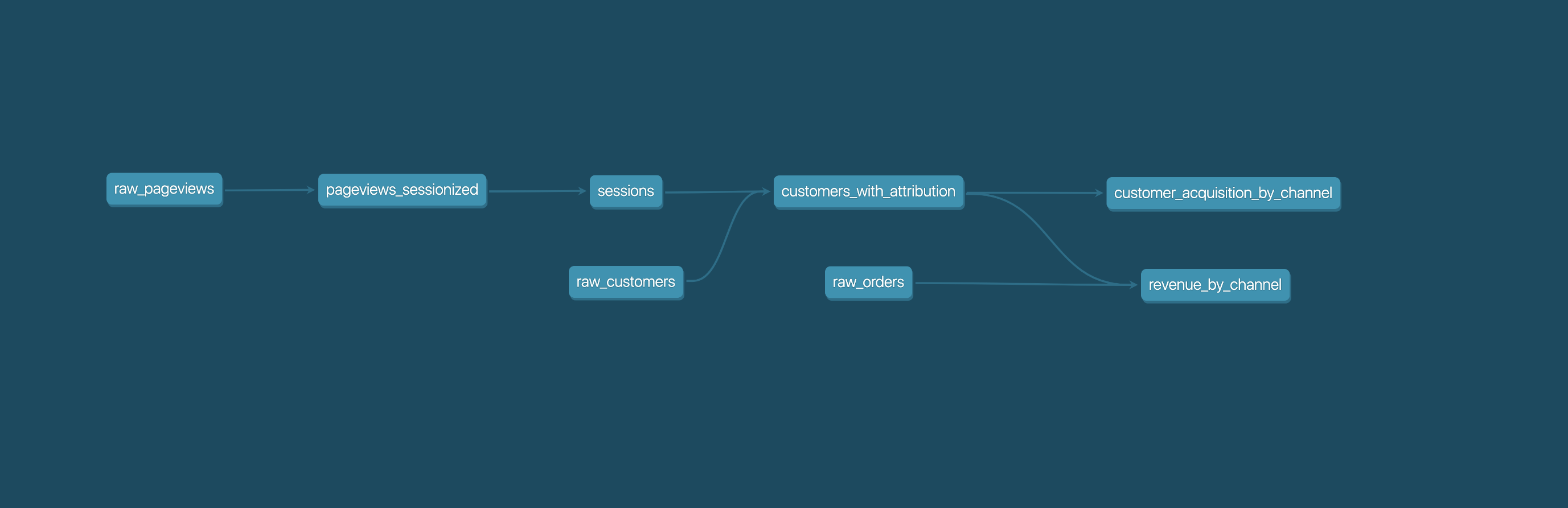
|
||||

|
||||
|
||||
## Getting started
|
||||
|
||||
- [Install dbt](https://docs.getdbt.com/docs/installation)
|
||||
- Read the [introduction](https://docs.getdbt.com/docs/introduction/) and [viewpoint](https://docs.getdbt.com/docs/about/viewpoint/)
|
||||
- [Install dbt](https://docs.getdbt.com/docs/installation)
|
||||
- Read the [documentation](https://docs.getdbt.com/).
|
||||
- Productionize your dbt project with [dbt Cloud](https://www.getdbt.com)
|
||||
|
||||
## Join the dbt Community
|
||||
## Find out more
|
||||
|
||||
- Be part of the conversation in the [dbt Community Slack](http://community.getdbt.com/)
|
||||
- Read more on the [dbt Community Discourse](https://discourse.getdbt.com)
|
||||
- Check out the [Introduction to dbt](https://docs.getdbt.com/docs/introduction/).
|
||||
- Read the [dbt Viewpoint](https://docs.getdbt.com/docs/about/viewpoint/).
|
||||
|
||||
## Join thousands of analysts in the dbt community
|
||||
|
||||
- Join the [chat](http://community.getdbt.com/) on Slack.
|
||||
- Find community posts on [dbt Discourse](https://discourse.getdbt.com).
|
||||
|
||||
## Reporting bugs and contributing code
|
||||
|
||||
- Want to report a bug or request a feature? Let us know on [Slack](http://community.getdbt.com/), or open [an issue](https://github.com/dbt-labs/dbt-core/issues/new)
|
||||
- Want to help us build dbt? Check out the [Contributing Guide](https://github.com/dbt-labs/dbt-core/blob/HEAD/CONTRIBUTING.md)
|
||||
- Want to report a bug or request a feature? Let us know on [Slack](http://community.getdbt.com/), or open [an issue](https://github.com/fishtown-analytics/dbt/issues/new).
|
||||
- Want to help us build dbt? Check out the [Contributing Getting Started Guide](/CONTRIBUTING.md)
|
||||
|
||||
## Code of Conduct
|
||||
|
||||
|
||||
92
RELEASE.md
Normal file
92
RELEASE.md
Normal file
@@ -0,0 +1,92 @@
|
||||
### Release Procedure :shipit:
|
||||
|
||||
#### Branching Strategy
|
||||
|
||||
dbt has three types of branches:
|
||||
|
||||
- **Trunks** track the latest release of a minor version of dbt. Historically, we used the `master` branch as the trunk. Each minor version release has a corresponding trunk. For example, the `0.11.x` series of releases has a branch called `0.11.latest`. This allows us to release new patch versions under `0.11` without necessarily needing to pull them into the latest version of dbt.
|
||||
- **Release Branches** track a specific, not yet complete release of dbt. These releases are codenamed since we don't always know what their semantic version will be. Example: `dev/lucretia-mott` became `0.11.1`.
|
||||
- **Feature Branches** track individual features and fixes. On completion they should be merged into a release branch.
|
||||
|
||||
#### Git & PyPI
|
||||
|
||||
1. Update CHANGELOG.md with the most recent changes
|
||||
2. If this is a release candidate, you want to create it off of your release branch. If it's an actual release, you must first merge to a master branch. Open a Pull Request in Github to merge it into the appropriate trunk (`X.X.latest`)
|
||||
3. Bump the version using `bumpversion`:
|
||||
- Dry run first by running `bumpversion --new-version <desired-version> <part>` and checking the diff. If it looks correct, clean up the chanages and move on:
|
||||
- Alpha releases: `bumpversion --commit --no-tag --new-version 0.10.2a1 num`
|
||||
- Patch releases: `bumpversion --commit --no-tag --new-version 0.10.2 patch`
|
||||
- Minor releases: `bumpversion --commit --no-tag --new-version 0.11.0 minor`
|
||||
- Major releases: `bumpversion --commit --no-tag --new-version 1.0.0 major`
|
||||
4. (If this is a not a release candidate) Merge to `x.x.latest` and (optionally) `master`.
|
||||
5. Update the default branch to the next dev release branch.
|
||||
6. Build source distributions for all packages by running `./scripts/build-sdists.sh`. Note that this will clean out your `dist/` folder, so if you have important stuff in there, don't run it!!!
|
||||
7. Deploy to pypi
|
||||
- `twine upload dist/*`
|
||||
8. Deploy to homebrew (see below)
|
||||
9. Deploy to conda-forge (see below)
|
||||
10. Git release notes (points to changelog)
|
||||
11. Post to slack (point to changelog)
|
||||
|
||||
After releasing a new version, it's important to merge the changes back into the other outstanding release branches. This avoids merge conflicts moving forward.
|
||||
|
||||
In some cases, where the branches have diverged wildly, it's ok to skip this step. But this means that the changes you just released won't be included in future releases.
|
||||
|
||||
#### Homebrew Release Process
|
||||
|
||||
1. Clone the `homebrew-dbt` repository:
|
||||
|
||||
```
|
||||
git clone git@github.com:fishtown-analytics/homebrew-dbt.git
|
||||
```
|
||||
|
||||
2. For ALL releases (prereleases and version releases), copy the relevant formula. To copy from the latest version release of dbt, do:
|
||||
|
||||
```bash
|
||||
cp Formula/dbt.rb Formula/dbt@{NEW-VERSION}.rb
|
||||
```
|
||||
|
||||
To copy from a different version, simply copy the corresponding file.
|
||||
|
||||
3. Open the file, and edit the following:
|
||||
- the name of the ruby class: this is important, homebrew won't function properly if the class name is wrong. Check historical versions to figure out the right name.
|
||||
- under the `bottle` section, remove all of the hashes (lines starting with `sha256`)
|
||||
|
||||
4. Create a **Python 3.7** virtualenv, activate it, and then install two packages: `homebrew-pypi-poet`, and the version of dbt you are preparing. I use:
|
||||
|
||||
```
|
||||
pyenv virtualenv 3.7.0 homebrew-dbt-{VERSION}
|
||||
pyenv activate homebrew-dbt-{VERSION}
|
||||
pip install dbt=={VERSION} homebrew-pypi-poet
|
||||
```
|
||||
|
||||
homebrew-pypi-poet is a program that generates a valid homebrew formula for an installed pip package. You want to use it to generate a diff against the existing formula. Then you want to apply the diff for the dependency packages only -- e.g. it will tell you that `google-api-core` has been updated and that you need to use the latest version.
|
||||
|
||||
5. reinstall, test, and audit dbt. if the test or audit fails, fix the formula with step 1.
|
||||
|
||||
```bash
|
||||
brew uninstall --force Formula/{YOUR-FILE}.rb
|
||||
brew install Formula/{YOUR-FILE}.rb
|
||||
brew test dbt
|
||||
brew audit --strict dbt
|
||||
```
|
||||
|
||||
6. Ask Connor to bottle the change (only his laptop can do it!)
|
||||
|
||||
#### Conda Forge Release Process
|
||||
|
||||
1. Clone the fork of `conda-forge/dbt-feedstock` [here](https://github.com/fishtown-analytics/dbt-feedstock)
|
||||
```bash
|
||||
git clone git@github.com:fishtown-analytics/dbt-feedstock.git
|
||||
|
||||
```
|
||||
2. Update the version and sha256 in `recipe/meta.yml`. To calculate the sha256, run:
|
||||
|
||||
```bash
|
||||
wget https://github.com/fishtown-analytics/dbt/archive/v{version}.tar.gz
|
||||
openssl sha256 v{version}.tar.gz
|
||||
```
|
||||
|
||||
3. Push the changes and create a PR against `conda-forge/dbt-feedstock`
|
||||
|
||||
4. Confirm that all automated conda-forge tests are passing
|
||||
154
azure-pipelines.yml
Normal file
154
azure-pipelines.yml
Normal file
@@ -0,0 +1,154 @@
|
||||
# Python package
|
||||
# Create and test a Python package on multiple Python versions.
|
||||
# Add steps that analyze code, save the dist with the build record, publish to a PyPI-compatible index, and more:
|
||||
# https://docs.microsoft.com/azure/devops/pipelines/languages/python
|
||||
|
||||
trigger:
|
||||
branches:
|
||||
include:
|
||||
- master
|
||||
- dev/*
|
||||
- pr/*
|
||||
|
||||
jobs:
|
||||
- job: UnitTest
|
||||
pool:
|
||||
vmImage: 'vs2017-win2016'
|
||||
steps:
|
||||
- task: UsePythonVersion@0
|
||||
inputs:
|
||||
versionSpec: '3.7'
|
||||
architecture: 'x64'
|
||||
|
||||
- script: python -m pip install --upgrade pip && pip install tox
|
||||
displayName: 'Install dependencies'
|
||||
|
||||
- script: python -m tox -e pywin-unit
|
||||
displayName: Run unit tests
|
||||
|
||||
- job: PostgresIntegrationTest
|
||||
pool:
|
||||
vmImage: 'vs2017-win2016'
|
||||
dependsOn: UnitTest
|
||||
|
||||
steps:
|
||||
- pwsh: |
|
||||
$serviceName = Get-Service -Name postgresql*
|
||||
Set-Service -InputObject $serviceName -StartupType Automatic
|
||||
Start-Service -InputObject $serviceName
|
||||
|
||||
& $env:PGBIN\createdb.exe -U postgres dbt
|
||||
& $env:PGBIN\psql.exe -U postgres -c "CREATE ROLE root WITH PASSWORD 'password';"
|
||||
& $env:PGBIN\psql.exe -U postgres -c "ALTER ROLE root WITH LOGIN;"
|
||||
& $env:PGBIN\psql.exe -U postgres -c "GRANT CREATE, CONNECT ON DATABASE dbt TO root WITH GRANT OPTION;"
|
||||
& $env:PGBIN\psql.exe -U postgres -c "CREATE ROLE noaccess WITH PASSWORD 'password' NOSUPERUSER;"
|
||||
& $env:PGBIN\psql.exe -U postgres -c "ALTER ROLE noaccess WITH LOGIN;"
|
||||
& $env:PGBIN\psql.exe -U postgres -c "GRANT CONNECT ON DATABASE dbt TO noaccess;"
|
||||
displayName: Install postgresql and set up database
|
||||
|
||||
- task: UsePythonVersion@0
|
||||
inputs:
|
||||
versionSpec: '3.7'
|
||||
architecture: 'x64'
|
||||
|
||||
- script: python -m pip install --upgrade pip && pip install tox
|
||||
displayName: 'Install dependencies'
|
||||
|
||||
- script: python -m tox -e pywin-postgres
|
||||
displayName: Run integration tests
|
||||
|
||||
# These three are all similar except secure environment variables, which MUST be passed along to their tasks,
|
||||
# but there's probably a better way to do this!
|
||||
- job: SnowflakeIntegrationTest
|
||||
pool:
|
||||
vmImage: 'vs2017-win2016'
|
||||
dependsOn: PostgresIntegrationTest
|
||||
condition: succeeded()
|
||||
steps:
|
||||
- task: UsePythonVersion@0
|
||||
inputs:
|
||||
versionSpec: '3.7'
|
||||
architecture: 'x64'
|
||||
|
||||
- script: python -m pip install --upgrade pip && pip install tox
|
||||
displayName: 'Install dependencies'
|
||||
|
||||
- script: python -m tox -e pywin-snowflake
|
||||
env:
|
||||
SNOWFLAKE_TEST_ACCOUNT: $(SNOWFLAKE_TEST_ACCOUNT)
|
||||
SNOWFLAKE_TEST_PASSWORD: $(SNOWFLAKE_TEST_PASSWORD)
|
||||
SNOWFLAKE_TEST_USER: $(SNOWFLAKE_TEST_USER)
|
||||
SNOWFLAKE_TEST_WAREHOUSE: $(SNOWFLAKE_TEST_WAREHOUSE)
|
||||
SNOWFLAKE_TEST_OAUTH_REFRESH_TOKEN: $(SNOWFLAKE_TEST_OAUTH_REFRESH_TOKEN)
|
||||
SNOWFLAKE_TEST_OAUTH_CLIENT_ID: $(SNOWFLAKE_TEST_OAUTH_CLIENT_ID)
|
||||
SNOWFLAKE_TEST_OAUTH_CLIENT_SECRET: $(SNOWFLAKE_TEST_OAUTH_CLIENT_SECRET)
|
||||
displayName: Run integration tests
|
||||
|
||||
- job: BigQueryIntegrationTest
|
||||
pool:
|
||||
vmImage: 'vs2017-win2016'
|
||||
dependsOn: PostgresIntegrationTest
|
||||
condition: succeeded()
|
||||
steps:
|
||||
- task: UsePythonVersion@0
|
||||
inputs:
|
||||
versionSpec: '3.7'
|
||||
architecture: 'x64'
|
||||
- script: python -m pip install --upgrade pip && pip install tox
|
||||
displayName: 'Install dependencies'
|
||||
- script: python -m tox -e pywin-bigquery
|
||||
env:
|
||||
BIGQUERY_SERVICE_ACCOUNT_JSON: $(BIGQUERY_SERVICE_ACCOUNT_JSON)
|
||||
displayName: Run integration tests
|
||||
|
||||
- job: RedshiftIntegrationTest
|
||||
pool:
|
||||
vmImage: 'vs2017-win2016'
|
||||
dependsOn: PostgresIntegrationTest
|
||||
condition: succeeded()
|
||||
steps:
|
||||
- task: UsePythonVersion@0
|
||||
inputs:
|
||||
versionSpec: '3.7'
|
||||
architecture: 'x64'
|
||||
|
||||
- script: python -m pip install --upgrade pip && pip install tox
|
||||
displayName: 'Install dependencies'
|
||||
|
||||
- script: python -m tox -e pywin-redshift
|
||||
env:
|
||||
REDSHIFT_TEST_DBNAME: $(REDSHIFT_TEST_DBNAME)
|
||||
REDSHIFT_TEST_PASS: $(REDSHIFT_TEST_PASS)
|
||||
REDSHIFT_TEST_USER: $(REDSHIFT_TEST_USER)
|
||||
REDSHIFT_TEST_PORT: $(REDSHIFT_TEST_PORT)
|
||||
REDSHIFT_TEST_HOST: $(REDSHIFT_TEST_HOST)
|
||||
displayName: Run integration tests
|
||||
|
||||
- job: BuildWheel
|
||||
pool:
|
||||
vmImage: 'vs2017-win2016'
|
||||
dependsOn:
|
||||
- UnitTest
|
||||
- PostgresIntegrationTest
|
||||
- RedshiftIntegrationTest
|
||||
- SnowflakeIntegrationTest
|
||||
- BigQueryIntegrationTest
|
||||
condition: succeeded()
|
||||
steps:
|
||||
- task: UsePythonVersion@0
|
||||
inputs:
|
||||
versionSpec: '3.7'
|
||||
architecture: 'x64'
|
||||
- script: python -m pip install --upgrade pip setuptools && python -m pip install -r requirements.txt && python -m pip install -r dev_requirements.txt
|
||||
displayName: Install dependencies
|
||||
- task: ShellScript@2
|
||||
inputs:
|
||||
scriptPath: scripts/build-wheels.sh
|
||||
- task: CopyFiles@2
|
||||
inputs:
|
||||
contents: 'dist\?(*.whl|*.tar.gz)'
|
||||
TargetFolder: '$(Build.ArtifactStagingDirectory)'
|
||||
- task: PublishBuildArtifacts@1
|
||||
inputs:
|
||||
pathtoPublish: '$(Build.ArtifactStagingDirectory)'
|
||||
artifactName: dists
|
||||
73
converter.py
Executable file
73
converter.py
Executable file
@@ -0,0 +1,73 @@
|
||||
#!/usr/bin/env python
|
||||
import json
|
||||
import yaml
|
||||
import sys
|
||||
import argparse
|
||||
from datetime import datetime, timezone
|
||||
import dbt.clients.registry as registry
|
||||
|
||||
|
||||
def yaml_type(fname):
|
||||
with open(fname) as f:
|
||||
return yaml.load(f)
|
||||
|
||||
|
||||
def parse_args():
|
||||
parser = argparse.ArgumentParser()
|
||||
parser.add_argument("--project", type=yaml_type, default="dbt_project.yml")
|
||||
parser.add_argument("--namespace", required=True)
|
||||
return parser.parse_args()
|
||||
|
||||
|
||||
def get_full_name(args):
|
||||
return "{}/{}".format(args.namespace, args.project["name"])
|
||||
|
||||
|
||||
def init_project_in_packages(args, packages):
|
||||
full_name = get_full_name(args)
|
||||
if full_name not in packages:
|
||||
packages[full_name] = {
|
||||
"name": args.project["name"],
|
||||
"namespace": args.namespace,
|
||||
"latest": args.project["version"],
|
||||
"assets": {},
|
||||
"versions": {},
|
||||
}
|
||||
return packages[full_name]
|
||||
|
||||
|
||||
def add_version_to_package(args, project_json):
|
||||
project_json["versions"][args.project["version"]] = {
|
||||
"id": "{}/{}".format(get_full_name(args), args.project["version"]),
|
||||
"name": args.project["name"],
|
||||
"version": args.project["version"],
|
||||
"description": "",
|
||||
"published_at": datetime.now(timezone.utc).astimezone().isoformat(),
|
||||
"packages": args.project.get("packages") or [],
|
||||
"works_with": [],
|
||||
"_source": {
|
||||
"type": "github",
|
||||
"url": "",
|
||||
"readme": "",
|
||||
},
|
||||
"downloads": {
|
||||
"tarball": "",
|
||||
"format": "tgz",
|
||||
"sha1": "",
|
||||
},
|
||||
}
|
||||
|
||||
|
||||
def main():
|
||||
args = parse_args()
|
||||
packages = registry.packages()
|
||||
project_json = init_project_in_packages(args, packages)
|
||||
if args.project["version"] in project_json["versions"]:
|
||||
raise Exception("Version {} already in packages JSON"
|
||||
.format(args.project["version"]),
|
||||
file=sys.stderr)
|
||||
add_version_to_package(args, project_json)
|
||||
print(json.dumps(packages, indent=2))
|
||||
|
||||
if __name__ == "__main__":
|
||||
main()
|
||||
@@ -1,2 +1 @@
|
||||
recursive-include dbt/include *.py *.sql *.yml *.html *.md .gitkeep .gitignore
|
||||
include dbt/py.typed
|
||||
recursive-include dbt/include *.py *.sql *.yml *.html *.md
|
||||
|
||||
Some files were not shown because too many files have changed in this diff Show More
Reference in New Issue
Block a user