mirror of
https://github.com/dlt-hub/dlt.git
synced 2025-12-17 19:31:30 +00:00
 266052eb76
* Initial commit

* lesson_1_quick_start adjusted for marimo

* lesson_2_dlt_sources_and_resources_create_first_dlt_pipeline marimo

* Fundamentals course 3 improved

* Marimo badges added

* Fundamenta: course 8

* Marimo badge link fix

* Fundamentals: course 7

* Fundamentals: course 6

* Fundamentals: course 5

* Fundamentals: cousre 4

* Fundamentals: course 3

* Fundamentals: course 2

* Fundmantals: course 1

* marimo links corrected

* Inline deps

* Fundamentals: fix lesson 2

* Fundamentals: fix lesson 3

* Fundamentals: fix lesson 4

* Formatting moved to build-molabs

* Fundamentals: fix lesson 5

* Removal of scrolls

* Fundamentals: fix lesson 6

* Fundamentals: fix lesson 7

* Fundamentals: fix lesson 8

* os.environ replaced with dlt.secrets where relevant

* Advanced: fix lesson 5

* Advanced fix lesson 9

* os.environ fixes

* Advanced: fix lesson 1

* Comments cleanup

* Additional comment removal, fix lesson 6 advanced

* Clean main makefile

* Get rid of constants.py

* Nicer json.loads()

* Better functions in preprocess_to_molab

* Tests for doc tooling funcs

* Validate molab command

* Marimo check added

* docs pages adjustment

* limits sqlglot in dev group until fixed

---------

Co-authored-by: Marcin Rudolf <rudolfix@rudolfix.org>
487 lines
15 KiB
Plaintext
487 lines
15 KiB
Plaintext
{
|
||
"cells": [
|
||
{
|
||
"cell_type": "markdown",
|
||
"metadata": {
|
||
"id": "pTAeTdoKJHZV"
|
||
},
|
||
"source": [
|
||
"# **Quick Start** 👩💻🚀 [](https://molab.marimo.io/github/dlt-hub/dlt/blob/master/docs/education/dlt-fundamentals-course/lesson_1_quick_start.py) [](https://colab.research.google.com/github/dlt-hub/dlt/blob/master/docs/education/dlt-fundamentals-course/lesson_1_quick_start.ipynb) [](https://github.com/dlt-hub/dlt/blob/master/docs/education/dlt-fundamentals-course/lesson_1_quick_start.ipynb)\n",
|
||
"\n",
|
||
"**Here, you will learn:**\n",
|
||
"- What is dlt?\n",
|
||
"- How to run a simple pipeline with toy data.\n",
|
||
"- How to explore the loaded data using:\n",
|
||
" - DuckDB connection\n",
|
||
" - dlt's sql_client\n",
|
||
" - dlt datasets"
|
||
]
|
||
},
|
||
{
|
||
"cell_type": "markdown",
|
||
"metadata": {
|
||
"id": "SuBY8YaVyVSy"
|
||
},
|
||
"source": [
|
||
"## **What is dlt?**\n",
|
||
"\n",
|
||
"In today's data-driven world, organizations often grapple with the challenge of efficiently **extracting, transforming,** and **loading** (ETL) data from various, often messy, data sources into well-structured, live datasets. This process can be complex, time-consuming, and prone to errors, especially when dealing with large volumes of data or nested data structures.\n",
|
||
"\n",
|
||
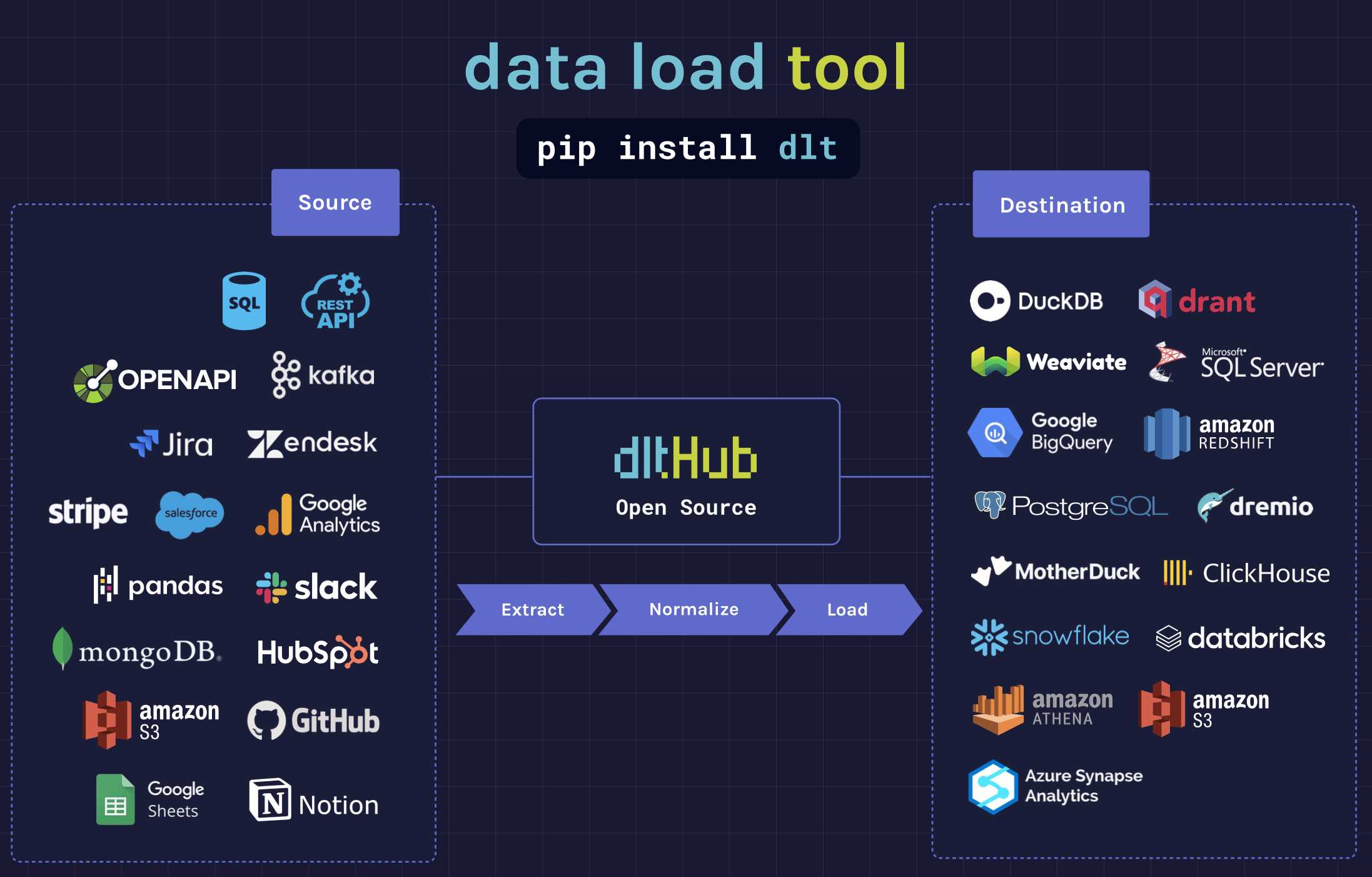
"Enter **dlt**, an **open-source Python library** designed to simplify and streamline this process. **dlt can load data from** a wide range of **sources** including REST APIs, SQL databases, cloud storage, and Python data structures, among others. It offers a lightweight interface that **infers schemas** and **data types**, **normalizes** the data, and handles **nested data** structures, making it easy to use, flexible, and scalable.\n",
|
||
"\n",
|
||
"Moreover, dlt supports a variety of **popular destinations** and allows for the addition of custom destinations to create **reverse ETL** pipelines. It can be deployed **anywhere Python runs**, be it on Airflow, serverless functions, or any other cloud deployment of your choice. With features like **schema evolution**, **data contracts** and **incremental loading**, dlt also automates pipeline maintenance, saving valuable time and resources.\n",
|
||
"\n",
|
||
"In essence, dlt is a powerful tool that simplifies the ETL process, making it more efficient and less error-prone. It allows data teams to **focus** on leveraging the data and driving value, while ensuring effective **governance** through timely notifications of any changes.\n",
|
||
"\n",
|
||
"[Learn more about dlt here](https://dlthub.com/docs/intro) and in this course!"
|
||
]
|
||
},
|
||
{
|
||
"cell_type": "markdown",
|
||
"metadata": {},
|
||
"source": [
|
||
""
|
||
]
|
||
},
|
||
{
|
||
"cell_type": "markdown",
|
||
"metadata": {
|
||
"id": "ZkW_N9CgLnFC"
|
||
},
|
||
"source": [
|
||
"---\n",
|
||
"## **Installation**\n",
|
||
"\n",
|
||
"> **Note**: We recommend working within a virtual environment when creating Python projects. This way, all the dependencies for your current project will be isolated from packages in other projects."
|
||
]
|
||
},
|
||
{
|
||
"cell_type": "code",
|
||
"execution_count": null,
|
||
"metadata": {
|
||
"id": "ygrb6tHBJ_Zm"
|
||
},
|
||
"outputs": [],
|
||
"source": [
|
||
"%%capture\n",
|
||
"!pip install \"dlt[duckdb]\""
|
||
]
|
||
},
|
||
{
|
||
"cell_type": "markdown",
|
||
"metadata": {
|
||
"id": "uLNfzcCefcpM"
|
||
},
|
||
"source": [
|
||
"Read more about DuckDB as a destination [here](https://dlthub.com/docs/dlt-ecosystem/destinations/duckdb)."
|
||
]
|
||
},
|
||
{
|
||
"cell_type": "markdown",
|
||
"metadata": {
|
||
"id": "l7Y1oCAvJ79I"
|
||
},
|
||
"source": [
|
||
"---\n",
|
||
"## **Run a simple pipeline with toy data**\n",
|
||
"For educational purposes, let’s start with a simple pipeline using a small dataset — Pokémon data represented as a list of Python dictionaries."
|
||
]
|
||
},
|
||
{
|
||
"cell_type": "markdown",
|
||
"metadata": {
|
||
"id": "YUaEe6pxLMA9"
|
||
},
|
||
"source": [
|
||
"1. Define a list of Python dictionaries, which will be your toy data:"
|
||
]
|
||
},
|
||
{
|
||
"cell_type": "code",
|
||
"execution_count": null,
|
||
"metadata": {
|
||
"id": "Tv6ogF3KLSaJ"
|
||
},
|
||
"outputs": [],
|
||
"source": [
|
||
"# Sample data containing pokemon details\n",
|
||
"data = [\n",
|
||
" {\"id\": \"1\", \"name\": \"bulbasaur\", \"size\": {\"weight\": 6.9, \"height\": 0.7}},\n",
|
||
" {\"id\": \"4\", \"name\": \"charmander\", \"size\": {\"weight\": 8.5, \"height\": 0.6}},\n",
|
||
" {\"id\": \"25\", \"name\": \"pikachu\", \"size\": {\"weight\": 6, \"height\": 0.4}},\n",
|
||
"]"
|
||
]
|
||
},
|
||
{
|
||
"cell_type": "markdown",
|
||
"metadata": {
|
||
"id": "IcofFDCQLfIs"
|
||
},
|
||
"source": [
|
||
"2. Import `dlt` and create a simple pipeline:"
|
||
]
|
||
},
|
||
{
|
||
"cell_type": "code",
|
||
"execution_count": null,
|
||
"metadata": {
|
||
"id": "qZvRAPQULX3j"
|
||
},
|
||
"outputs": [],
|
||
"source": [
|
||
"import dlt\n",
|
||
"\n",
|
||
"# Set pipeline name, destination, and dataset name\n",
|
||
"pipeline = dlt.pipeline(\n",
|
||
" pipeline_name=\"quick_start\",\n",
|
||
" destination=\"duckdb\",\n",
|
||
" dataset_name=\"mydata\",\n",
|
||
")"
|
||
]
|
||
},
|
||
{
|
||
"cell_type": "markdown",
|
||
"metadata": {
|
||
"id": "Xybb5m8hL8Gc"
|
||
},
|
||
"source": [
|
||
"3. Run your pipeline and print the load info:"
|
||
]
|
||
},
|
||
{
|
||
"cell_type": "code",
|
||
"execution_count": null,
|
||
"metadata": {
|
||
"id": "KeeakH8HL5UK"
|
||
},
|
||
"outputs": [],
|
||
"source": [
|
||
"# Run the pipeline with data and table name\n",
|
||
"load_info = pipeline.run(data, table_name=\"pokemon\")\n",
|
||
"\n",
|
||
"print(load_info)"
|
||
]
|
||
},
|
||
{
|
||
"cell_type": "markdown",
|
||
"metadata": {
|
||
"id": "Llrws_lsMa-B"
|
||
},
|
||
"source": [
|
||
"> **What just happened?** \n",
|
||
"> The first run of a pipeline will scan the data that goes through it and generate a schema. To convert nested data into a relational format, dlt flattens dictionaries and unpacks nested lists into sub-tables.\n",
|
||
">\n",
|
||
"> For this example, `dlt` created a schema called 'mydata' with the table 'pokemon' in it and stored it in DuckDB.\n",
|
||
">\n",
|
||
">For detailed instructions on running a pipeline, see the documentation [here](https://dlthub.com/docs/walkthroughs/run-a-pipeline)."
|
||
]
|
||
},
|
||
{
|
||
"cell_type": "markdown",
|
||
"metadata": {
|
||
"id": "Z9ll-Ax1BxGu"
|
||
},
|
||
"source": [
|
||
"Quick start was really quick, huh? It seems like some kind of magic happened.\n",
|
||
"\n",
|
||
"We don't believe in magic! Let's start from the beginning, what is a `dlt` Pipeline?"
|
||
]
|
||
},
|
||
{
|
||
"cell_type": "markdown",
|
||
"metadata": {
|
||
"id": "XQ_FyGPpV7RZ"
|
||
},
|
||
"source": [
|
||
"---\n",
|
||
"\n",
|
||
"## **What is a `dlt` Pipeline?**\n",
|
||
"\n",
|
||
"A [pipeline](https://dlthub.com/docs/general-usage/pipeline) is a connection that moves data from your Python code to a destination. The pipeline accepts dlt sources or resources, as well as generators, async generators, lists, and any iterables. Once the pipeline runs, all resources are evaluated and the data is loaded at the destination."
|
||
]
|
||
},
|
||
{
|
||
"cell_type": "code",
|
||
"execution_count": null,
|
||
"metadata": {
|
||
"id": "iljFY2kgXltJ"
|
||
},
|
||
"outputs": [],
|
||
"source": [
|
||
"another_pipeline = dlt.pipeline(\n",
|
||
" pipeline_name=\"resource_source\",\n",
|
||
" destination=\"duckdb\",\n",
|
||
" dataset_name=\"mydata\",\n",
|
||
" dev_mode=True,\n",
|
||
")"
|
||
]
|
||
},
|
||
{
|
||
"cell_type": "markdown",
|
||
"metadata": {
|
||
"id": "czTwfzOCW9jC"
|
||
},
|
||
"source": [
|
||
"You instantiate a pipeline by calling the `dlt.pipeline` function with the following arguments:\n",
|
||
"* **`pipeline_name`**: This is the name you give to your pipeline. It helps you track and monitor your pipeline, and also helps to bring back its state and data structures for future runs. If you don't provide a name, dlt will use the name of the Python file you're running as the pipeline name.\n",
|
||
"* **`destination`**: a name of the destination to which dlt will load the data. It may also be provided to the run method of the pipeline.\n",
|
||
"* **`dataset_name`**: This is the name of the group of tables (or dataset) where your data will be sent. You can think of a dataset like a folder that holds many files, or a schema in a relational database. You can also specify this later when you run or load the pipeline. If you don't provide a name, it will default to the name of your pipeline.\n",
|
||
"* **`dev_mode`**: If you set this to True, dlt will add a timestamp to your dataset name every time you create a pipeline. This means a new dataset will be created each time you create a pipeline.\n",
|
||
"\n",
|
||
"There are additional arguments for advanced use, but we’ll skip them for now."
|
||
]
|
||
},
|
||
{
|
||
"cell_type": "markdown",
|
||
"metadata": {
|
||
"id": "Y9cmTZWBX3cJ"
|
||
},
|
||
"source": [
|
||
"---\n",
|
||
"\n",
|
||
"## **Run method**\n",
|
||
"\n",
|
||
"To load the data, you call the `run()` method and pass your data in the data argument."
|
||
]
|
||
},
|
||
{
|
||
"cell_type": "code",
|
||
"execution_count": null,
|
||
"metadata": {
|
||
"id": "xipHkCj6X_4D"
|
||
},
|
||
"outputs": [],
|
||
"source": [
|
||
"# Run the pipeline and print load info\n",
|
||
"load_info = another_pipeline.run(data, table_name=\"pokemon\")\n",
|
||
"print(load_info)"
|
||
]
|
||
},
|
||
{
|
||
"cell_type": "markdown",
|
||
"metadata": {
|
||
"id": "D534IdD4YENz"
|
||
},
|
||
"source": [
|
||
"Commonly used arguments:\n",
|
||
"\n",
|
||
"* **`data`** (the first argument) may be a dlt source, resource, generator function, or any Iterator or Iterable (i.e., a list or the result of the map function).\n",
|
||
"* **`write_disposition`** controls how to write data to a table. Defaults to the value \"append\".\n",
|
||
" * `append` will always add new data at the end of the table.\n",
|
||
" * `replace` will replace existing data with new data.\n",
|
||
" * `skip` will prevent data from loading.\n",
|
||
" * `merge` will deduplicate and merge data based on `primary_key` and `merge_key` hints.\n",
|
||
"* **`table_name`**: specified in cases when the table name cannot be inferred, i.e., from the resources or name of the generator function."
|
||
]
|
||
},
|
||
{
|
||
"cell_type": "markdown",
|
||
"metadata": {
|
||
"id": "G2XrStRSMNRN"
|
||
},
|
||
"source": [
|
||
" ---\n",
|
||
" ## **Explore the loaded data**"
|
||
]
|
||
},
|
||
{
|
||
"cell_type": "markdown",
|
||
"metadata": {
|
||
"id": "9t7SAblRQMUE"
|
||
},
|
||
"source": [
|
||
"---\n",
|
||
"### **(1) DuckDB Connection**"
|
||
]
|
||
},
|
||
{
|
||
"cell_type": "markdown",
|
||
"metadata": {
|
||
"id": "xQcYIbDbQevC"
|
||
},
|
||
"source": [
|
||
"Start a connection to your database using a native `duckdb` connection and see which tables were generated:"
|
||
]
|
||
},
|
||
{
|
||
"cell_type": "code",
|
||
"execution_count": null,
|
||
"metadata": {
|
||
"id": "iyVBB3upWL9g"
|
||
},
|
||
"outputs": [],
|
||
"source": [
|
||
"import duckdb\n",
|
||
"\n",
|
||
"# A database '<pipeline_name>.duckdb' was created in working directory so just connect to it\n",
|
||
"\n",
|
||
"# Connect to the DuckDB database\n",
|
||
"conn = duckdb.connect(f\"{another_pipeline.pipeline_name}.duckdb\")\n",
|
||
"\n",
|
||
"# Set search path to the dataset\n",
|
||
"conn.sql(f\"SET search_path = '{another_pipeline.dataset_name}'\")\n",
|
||
"\n",
|
||
"# Describe the dataset\n",
|
||
"conn.sql(\"DESCRIBE\").df()"
|
||
]
|
||
},
|
||
{
|
||
"cell_type": "markdown",
|
||
"metadata": {
|
||
"id": "629UaVgTWip1"
|
||
},
|
||
"source": [
|
||
"You can see:\n",
|
||
"- `pokemon` table,\n",
|
||
"\n",
|
||
"and 3 special `dlt` tables (we will discuss them later):\n",
|
||
"- `_dlt_loads`,\n",
|
||
"- `_dlt_pipeline_state`,\n",
|
||
"- `_dlt_version`.\n",
|
||
"\n",
|
||
"Let's execute a query to get all data from the `pokemon` table:"
|
||
]
|
||
},
|
||
{
|
||
"cell_type": "code",
|
||
"execution_count": null,
|
||
"metadata": {
|
||
"id": "4NLrShl8Wlyn"
|
||
},
|
||
"outputs": [],
|
||
"source": [
|
||
"# Fetch all data from 'pokemon' as a DataFrame\n",
|
||
"table = conn.sql(\"SELECT * FROM pokemon\").df()\n",
|
||
"\n",
|
||
"# Display the DataFrame\n",
|
||
"table"
|
||
]
|
||
},
|
||
{
|
||
"cell_type": "markdown",
|
||
"metadata": {
|
||
"id": "pSYuVS2oRFpJ"
|
||
},
|
||
"source": [
|
||
" ---\n",
|
||
" ### **(2) `dlt`'s [sql_client](https://dlthub.com/docs/general-usage/dataset-access/sql-client)**"
|
||
]
|
||
},
|
||
{
|
||
"cell_type": "markdown",
|
||
"metadata": {
|
||
"id": "xINpV6fQRbkG"
|
||
},
|
||
"source": [
|
||
"Most dlt destinations (even filesystem) use an implementation of the `SqlClientBase` class to connect to the physical destination to which your data is loaded. You can access the SQL client of your destination via the `sql_client` method on your pipeline.\n",
|
||
"\n",
|
||
"Start a connection to your database with `pipeline.sql_client()` and execute a query to get all data from the `pokemon` table:"
|
||
]
|
||
},
|
||
{
|
||
"cell_type": "code",
|
||
"execution_count": null,
|
||
"metadata": {
|
||
"id": "5PVWx9OpQ73n"
|
||
},
|
||
"outputs": [],
|
||
"source": [
|
||
"# Query data from 'pokemon' using the SQL client\n",
|
||
"with another_pipeline.sql_client() as client:\n",
|
||
" with client.execute_query(\"SELECT * FROM pokemon\") as cursor:\n",
|
||
" data = cursor.df()\n",
|
||
"\n",
|
||
"# Display the data\n",
|
||
"data"
|
||
]
|
||
},
|
||
{
|
||
"cell_type": "markdown",
|
||
"metadata": {
|
||
"id": "fT025J9R_NH-"
|
||
},
|
||
"source": [
|
||
"---\n",
|
||
"### **(3) dlt [datasets](https://dlthub.com/docs/general-usage/dataset-access/dataset)**\n",
|
||
"\n",
|
||
"Here's an example of how to retrieve data from a pipeline and load it into a Pandas DataFrame or a PyArrow Table."
|
||
]
|
||
},
|
||
{
|
||
"cell_type": "code",
|
||
"execution_count": null,
|
||
"metadata": {
|
||
"id": "GKLBgbCbBJRL"
|
||
},
|
||
"outputs": [],
|
||
"source": [
|
||
"dataset = another_pipeline.dataset()\n",
|
||
"dataset.pokemon.df()"
|
||
]
|
||
},
|
||
{
|
||
"cell_type": "markdown",
|
||
"metadata": {
|
||
"id": "WDKOjSVLR2z9"
|
||
},
|
||
"source": [
|
||
"---\n",
|
||
"# **Exercise 1**\n",
|
||
"\n",
|
||
"Using the code from the previous cell, fetch the data from the `pokemon` table into a dataframe and count the number of columns in the table `pokemon`.\n"
|
||
]
|
||
},
|
||
{
|
||
"cell_type": "markdown",
|
||
"metadata": {
|
||
"id": "ieTz0PhuJMb1"
|
||
},
|
||
"source": [
|
||
"**Use this number to answer the question in the Quiz LearnWorlds Form.**"
|
||
]
|
||
},
|
||
{
|
||
"cell_type": "markdown",
|
||
"metadata": {
|
||
"id": "aAFj_DishDzi"
|
||
},
|
||
"source": [
|
||
""
|
||
]
|
||
},
|
||
{
|
||
"cell_type": "markdown",
|
||
"metadata": {
|
||
"id": "NYbccmLie1zm"
|
||
},
|
||
"source": [
|
||
"✅ ▶ Proceed to the [next lesson](https://github.com/dlt-hub/dlt/blob/master/docs/education/dlt-fundamentals-course/lesson_2_dlt_sources_and_resources_create_first_dlt_pipeline.ipynb)!"
|
||
]
|
||
}
|
||
],
|
||
"metadata": {
|
||
"colab": {
|
||
"provenance": []
|
||
},
|
||
"kernelspec": {
|
||
"display_name": "dlt",
|
||
"language": "python",
|
||
"name": "python3"
|
||
},
|
||
"language_info": {
|
||
"codemirror_mode": {
|
||
"name": "ipython",
|
||
"version": 3
|
||
},
|
||
"file_extension": ".py",
|
||
"mimetype": "text/x-python",
|
||
"name": "python",
|
||
"nbconvert_exporter": "python",
|
||
"pygments_lexer": "ipython3",
|
||
"version": "3.10.0"
|
||
}
|
||
},
|
||
"nbformat": 4,
|
||
"nbformat_minor": 0
|
||
}
|