mirror of
https://github.com/dlt-hub/dlt.git
synced 2025-12-17 19:31:30 +00:00
 266052eb76
* Initial commit

* lesson_1_quick_start adjusted for marimo

* lesson_2_dlt_sources_and_resources_create_first_dlt_pipeline marimo

* Fundamentals course 3 improved

* Marimo badges added

* Fundamenta: course 8

* Marimo badge link fix

* Fundamentals: course 7

* Fundamentals: course 6

* Fundamentals: course 5

* Fundamentals: cousre 4

* Fundamentals: course 3

* Fundamentals: course 2

* Fundmantals: course 1

* marimo links corrected

* Inline deps

* Fundamentals: fix lesson 2

* Fundamentals: fix lesson 3

* Fundamentals: fix lesson 4

* Formatting moved to build-molabs

* Fundamentals: fix lesson 5

* Removal of scrolls

* Fundamentals: fix lesson 6

* Fundamentals: fix lesson 7

* Fundamentals: fix lesson 8

* os.environ replaced with dlt.secrets where relevant

* Advanced: fix lesson 5

* Advanced fix lesson 9

* os.environ fixes

* Advanced: fix lesson 1

* Comments cleanup

* Additional comment removal, fix lesson 6 advanced

* Clean main makefile

* Get rid of constants.py

* Nicer json.loads()

* Better functions in preprocess_to_molab

* Tests for doc tooling funcs

* Validate molab command

* Marimo check added

* docs pages adjustment

* limits sqlglot in dev group until fixed

---------

Co-authored-by: Marcin Rudolf <rudolfix@rudolfix.org>
465 lines
12 KiB
Python
465 lines
12 KiB
Python
# /// script
|
||
# dependencies = [
|
||
# "dlt",
|
||
# "dlt[duckdb]",
|
||
# "notion-client",
|
||
# "numpy",
|
||
# "pandas",
|
||
# "pymysql",
|
||
# "sqlalchemy",
|
||
# ]
|
||
# ///
|
||
|
||
import marimo
|
||
|
||
__generated_with = "0.17.4"
|
||
app = marimo.App()
|
||
|
||
|
||
@app.cell(hide_code=True)
|
||
def _(mo):
|
||
mo.md(r"""
|
||
# Custom destinations & Reverse ETL [](https://molab.marimo.io/github/dlt-hub/dlt/blob/master/docs/education/dlt-advanced-course/lesson_4_destinations_reverse_etl.py) [](https://colab.research.google.com/github/dlt-hub/dlt/blob/master/docs/education/dlt-advanced-course/lesson_4_destinations_reverse_etl.ipynb) [](https://github.com/dlt-hub/dlt/blob/master/docs/education/dlt-advanced-course/lesson_4_destinations_reverse_etl.ipynb)
|
||
|
||
---
|
||
|
||
## What you’ll learn
|
||
|
||
- What reverse ETL means in practice
|
||
- How to build custom destinations with `@dlt.destination`
|
||
- How batching works
|
||
- How to push real data from the Rfam database to Notion
|
||
|
||
---
|
||
""")
|
||
return
|
||
|
||
|
||
@app.cell(hide_code=True)
|
||
def _(mo):
|
||
mo.md(
|
||
r""""""
|
||
)
|
||
return
|
||
|
||
|
||
@app.cell(hide_code=True)
|
||
def _(mo):
|
||
mo.md(r"""
|
||
## **1. Concept: What is a custom destination?**
|
||
|
||
Normally, dlt sends your data to databases like BigQuery or Postgres.
|
||
|
||
But with `@dlt.destination`, you can **intercept the normalized data** and send it wherever you want:
|
||
- APIs (Notion, Slack, Airtable)
|
||
- Message queues (Kafka, SQS)
|
||
- Logging systems
|
||
- Custom data sinks
|
||
|
||
All you have to do is define a function like:
|
||
|
||
```python
|
||
@dlt.destination
|
||
def my_destination(items, table):
|
||
...
|
||
```
|
||
|
||
And dlt will call this for every batch of data extracted and normalized.
|
||
""")
|
||
return
|
||
|
||
|
||
@app.cell(hide_code=True)
|
||
def _(mo):
|
||
mo.md(r"""
|
||
---
|
||
|
||
## **2. Simple example: print data rows**
|
||
|
||
### Code example:
|
||
""")
|
||
return
|
||
|
||
|
||
@app.cell
|
||
def _():
|
||
import dlt
|
||
from dlt.common.typing import TDataItems
|
||
from dlt.common.schema import TTableSchema
|
||
|
||
@dlt.destination(batch_size=5)
|
||
def print_sink(items: TDataItems, table: TTableSchema) -> None:
|
||
print(f"\nTable: {table['name']}")
|
||
for item in items:
|
||
print(item)
|
||
|
||
@dlt.resource
|
||
def simple_data() -> TDataItems:
|
||
yield [{"id": i, "value": f"row-{i}"} for i in range(12)]
|
||
|
||
_pipeline = dlt.pipeline("print_example", destination=print_sink)
|
||
_pipeline.run(simple_data())
|
||
print(_pipeline.last_trace)
|
||
return TDataItems, TTableSchema, dlt, simple_data
|
||
|
||
|
||
@app.cell(hide_code=True)
|
||
def _(mo):
|
||
mo.md(r"""
|
||
**What’s happening?**
|
||
|
||
- `simple_data()` yields 12 small records.
|
||
- The data goes through **normalization** (converted to rows + types).
|
||
- `@dlt.destination(batch_size=5)` groups these rows into batches of 5.
|
||
- For each batch, `print_sink()` is called.
|
||
- The `table` parameter tells you which table the batch belongs to.
|
||
|
||
|
||
**Why this is important?**
|
||
|
||
- This is the **simplest possible custom destination.**
|
||
- You’re in control: log, debug, or route data per table.
|
||
- It introduces how dlt structures the data and calls your function.
|
||
""")
|
||
return
|
||
|
||
|
||
@app.cell(hide_code=True)
|
||
def _(mo):
|
||
mo.md(r"""
|
||
## Question 1:
|
||
|
||
In the following example, how many times will the function be called?
|
||
""")
|
||
return
|
||
|
||
|
||
@app.cell
|
||
def _(TDataItems, TTableSchema, dlt):
|
||
@dlt.destination(batch_size=2)
|
||
def new_print_sink(items: TDataItems, table: TTableSchema) -> None:
|
||
print(items)
|
||
|
||
@dlt.resource
|
||
def new_simple_data() -> TDataItems:
|
||
yield [{"id": i} for i in range(6)]
|
||
return
|
||
|
||
|
||
@app.cell(hide_code=True)
|
||
def _(mo):
|
||
mo.md(r"""
|
||
## **3. How batching works**
|
||
|
||
By default `batch_size` is 10.
|
||
|
||
|
||
Let’s tweak just one thing:
|
||
""")
|
||
return
|
||
|
||
|
||
@app.cell
|
||
def _(TDataItems, TTableSchema, dlt, simple_data):
|
||
@dlt.destination(batch_size=1)
|
||
def print_each_row(items: TDataItems, table: TTableSchema) -> None:
|
||
print(f"Got one row from table {table['name']}:")
|
||
print(items)
|
||
|
||
_pipeline = dlt.pipeline("print_example", destination=print_each_row)
|
||
_pipeline.run(simple_data())
|
||
print(_pipeline.last_trace)
|
||
return
|
||
|
||
|
||
@app.cell(hide_code=True)
|
||
def _(mo):
|
||
mo.md(r"""
|
||
Now, dlt calls your function **once per row** instead of per 5 rows.
|
||
|
||
Useful if:
|
||
- Your API doesn’t support bulk inserts.
|
||
- You want fine-grained control or retries.
|
||
""")
|
||
return
|
||
|
||
|
||
@app.cell(hide_code=True)
|
||
def _(mo):
|
||
mo.md(r"""
|
||
## **4. Real-world project: Rfam database → Notion**
|
||
|
||
Let’s build a real pipeline that fetches data from database and **sends it to Notion**.
|
||
|
||
### Why Notion?
|
||
|
||
- Notion is a great tool for product/dev teams.
|
||
- But dlt doesn’t support Notion as a *destination*.
|
||
- So, we’ll build that ourselves.
|
||
""")
|
||
return
|
||
|
||
|
||
@app.cell(hide_code=True)
|
||
def _(mo):
|
||
mo.md(r"""
|
||
### 4.1. Step 1: Create a database in Notion
|
||
|
||
1. Create empty an database. [Notion documentation.](https://super.so/blog/6-steps-to-creating-databases-in-notion)
|
||
2. [Create an integration](https://www.notion.so/profile/integrations) in your Notion Workspace.
|
||
3. Connect your database to the integration.
|
||
4. Create 3 columns: Accession (title), ID (text), Description (text)
|
||
""")
|
||
return
|
||
|
||
|
||
@app.cell(hide_code=True)
|
||
def _(mo):
|
||
mo.md(
|
||
r"""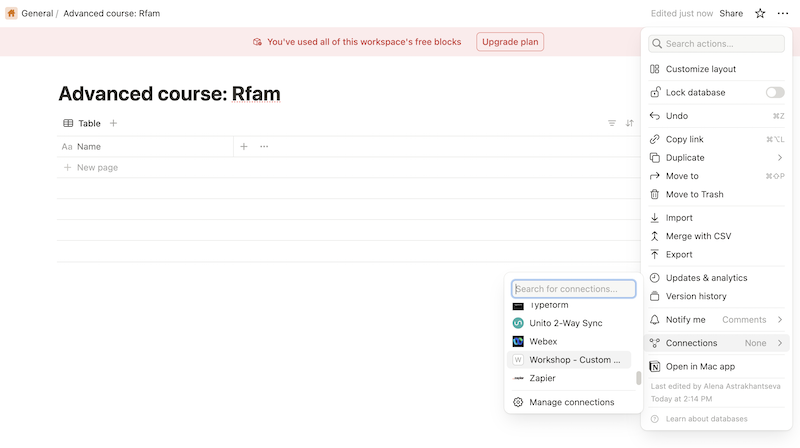"""
|
||
)
|
||
return
|
||
|
||
|
||
@app.cell(hide_code=True)
|
||
def _(mo):
|
||
mo.md(
|
||
r""""""
|
||
)
|
||
return
|
||
|
||
|
||
@app.cell(hide_code=True)
|
||
def _(mo):
|
||
mo.md(r"""### 4.2. Step 2: Configure""")
|
||
return
|
||
|
||
|
||
@app.cell(hide_code=True)
|
||
def _(mo):
|
||
mo.md(r"""
|
||
2. Set your credentials either in:
|
||
- `~/.dlt/secrets.toml`
|
||
- or environment variables
|
||
- or (**in our case**) in Colab or Molab Secrets
|
||
|
||
```toml
|
||
[destination.notion]
|
||
notion_auth = "<your_integration_token>"
|
||
notion_page_id = "<your_database_id>"
|
||
```
|
||
""")
|
||
return
|
||
|
||
|
||
@app.cell(hide_code=True)
|
||
def _(mo):
|
||
mo.md(
|
||
r"""- Save your [Notion authentication token](https://developers.notion.com/docs/authorization#internal-integration-auth-flow-set-up) and the [ID of the page](https://developers.notion.com/docs/working-with-page-content#creating-a-page-with-content) where you want to create a database in your Colab secrets:"""
|
||
)
|
||
return
|
||
|
||
|
||
@app.cell(hide_code=True)
|
||
def _(mo):
|
||
mo.md(
|
||
r"""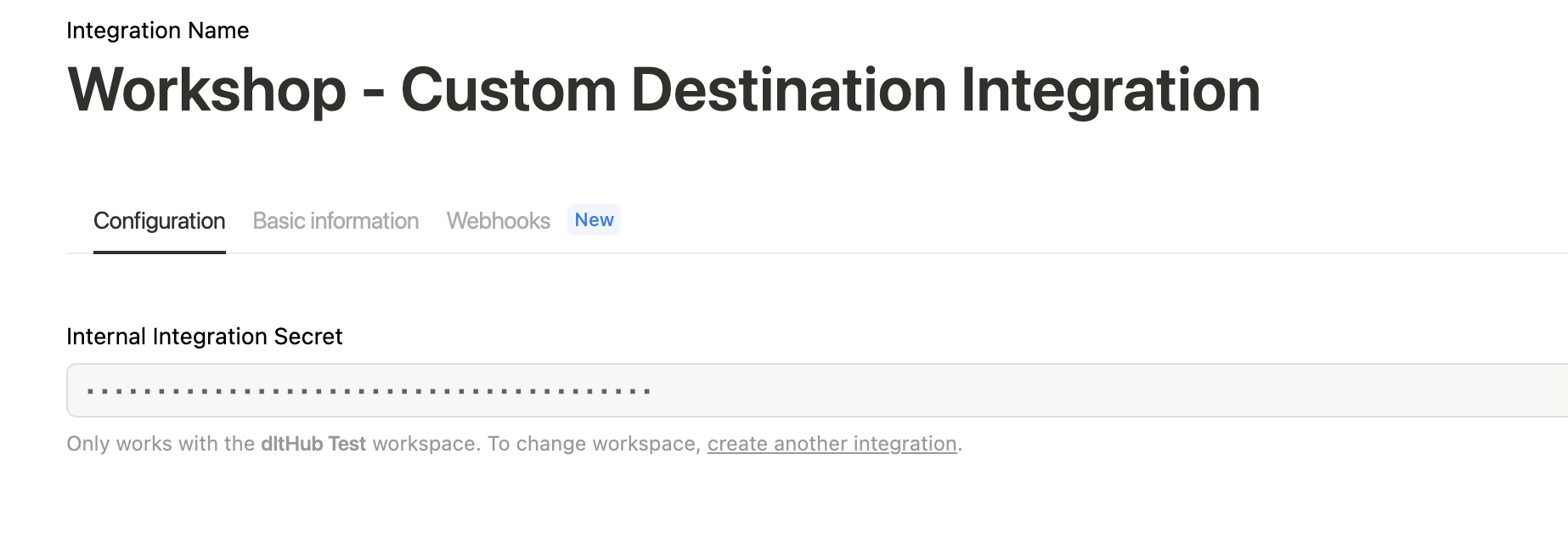"""
|
||
)
|
||
return
|
||
|
||
|
||
@app.cell(hide_code=True)
|
||
def _(mo):
|
||
mo.md(
|
||
r""""""
|
||
)
|
||
return
|
||
|
||
|
||
@app.cell(hide_code=True)
|
||
def _(mo):
|
||
mo.md(
|
||
r""""""
|
||
)
|
||
return
|
||
|
||
|
||
@app.cell(hide_code=True)
|
||
def _(mo):
|
||
mo.md(
|
||
r"""> Make sure to [connect the page](https://www.notion.so/help/add-and-manage-connections-with-the-api#add-connections-to-pages) to the integration associated with the token!"""
|
||
)
|
||
return
|
||
|
||
|
||
@app.cell(hide_code=True)
|
||
def _(mo):
|
||
mo.md(r"""
|
||
You can also check if your integration works via the requests library:
|
||
1. Modify Bearer token
|
||
2. Modify "query" if you database have another name
|
||
""")
|
||
return
|
||
|
||
|
||
@app.cell
|
||
def _():
|
||
import requests
|
||
|
||
url = "https://api.notion.com/v1/search"
|
||
|
||
headers = {
|
||
"Authorization": "Bearer ntn_q5_your_token_o5xQLn1sewnep6",
|
||
"Content-Type": "application/json",
|
||
"Notion-Version": "2022-06-28",
|
||
}
|
||
|
||
data = {
|
||
"query": "Advanced",
|
||
"filter": {"value": "database", "property": "object"},
|
||
"sort": {"direction": "ascending", "timestamp": "last_edited_time"},
|
||
}
|
||
|
||
response = requests.post(url, headers=headers, json=data)
|
||
print(response.json())
|
||
return
|
||
|
||
|
||
@app.cell(hide_code=True)
|
||
def _(mo):
|
||
mo.md(r"""
|
||
### 4.3. Step 3: Get data from Rfam database
|
||
|
||
Let's use `query_callback` and limit the number of data rows:
|
||
""")
|
||
return
|
||
|
||
|
||
@app.cell
|
||
def _():
|
||
import os
|
||
import sqlalchemy as sa
|
||
from sqlalchemy import text
|
||
from dlt.sources.sql_database import sql_database
|
||
from dlt.sources.sql_database.helpers import SelectClause, Table
|
||
|
||
def limit_rows(query: SelectClause, table: Table) -> SelectClause:
|
||
return text(f"SELECT * FROM {table.fullname} LIMIT 20")
|
||
|
||
source = sql_database(
|
||
"mysql+pymysql://rfamro@mysql-rfam-public.ebi.ac.uk:4497/Rfam",
|
||
table_names=["family"],
|
||
query_adapter_callback=limit_rows,
|
||
)
|
||
return os, source
|
||
|
||
|
||
@app.cell(hide_code=True)
|
||
def _(mo):
|
||
mo.md(r"""### 4.4. Step 4: Define Notion destination""")
|
||
return
|
||
|
||
|
||
@app.cell
|
||
def _(TDataItems, TTableSchema, dlt, os):
|
||
from notion_client import Client
|
||
|
||
dlt.secrets["DESTINATION__NOTION__NOTION_AUTH"] = os.getenv("NOTION_AUTHENTICATION")
|
||
dlt.secrets["DESTINATION__NOTION__NOTION_PAGE_ID"] = os.getenv("NOTION_PAGE_ID")
|
||
|
||
@dlt.destination(name="notion")
|
||
def push_to_notion(
|
||
items: TDataItems,
|
||
table: TTableSchema,
|
||
notion_auth: str = dlt.secrets.value,
|
||
notion_page_id: str = dlt.secrets.value,
|
||
) -> None:
|
||
client = Client(auth=notion_auth)
|
||
print(len(items))
|
||
for item in items:
|
||
client.pages.create(
|
||
parent={"database_id": notion_page_id},
|
||
properties={
|
||
"Accession": {"title": [{"text": {"content": item["rfam_acc"]}}]},
|
||
"ID": {"rich_text": [{"text": {"content": item["rfam_id"]}}]},
|
||
"Description": {
|
||
"rich_text": [{"text": {"content": item["description"]}}]
|
||
},
|
||
},
|
||
)
|
||
return (push_to_notion,)
|
||
|
||
|
||
@app.cell(hide_code=True)
|
||
def _(mo):
|
||
mo.md(r"""
|
||
**What’s happening?**
|
||
|
||
- dlt will call `push_to_notion()` with one batch of records at a time.
|
||
- For each record, we create a page in Notion.
|
||
- Credentials and database ID come from `secrets.toml` or env vars.
|
||
|
||
**Why this is useful?**
|
||
|
||
- You just turned your pipeline into a full **reverse ETL** job.
|
||
- No need for Airbyte or writing custom orchestration scripts.
|
||
- It’s reusable and works with dlt’s retry logic, state management, and transformations.
|
||
""")
|
||
return
|
||
|
||
|
||
@app.cell(hide_code=True)
|
||
def _(mo):
|
||
mo.md(r"""### 4.5. Step 5: Run the pipeline""")
|
||
return
|
||
|
||
|
||
@app.cell
|
||
def _(dlt, push_to_notion, source):
|
||
_pipeline = dlt.pipeline(
|
||
"notion_pipeline", destination=push_to_notion, progress="log"
|
||
)
|
||
_pipeline.run(source, table_name="rfam_family")
|
||
print(_pipeline.last_trace)
|
||
return
|
||
|
||
|
||
@app.cell(hide_code=True)
|
||
def _(mo):
|
||
mo.md(
|
||
r""""""
|
||
)
|
||
return
|
||
|
||
|
||
@app.cell(hide_code=True)
|
||
def _(mo):
|
||
mo.md(r"""
|
||
## 5. Reliability and state
|
||
|
||
### What if Notion fails mid-run?
|
||
|
||
- dlt **retries batches** up to 5 times.
|
||
- You can restart the pipeline and it will continue from the failed batch.
|
||
- But you must make your destination **idempotent** (i.e., safe to re-run the same input).
|
||
""")
|
||
return
|
||
|
||
|
||
@app.cell(hide_code=True)
|
||
def _(mo):
|
||
mo.md(
|
||
r"""✅ ▶ Proceed to the [next lesson](https://github.com/dlt-hub/dlt/blob/master/docs/education/dlt-advanced-course/lesson_5_transform_data_before_and_after_loading.ipynb)!"""
|
||
)
|
||
return
|
||
|
||
|
||
@app.cell
|
||
def _():
|
||
import marimo as mo
|
||
return (mo,)
|
||
|
||
|
||
if __name__ == "__main__":
|
||
app.run()
|